
Upgrading Win 7 to Win 10 guests on Opensuse/Linux based VMware hosts – I – some experiences

As my readers know I am not a fan of MS or any “Windows N” operating system – whatever the version number N. But some of you may be facing the same situation as me:

A customer or an employer enforces the use of MS products – as e.g. MS Office, clients for MS Exchange, Skype for Business, Sharepoint, components for effort booking and so on. For the fulfillment of most of your customer’s demands you can use browser based interfaces or Linux clients.

However, something that regularly leads to problems is the heavy use of MS Office programs or graphics tools in their latest versions. Despite other claims: A friction-less back and forth between Libreoffice and MS Office is still a dream. Crossover Office is nice – but the latest MS Office versions are often not yet covered when you need them. Another very reasonable field of using MS Windows guests on Linux is, by the way, training for pen-testing and security measures.

So, even Linux enthusiasts are sometimes forced to work with or within a native Windows environment. We would use a virtualized Windows guest machine then – on a Linux host with the help of VMware, KVM or Virtualbox. Regarding graphical performance, support of basic 3D features, Direct X and of the latest USB-versions in the emulated system environment I have a tendency to use VMware Workstation, despite its high price. Get me right: I practically never use VMware to virtualize Linux systems – for this purpose I use LXC containers or KVM. But for “Win 7” or “Win 10” VMware seemed to be a good choice – so far.

Upgrade to Win 10

During the last days of orchestrated panic regarding the transition from Windows 7 to Windows 10 I eventually gave in and upgraded some of my VMware-virtualized Windows 7 systems to Windows 10. More because of having some free time to get into this process than because assuming a sudden drop in security. (As if we ever trusted in the security of Windows system … I come back to security and privacy aspects in a second article.) However, on a perspective of some weeks or months the transition from Win 7 to Win 10 is probably unavoidable – if you cannot isolate your Windows machine completely from the Internet and/or from other external servers which bring a potential attack risk with them. The latter may even hold for servers of your clients.

I was a bit skeptical about the outcome of the upgrade procedure and the effort it would require on my side. A good friend of mine, who sells and administers Windows system professionally, had told me that he had experienced a whole variety of different problems – depending on the Win 7 setup, the amount and character of application SW installed, hardware drivers and the validity of licenses.

Well, my Windows 7 Pro clients were equipped with rather elementary SW: MS Office in different versions, MS Project, Lexware, Adobe Creative suite in an old version, some mind mapping SW, Adobe Reader, Anti malware SW. The “hardware” of the virtual machines is standard, partially emulated by VMware with appropriate drivers. So, no need to be especially nervous.

To be on the safe side I also ordered a VMware WS Pro upgrade to version 15.X. (I own WS 12.5.9 and WS 14 licenses.) Reason: I had read that only the WS 15.5 Pro supports the latest Win 10 versions fully. Well reading without thinking may lead to a waste of resources – see below.

Another rumor you often hear is that Windows 10 requires rather new hardware and is quite resource-demanding. MS itself recommends to buy a new PC or laptop on its web-sites – of course often followed by advertisement for MS notebook models on the very same web page. Yeah, money makes the world turn around. Well, regarding resources for my Windows guest systems I was/am rather restrictive:

Virtual machines for MS Win never get a lot of RAM from me – a maximum of 4 GB at most. This is enough for office purposes. (All really resource craving
things I do on Linux 🙂 ). Neither do my virtualized Win systems get a lot of disk space – typically < 60 GB. I mostly use vmdk-files to provide virtual hard disks – without full space allocation at startup, but dynamically added 4GB extents. vdmk files allow for an easy movement of virtual machines and simple backup procedures. And I usually give my virtual Win machines a maximum of 2 processor cores. So, these limitations contributed a bit to my skepticism. In addition I have 3D support on for my Win 7 guests in the virtual machine setup.

Meanwhile, I have successfully performed multiple upgrades on a rather old Linux host with an i7 950 CPU and newer hosts with I7 6700 K and modern i9 9900 processors. The operative system on all hosts run Opensuse Leap 15.1; I did not find the time to test my Debian hosts, yet.
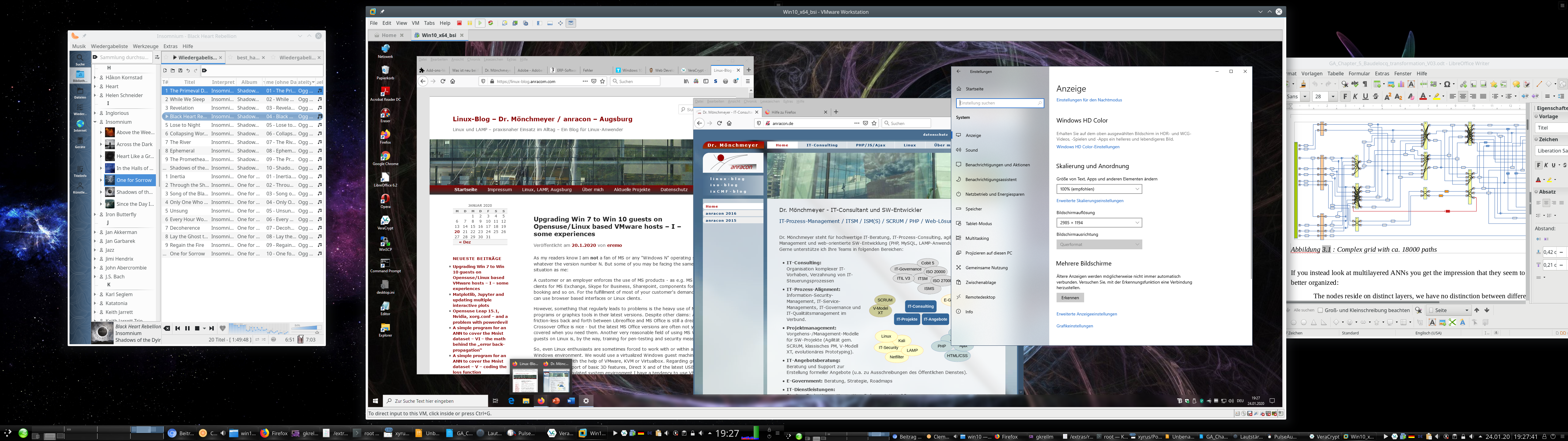
I had some nice and some annoying experiences. I also found some aspects which you should take care of ahead of the Win 7 to Win 10 upgrade.

Make a backup!

As always with critical operations: Make a backup first! This is quite easy with a VMware virtual machine based on “vmdk”-files: Just copy the machines directory with all its files to some Linux formatted backup medium and keep up all the access rights during copying (=> cp -dpRv). In case of partition based virtual machines – make a copy of the partition with “dd”.

If you should need to restore the virtual machine in its old state again and to copy your backup files to their old places: VMware will notice this and will ask you whether you moved or copied the guest. Then answer “moved” (!) – which appears a bit paradox. But otherwise there is a very high probability that trouble with your Windows license will follow. VMware interprets a “copy”-operation as a duplication of a virtual machine and puts a related information somewhere (?) which Windows evaluates. Windows will almost certainly ask for a reactivation of your installation in case that your Win license was/is an individual one – as e.g. an OEM license.

Good news and potentially bad news regarding the upgrade to Win 10

The good news is:

  • Provided that you have valid licences for your Win 7 and for all SW components installed and provided that there is enough real and virtual disk space available, the Win 7 to Win 10 upgrade works smoothly. However, it takes a considerable amount of time.
  • I did not experience any performance problems after the upgrades – not even regarding transparency effects and other gimmicks in comparison to Windows 7. VMware’s 3D support for Win works – in WS 15 even for DirectX 10.

The requirement for time depends partially on the bandwidth of your Internet connection and partially on the performance of your disk access as well as your CPU and the available RAM. In my case I had to invest around 1 hr – in those cases when everything went straight through.

The potentially bad news comprises the following points:

  • The upgrade requires a considerable amount of free space on your virtual machine’s hard disk, which will be used temporarily. So, you should carefully check the available disk space – inside the virtual machine and – a bit surprising – also on the Linux filesystem keeping the vmdk-files. I ran into problems with limited space for multiple upgrades on both sides; see below. Whether you will experience something similar depends on your safety margin policies with respect to disk space in the guest and on the host.
  • A really annoying
    aspect of the upgrade had to do with VMware’s development and market strategy. From advertisement you may conclude that it would be best to use VMware WS 14 or 15 to handle Windows 10. However, on older Intel based systems you should absolutely check whether the CPU is compatible with VMware WS 14 and 15. Check it, before you think upgrading a Vmware WS 12 license to anything higher. On my Intel i7 950 neither WS 14 nor WS 15 did work at all. Even if you get these WS versions working by a trick (see below) they perform badly.
  • Then there is a certain privacy aspect. As said, the upgrade takes a lot of time during which you are connected to the Internet and to Microsoft servers. This is only partially due to the fact that Win 10 SW has to be downloaded during the upgrade process; there are more phases of information exchange. It is also quite understandable that MS has to analyze and check your system on a full scale. But do we know what Big Brother [BB] MS is doing during this time and what information/data they transfer to their own systems? No, we do not. So, if you have any sensitive data files on your system – how to protect them? You cannot isolate your Windows 10 during the upgrade. And even worse: Later on you will be more or less forced to perform updates within certain periods. So, how to keep sensitive data inaccessible for BB during the upgrade and beyond?

I address the first two aspects below. The last point of privacy is an interesting but complicated one. I shall discuss it in a separate article.

Which VMware workstation version should I use?

Do not get misguided by reports or advertisement on the Internet that certain MS Win 10 require the latest version of VMware Workstation! WS 12 Pro was the first version which supported Win 10 in late 2015. Now VMware 15.X has arrived. And yes, there are articles that claim incompatibility of VMware WS 12, WS 14 and early subversions of WS 15 with some of the latest Win 10 builds and updates. See the following links and discussions therein:
https://communities.vmware.com/thread/608589
https://www.borncity.com/blog/2019/10/03/windows-10-update-kb4522015-breaks-vmware-workstation/
https://www.askwoody.com/forums/topic/vmware-12-and-newer-incompatible-with-windows-10-1903/

But read carefully: The statements on incompatibility refer mostly (if not only) to using a MS Win 10 system as a host for VMware! But we guys are using Linux systems as hosts.

Therefore the good message is:

Windows 10 as a VMware guest is already supported by VM WS 12.5.9 Pro, which runs also on older CPUs. For all practical purposes and 2D graphics a Win 10 guest installation works quite well on a Linux host with VMware 12.5.9.

At least, I have not yet noticed anything wrong on my hosts with Opensuse Leap 15.1 and VMware WS 12.5.9 PRO for a Win 10 guests. (Neither did I see problems with WS 14 or WS 15 on those hosts where I could use these versions).

The compatibility of WS 12.5 with Win 10 guest on Linux is more important than you may think if your host has an older CPU. If you really want to spend money and use WS 14 or WS 15 please note:

WS 14 Pro and WS 15 Pro require that your CPU provides Intel VT-x virtualization technology and EPT abilities.

So, the potentially bad message for you as the still proud owner of an older but capable CPU is:

The present VMware WS versions 14 and 15 which support Win 10 fully (as guest and host system) may not be compatible with your CPU!

Check
compatibility twice BEFORE you intend to upgrade VMware Workstation ahead of a “Win7 to Win 10”-upgrade. It would be a major waste of money if your CPU is not supported. And as stated: Win 12.5 does a good job with Win 10 guests.

VMware has deserved a lot of criticism with their decision to ignore older processors with WS Pro versions > 14. See
https://communities.vmware.com/thread/572931
https://vinfrastructure.it/2018/07/vmware-workstation-pro-14-issues-with-old-cpu/
https://www.heise.de/newsticker/meldung/VMware-Workstation-14-braucht-juengere-Prozessoren-3847372.html
For me this is a good reason to try a bit harder with KVM for the virtualization of Windows – and drop VMware wherever possible.

There is a small trick, though, to get WS 14 Pro running on an i7 950 and other older processors: In the file “/etc/vmware/config” you can add the setting

monitor.allowLegacyCPU = “true”

See https://communities.vmware.com/thread/572804.

But: I have tested this and found that a Win 7 start takes around 3 minutes! You really have to be very patient… This is crazy – and for me unacceptable. After you once are logged in, performance of Win 7 seems to be OK – maybe a bit sluggish. Still I cannot bear the waiting at boot time. So, I went back to WS 12 Pro on the machine with an i7 950.

Another problem for you may be that the installation of WS 12.5.9 on both Opensuse Leap 15.0 and 15.1 requires some special settings and tricks which I have written about in this blog. See:
Upgrade auf Opensuse Leap 15.0 – Probleme mit Nvidia-Treiber aus dem Repository und mit VMware WS 12.5.9
Upgrade Laptop to Opensuse 42.3, Probleme mit Bumblebee und VMware WS 12.5, Workarounds
The first article is relevant also for Opensuse 15.1.

Use the Windows Upgrade site and the Media Creation Tool page to save money

If you have a valid Win 7 license for all of your virtualized Win 7 installations it is not required to spend money on a new Win 10 license. Microsoft’s offer for a cost free upgrade to Win 10 still works. See e.g.:
https://www.cnet.com/how-to/windows-10-dont-wait-on-free-upgrade-because-windows-7-officially-done/
https://www.techbook.de/apps/kostenloses-update-windows-10
Follow the steps there – as I have done successfully myself.

Problems with disk space within the VMware Windows 7 guest during upgrade

My first Win7 to Win10 upgrade trial ran into trouble twice. The first problem occurred during the upgrade process and within the virtual machine:
I got a warning from the upgrade program at its start that I should free at least some 8.5 GByte.

Not so funny – as said, I am a bit picky about resources. The virtual guest machine had only a 60 GB C-disk. Fortunately, there were a lot of temporary files which could be deleted. Actually Gigabytes and partially years old – makes you wonder why Win 7 kept those files piled up. I also could move a bunch of data files to a D-disk. And I deinstalled some programs. All in all – it just worked out. The upgrade itself afterwards went friction-free and without

So one
message is:

Ensure that you have around 15 GB free on your virtual C-disk.

It is better to solve the problems with freeing C-disk space inside Win 7 without pressure – meaning: ahead of the upgrade to Win 10. If you run into the described problem it may be better to abort the Win 10 upgrade. I have tested this – and the Win 7 system was restored – apparently in good health. I got a strange message during reboot that the system was prepared for first use – but after everything was as before.

On another system I got a warning during the upgrade, when the “search for updates” began, that I should clear some 10 GByte of temporarily required disk space or attach an external drive (USB) to be used for temporary operations. The latter went OK in this case. But be careful the USB disk must be kept attached to the virtual machine over some reboots. Do not touch it until the upgrade has finalized.

So, a second message is:

Be prepared to have some external device with some free 20 GB ready if you have a complex installation with a lot of application SW and/or a complex virtual HW configuration.

I advise you to check your external USB drive, USB stick or whatever you use for filesystem errors before attaching it. And have your VMware window active whilst attaching the device! VMware will then warn you that the Linux host may claim access to the device and you just have to click the buttons in the dialog boxes to give the VMware guest full control instead of the host OS.

If you now should think about a general enlargement of the virtual disk(s) of your existing Win 7 installation please take into account the following:

On the one hand side an enlargement is of course possible and relatively easy to handle if you use vdmk files for disk virtualization and have free space on the Linux partition which hosts the vmdks. VMware supports the resizing process in the disk section of the virtual machine “settings”. On Win 7 you afterward can use the Win admin tools to extend the NTFS filesystem to the full extent of the newly configured disk.

But, on the other side, please, consider that Windows may react allergic to a change of the main C-disk and request a new activation due to major hardware changes. 🙁

This is one of the points why we do not like Windows ….
So, how you solve a potential free disk problem depends a bit on what you think is the bigger problem – reactivation or freeing disk space by deletions, movement of files or deinstallations.

Addendum: Also check old restore points Win 7 may have created over time! After a successful upgrade to Win 10 I stumbled across an option to release all restore information for old installations (in this case for Win 7 and its kept restore points). This will give you again many Gigabytes if you had not deleted “restore point” data for a long time in your Win 7. In my case I gained remarkable 17 GB! => Should have deleted some old restore points data already before the upgrade.

Problems with disk space on the Linux host

The second problem with disk space occurred after or during some upgrades to Win 10: I ran out of space in the Linux filesystem containing the vmdk files of my virtual machine. In one case the upgrade simply stopped. In another case the problem occurred a while after the upgrade – without me actually doing much on the new Win 10 installation. VMware suddenly issued a warning regarding the Linux file system and paused the virtual machine. I was first a bit surprised as I had not experienced this lack of space during normal usage of the previous Win 7 installation.

The explanation was simple: As said, I had set up the virtual disk such that the required space was not allocated at once, but as required. Due to the upgrade the VMware had created all 4GB-extends
to provide the full disk space the guest needed. In addition I had activated “Autoprotect Snapshots” on VMware (3 per day) – the first automatically created snapshot after the upgrade required a lot of additional space on the Linux file system – due to heavy changes on the hard disk.

My virtualized machines most often reside on specific (encrypted) LVM-based Linux partitions. And there it just got tight – when VMware stopped the virtual machine only 3.5 GB were left free. Not funny: You cannot kill snapshots on a paused virtual guest – the guest must be running or be shut down. And if you want to enlarge a Linux partition – which is possible if there is (neighboring) space free on your hard disk – then the filesystem should best be unmounted. Well, you can enlarge a GPT-partition with the ext4-filesystem in operation (e.g. with YaST) – but it gives you an uncomfortable feeling.

In my case I decided to brutally power down the virtual machines. In one case where this problem occurred I could at least eliminate one snapshot. I could start the virtual machine then again and let Windows check the NTFS filesystems for errors. Then I shut down the virtual machine again, deleted another snapshot and used the tools of VMware to defragment and compact the virtual disks. This gave me a considerable amount of free GBs. Good!
Afterwards I additionally reduced the number of protection snapshots – if this still seemed to be necessary.

On another system with a more important Win 7/10 installation I really extended the Linux partition and its ext4 filesystem by 20 GB – I had some spare space, fortunately – and then followed the steps just described.

So, there is a whole spectrum of options to regain disk space after the upgrade. See also:
thebackroomtech.com : reduce-size-virtual-machine-disk-vmware-workstation/

My third message is:

Ensure a reasonable amount of free space in the Linux filesystem – for required extents and snapshots!
After the backup of your old Win 7 installation, eliminate all VMware snapshots which you do not absolutely need – in the snapshot manager from the left to the right. Also use the VMware tools to defragment and compact your virtual disks ahead of the upgrade.

By the way: I hope that it is clear that snapshots do NOT replace backups. You should make a backup of your successfully upgraded Win 10 installation after you have tested the functionality of your applications and before you start working seriously with your new Win 10. You do not want to go through the upgrade procedure again ..

Addendum: Circumvent the enforcement of Windows 10 updates after your upgrade

Updates on Windows 7 have often lead to trouble in the past – and as an administrator you were happy to have some control over the download and installation points for updates in time. After reading a bit, I got the impression that the situation has not changed much: There have occurred some major problems related to updates of Win 10 since 2016. Yet, Windows 10 enforces updates more rigidly than Win 7.

I, therefore, generally recommend the following:

Delay or stop automatic updates on Win 10. Then use VMware’s snapshot mechanism before manual updates to be able to turn back to a running Win 10 guest version. In this order.

The first point is not so easy as it may seem – there are no basic and directly accessible options to only get informed about available updates as on Win 7. Win 10 enforces updates if you have enabled “Windows Update”; there is no “inform only” or “download only”. You have to either disable updates totally or to delay them. The latter only works for a maximum period of 35 days. How to deactivate updates completely is described here:

https://www.easeus.com/todo-backup-resource/how-to-stop-windows-10-from-automatically-update.html
https://www.t-online.de/digital/software/id_77429674/windows-10-automatische-updates-deaktivieren-so-geht-s.html

There is also a description on “Upgrade” values for a related registry entry:
www.deskmodder.de/wiki/index.php/Automatische-Updates-deaktivieren-oder-auf-manuell-setzen-Windows-10#Windows_10_1607.2C-1703-Pro-Updates-auf-manuell-setzen-oder-deaktivieren

I am not sure whether this works on Win 10 Pro build 1909 – we shall see.

Conclusion

Win 7 and Win 10 can be run on VMware WS Pro versions 12.5 up to 15.5 on Linux hosts. Before you upgrade VMware WS check for compatibility with your CPU! An upgrade of a Win 7 Pro installation on a VMware virtual machine to Win 10 Pro basically works smoothly – but you should take care of providing enough disk space within the virtual machine and also on the host’s filesystem containing the vdmk-files for the virtual disks.

It is not necessary to change the quality of the virtualized hardware configuration. Win 10 appears to be running with at least the same performance as the old Win 7 on a given virtual machine.

In the next article I will discuss some privacy aspects during the upgrade and after. The main question there will be: What can we do to prevent the transfer of sensitive data files from a Win 10 installation?
 

Matplotlib, Jupyter and updating multiple interactive plots

For experiments in Machine Learning [ML] it is quite useful to see the development of some characteristic quantities during optimization processes for algorithms – e.g. the behaviour of the cost function during the training of Artificial Neural Networks. Beginners in Python the look for an option to continuously update plots by interactively changing or extending data from a running Python code.

Does Matplotlib offer an option for interactively updating plots? In a Jupyter notebook? Yes, it does. It is even possible to update multiple plot areas simultanously. The magic (meta) commands are “%matplotlib notebook” and “matplotlib.pyplot.ion()”.

The following code for a Jupyter cell demonstrates the basic principles. I hope it is useful for other ML- and Python beginners as me.

# Tests for dynamic plot updates
#-------------------------------
%matplotlib notebook
import numpy as np
import matplotlib.pyplot as plt
import time

x = np.linspace(0, 10*np.pi, 100)
y = np.sin(x)

# The really important command for interactive plot updating
plt.ion()

# sizing of the plots figure sizes 
fig_size = plt.rcParams["figure.figsize"]
fig_size[0] = 8
fig_size[1] = 3

# Two figures 
# -----------
fig1 = plt.figure(1)
fig2 = plt.figure(2)

# first figure with two plot-areas with axes 
# --------------------------------------------
ax1_1 = fig1.add_subplot(121)
ax1_2 = fig1.add_subplot(122)

fig1.canvas.draw()

# second figure with just one plot area with axes
# -------------------------------------------------
ax2 = fig2.add_subplot(121)
line1, = ax2.plot(x, y, 'b-')
fig2.canvas.draw()

z= 32
b = np.zeros([1])
c = np.zeros([1])
c[0] = 1000

for i in range(z):
    # update data 
    phase = np.pi / z * i 
    line1.set_ydata(np.sin(0.5 * x + phase))
    b = np.append(b, [i**2])
    c = np.append(c, [1000.0 - i**2])
    
    # re-plot area 1 of fig1  
    ax1_1.clear()
    ax1_1.set_xlim (0, 100)
    ax1_1.set_ylim (0, 1000)
    ax1_1.plot(b)
    
    # re-plot area 2 of fig1  
    ax1_2.clear()
    ax1_2.set_xlim (0, 100)
    ax1_2.set_ylim (0, 1000)
    ax1_2.plot(c)
    
    # redraw fig 1 
    fig1.canvas.draw()

    # redraw fig 2 with updated data  
    fig2.canvas.draw()
    
    time.sleep(0.1)

As you see clearly we defined two different “figures” to be plotted – fig1 and fig2. The first figure ist horizontally splitted into two plotting areas with axes “ax1_1” and “ax1_2”. Such a plotting area is created via the “fig1.add_subplot()” function and suitable parameters. The second figure contains only one plotting area “ax2”.

Then we update data for the plots within a loop witrh a timer of 0.1 secs. We clear the respective areas, redefine the axes and perform the plot for the updated data via the function “plt.figure.canvas.draw()”.

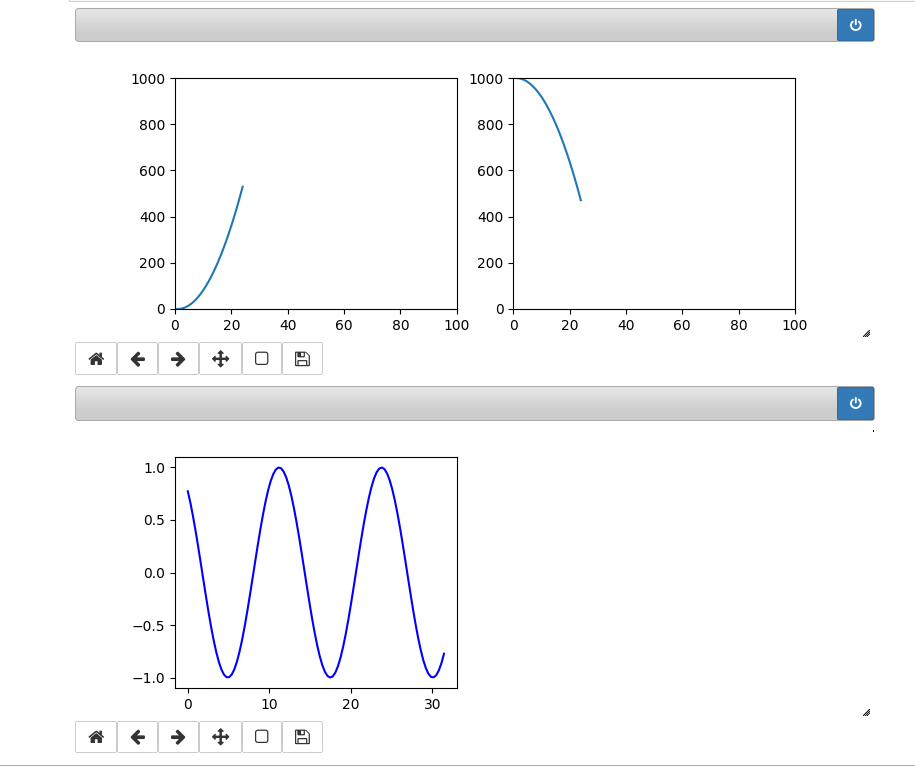
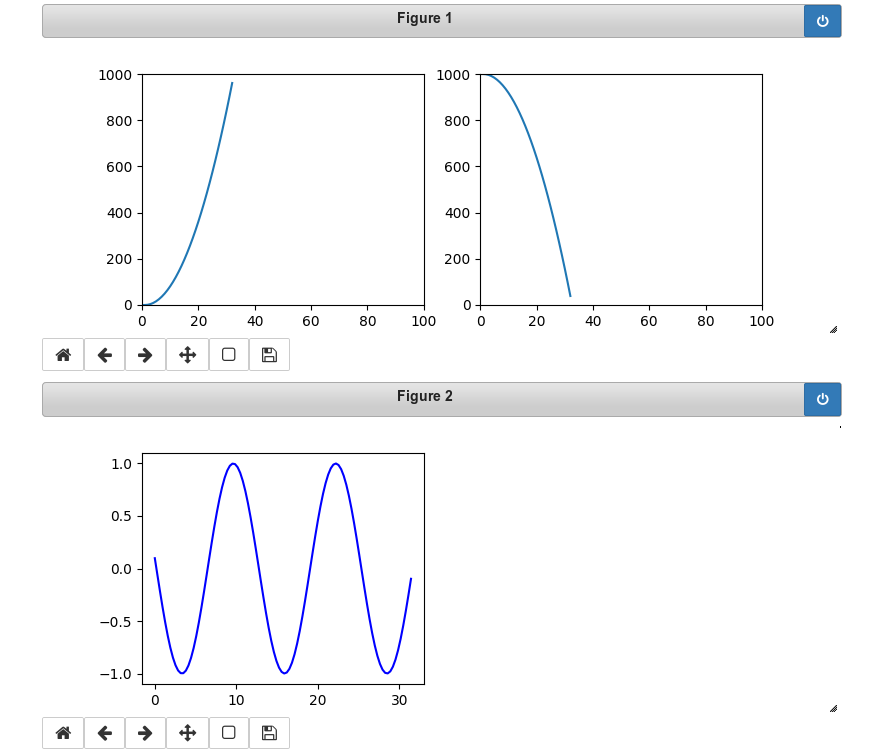
In our case we see two parabolas develop in the upper figure; the lower figure shows a sinus-wave moving slowly from the right to the left.

The following plots show screenshots of the output in a Jupyter notebook in th emiddle of the loop and at its end:

You see that we can deal with 3 plots at the same time. Try it yourself!

Hint:
There is small problem with the plot sizing when you have used the zoom-functionality of Chrome, Chromium or Firefox. You should work with interactive plots with the browser-zoom set to 100%.

Opensuse Leap 15.1, Nvidia, xorg.conf – and a problem with powerdevil

Today, I found the origin of a small problem, which drove me nuts the last months. Some time after an upgrade from Opensuse Leap 15.0 to Leap 15.1 I found that I could no longer bring up the power management functionality in “systemsettings5” of KDE. So, configuring time intervals for switching my monitors into an energy saving mode was no longer possible. In addition, bringing the whole system down into stand-by or hibernation did not work either.

KDE gave me error messages like:

Power management configuration module could not be loaded.
The Power Management Service appears not to be running.
This can be solved by starting or scheduling it inside “Startup and Shutdown”

Unfortunately, no “power management service” was available in the list of the KDE backgroud services …. So, the message did not help at all.

KDE plasma controls power management via a module called “powerdevil”. Powerdevil requires a running daemon named “uppower”. So, as a next step, I checked the list of running processes for the upower. Result: The daemon was running healthily, and systemd’s journactl showed me a message about its the successful start, too. “journalctl”, however, gave me some strange messages regarding powerdevil:

2019-12-25T10:43:20.598118+01:00 mytux org_kde_powerdevil[7147]: The X11 connection broke: Unsupported extension used (code 2)
2019-12-25T10:43:56.793629+01:00 mytux systemsettings5[7461]: powerdevil: ("LowBattery", "Battery", "AC") ()
2019-12-25T10:43:56.793813+01:00 mytux systemsettings5[7461]: powerdevil: "Bildschirm-Energieverwaltung"  has a runtime requirement
2019-12-25T10:43:56.794221+01:00 mytux systemsettings5[7461]: powerdevil: There was a problem in contacting DBus!! Assuming the action is ok.

These messages came user-independent and also for freshly created users. So, the problem had nothing to do with any of the settings in KDE’s configuration files below “~/.config/”. Searching on the Internet showed that others were having similar problems, but none of the offered suggestions helped. Time to dig a bit deeper at other places …

The monitors on my workstation are handled by a Nvidia graphics card. I use the file “/etc/X11/xorg.conf” to inform the card (independently of “XrandR”) about a certain TwinView or Xinerama screen configuration during early start-up phases. To avoid confusion with mouse movement I of course do this in a way consistent with KDE’s later settings for a combined screen across different monitors – which you can configure via
“systemsettings5 => Hardware => “Display and Monitors”.
As far as I know, KDE5 uses XrandR to perform the configuration of the Plasma display.

Now, sometimes I switch to the Nvidia installation mechanism for the latest driver or for testing a beta-driver from the NVidia web-site. Afterwards, I return to the native Opensuse driver installation via the Nvidia community repository. In my experience this seldom leads to changes in the file “/etc/X11/xorg.conf”. But it may happen …

Today, I therefore checked the contents of the “xorg.conf” file. There I found – to my surprise – a statement in the “monitor“-section for one of my monitors which disabled DPMS:

Option “DPMS” “false”

Section "Monitor"
    Identifier     "Monitor0"
    VendorName     "Unknown"
    ModelName      "DELL U2515H"
    HorizSync       30.0 - 113.0
    VertRefresh     56.0 - 86.0
    Option         "DPMS" "false"

I cannot recall how and why the entry for DPMS deactivation appeared in one of the monitor sections. All my monitors support DPMS. …??? …

Anyway: Commenting the line out

Section "Monitor"
    Identifier     "Monitor0"
    
VendorName     "Unknown"
    ModelName      "DELL U2515H"
    HorizSync       30.0 - 113.0
    VertRefresh     56.0 - 86.0
#    Option         "DPMS" "true"

or setting the option to “true” enabled the interface to powerdevil again in “systemsettings5” of KDE5.

Obviously, in its present state powerdevil requires an active DPMS on all monitors used.

I hope this finding will help others. Note that in some installations there may exit a Nvidia configuration file in the directory “/etc/X11/xorg.conf.d” instead of a central “/etc/X11/xorg.conf”. You should check all relevant files for a statement which deactivates DPMS for any of the monitors you use in a X11 based KDE5 plasma session.

Unfortunately, I do not know whether a similar problem can arise with Wayland and how it could be solved then.

A simple Python program for an ANN to cover the MNIST dataset – VI – the math behind the “error back-propagation”

I continue with my article series on how to program a training algorithm for a multi-layer perceptron [MLP]. In the course of my last articles

A simple program for an ANN to cover the Mnist dataset – V – coding the loss function
A simple program for an ANN to cover the Mnist dataset – IV – the concept of a cost or loss function
A simple program for an ANN to cover the Mnist dataset – III – forward propagation
A simple program for an ANN to cover the Mnist dataset – II – initial random weight values
A simple program for an ANN to cover the Mnist dataset – I – a starting point

we have already created code for the “Feed Forward Propagation” algorithm [FFPA] and two different cost functions – “Log Loss” and “MSE”. In both cases we took care of a vectorized handling of multiple data records in mini-batches of training data.

Before we turn to the coding of the so called “error back-propagation” [EBP], I found it usefull to clarify the math behind behind this method for ANN/MLP-training. Understanding the basic principles of the gradient descent method for the optimization of MLP-weights is easy. But comprehending

  • why and how gradient descent method leads to the back propagation of error terms
  • and how we cover multiple training data records at the same time

is not – at least not in my opinion. So, I have discussed the required analysis and resulting algorithmic steps in detail in a PDF which you find attached to this article. I used a four layer MLP as an example for which I derived the partial derivatives of the “Log Loss” cost function for weights of the hidden layers in detail. I afterwards generalized the formalism. I hope the contents of the PDF will help beginners in the field of ML to understand what kind of matrix operations gradient descent leads to.

PDF on the math behind Error Back_Propagation

In the next article we shall encode the surprisingly compact algorithm for EBP. In the meantime I wish all readers Merry Christmas …

Addendum 01.01.2020 / 23.02.2020 : Corrected a missing “-” for the cost function and resulting terms in the above PDF.

A simple Python program for an ANN to cover the MNIST dataset – V – coding the loss function

We proceed with encoding a Python class for a Multilayer Perceptron [MLP] to be able to study at least one simple examples of an artificial neural network [ANN] in detail. During the articles

A simple program for an ANN to cover the Mnist dataset – IV – the concept of a cost or loss function
A simple program for an ANN to cover the Mnist dataset – III – forward propagation
A simple program for an ANN to cover the Mnist dataset – II – initial random weight values
A simple program for an ANN to cover the Mnist dataset – I – a starting point

we came so far that we could apply the “Feed Forward Propagation” algorithm [FFPA] to multiple data records of a mini-batch of training data in parallel. We spoke of a so called vectorized form of the FFPA; we used special Linear Algebra matrix operations of Numpy to achieve the parallel operations. In the last article

A simple program for an ANN to cover the Mnist dataset – IV – the concept of a cost or loss function

I commented on the necessity of a so called “loss function” for the MLP. Although not required for a proper training algorithm we will nevertheless encode a class method to calculate cost values for mini-batches. The behavior of such cost values with training epochs will give us an impression of how good the training algorithm works and whether it actually converges into a minimum of the loss function. As explained in the last article this minimum should correspond to an overall minimum distance of the FFPA results for all training data records from their known correct target values in the result vector space of the MLP.

Before we do the coding for two specific cost or loss functions – namely the “Log Loss“-function and the “MSE“-function, I will briefly point out the difference between standard “*”-operations between multidimensional Numpy arrays and real “dot”-matrix-operations in the sense of Linear Algebra. The latte one follows special rules in multiplying specific elements of both matrices and summing up over the results.

As in all the other articles of this series: This is for beginners; experts will not learn anything new – especially not of the first section.

Element-wise multiplication between multidimensional Numpy arrays in contrast to the “dot”-operation of linear algebra

I would like to point out some aspects of combining two multidimensional Numpy arrays which may be confusing for Python beginners. At least they were for me 🙂 . As a former physicist I automatically expected a “*”-like operation for two multidimensional arrays to perform a matrix operation in the sense of linear algebra. This lead to problems when I tried to understand Python code of others.

Let us assume we have two 2-dimensional arrays A and B. A and B shall be similar in the sense that their shape is identical, i.e. A.shape = B.shape – e.g (784, 60000):
The two matrices each have the same specific number of elements in their different dimensions.

Whenever we operate with multidimensional Numpy arrays with the same same shape we can use the standard operators “+”, “-“, “*”, “/”. These
operators then are applied between corresponding elements of the matrices. I.e., the mathematical operation is applied between elements with the same position along the different dimensional axes in A and B. We speak of an element-wise operation. See the example below.

This means (A * B) is not equivalent to the C = numpy.dot(A, B) operation – which appears in Linear Algebra; e.g. for vector and operator transformations!

The”dot()”-operation implies a special operation: Let us assume that the shape of A[i,j,v] is

A.shape = (p,q,y)

and the shape of B[k,w,m] is

B.shape = (r,z,s)

with

y = z .

Then in the “dot()”-operation all elements of a dimension “v” of A[i,j,v] are multiplied with corresponding elements of the dimension “w” of B[k,w,m] and then the results summed up.

dot(A, B)[i,j,k,m] = sum(A[i,j,:] * B[k,:,m])

The “*” operation in the formula above is to be interpreted as a standard multiplication of array elements.

In the case of A being a 2-dim array and B being a 1-dimensional vector we just get an operation which could – under certain conditions – be interpreted as a typical vector transformation in a 2-dim vector space.

So, when we define two Numpy arrays there may exist two different methods to deal with array-multiplication: If we have two arrays with the same shape, then the “*”-operation means an element-wise multiplication of the elements of both matrices. In the context of ANNs such an operation may be useful – even if real linear algebra matrix operations dominate the required calculations. The first “*”-operation will, however, not work if the array-shapes deviate.

The “numpy.dot(A, B)“-operation instead requires a correspondence of the last dimension of matrix A with the second to last dimension of matrix B. Ooops – I realize I just used the expression “matrix” for a multidimensional Numpy array without much thinking. As said: “matrix” in linear algebra has a connotation of a transformation operator on vectors of a vector space. Is there a difference in Numpy?

Yes, there is, indeed – which may even lead to more confusion: We can apply the function numpy.matrix()

A = numpy.matrix(A),
B = numpy.matrix(B)

then the “*”-operator will get a different meaning – namely that of numpy.dot(A,B):

A * B = numpy.dot(A, B)

So, better read Python code dealing with multidimensional arrays rather carefully ….

To understand this better let us execute the following operations on some simple examples in a Jupyter cell:

A1 = np.ones((5,3))
A1[:,1] *= 2
A1[:,2] *= 4
print("\nMatrix A1:\n")
print(A1)


A2= np.random.randint(1, 10, 5*3)
A2 = A2.reshape(5,3)
# A2 = A2.reshape(3,5)
print("\n Matrix A2 :\n")
print(A2)


A3 = A1 * A2 
print("\n\nA3:\n")
print(A3)

A4 = np.dot(A1, A2.T)
print("\n\nA4:\n")
print(A4)

A5 = np.matrix(A1)
A6 = np.matrix(A2)

A7 = A5 * A6.T 
print("\n\nA7:\n")
print(A7)

A8 = A5 * A6

We get the following output:


Matrix A1:

[[1. 2. 4.]
 [1. 2. 4.]
 [1. 2. 4.]
 [1. 2. 4.]
 [1. 2. 4.]]

 Matrix A2 :

[[6 8 9]
 [9 1 6]
 [8 8 9]
 [2 8 3]
 [5 8 8]]


A3:

[[ 6. 16. 36.]
 [ 9.  2. 24.]
 [ 8. 16. 36.]
 [ 2. 16. 12.]
 [
 5. 16. 32.]]


A4:

[[58. 35. 60. 30. 53.]
 [58. 35. 60. 30. 53.]
 [58. 35. 60. 30. 53.]
 [58. 35. 60. 30. 53.]
 [58. 35. 60. 30. 53.]]


A7:

[[58. 35. 60. 30. 53.]
 [58. 35. 60. 30. 53.]
 [58. 35. 60. 30. 53.]
 [58. 35. 60. 30. 53.]
 [58. 35. 60. 30. 53.]]

---------------------------------------------------------------------------
ValueError                                Traceback (most recent call last)
<ipython-input-10-4ea2dbdf6272> in <module>
     28 print(A7)
     29 
---> 30 A8 = A5 * A6
     31 

/projekte/GIT/ai/ml1/lib/python3.6/site-packages/numpy/matrixlib/defmatrix.py in __mul__(self, other)
    218         if isinstance(other, (N.ndarray, list, tuple)) :
    219             # This promotes 1-D vectors to row vectors
--> 220             return N.dot(self, asmatrix(other))
    221         if isscalar(other) or not hasattr(other, '__rmul__') :
    222             return N.dot(self, other)

<__array_function__ internals> in dot(*args, **kwargs)

ValueError: shapes (5,3) and (5,3) not aligned: 3 (dim 1) != 5 (dim 0)

This example obviously demonstrates the difference of an multiplication operation on multidimensional arrays and a real matrix “dot”-operation. Note especially how the “*” operator changed when we calculated A7.

If we instead execute the following code

A1 = np.ones((5,3))
A1[:,1] *= 2
A1[:,2] *= 4
print("\nMatrix A1:\n")
print(A1)


A2= np.random.randint(1, 10, 5*3)
#A2 = A2.reshape(5,3)
A2 = A2.reshape(3,5)
print("\n Matrix A2 :\n")
print(A2)

A3 = A1 * A2 
print("\n\nA3:\n")
print(A3)

we directly get an error:


Matrix A1:

[[1. 2. 4.]
 [1. 2. 4.]
 [1. 2. 4.]
 [1. 2. 4.]
 [1. 2. 4.]]

 Matrix A2 :

[[5 8 7 3 8]
 [4 4 8 4 5]
 [8 1 9 4 8]]

---------------------------------------------------------------------------
ValueError                                Traceback (most recent call last)
<ipython-input-12-c4d3ffb1e683> in <module>
     13 
     14 
---> 15 A3 = A1 * A2
     16 print("\n\nA3:\n")
     17 print(A3)

ValueError: operands could not be broadcast together with shapes (5,3) (3,5) 

As expected!

Cost calculation for our ANN

As we want to be able to use different types of cost/loss functions we have to introduce new corresponding parameters in the class’s interface. So we update the “__init__()”-function:


    def __init__(self, 
                 my_data_set = "mnist", 
                 n_hidden_layers = 1, 
                 ay_nodes_layers = [0, 100, 0], # array which should have as much elements as n_hidden + 2
                 n_nodes_layer_out = 10,  # expected number of nodes in output layer 
                                                  
                 my_activation_function = "sigmoid", 
                 my_out_function        = "sigmoid",   
                 my_loss_function       = "LogLoss",   
                 
                 n_size_mini_batch = 50,  # number of data elements in a mini-batch 
                 
                 n_epochs      = 1,
                 n_max_batches = -1,  # number of mini-batches to use during epochs - > 0 only for testing 
                                      # a negative value uses all mini-batches 
                 
                 lambda2_reg = 0.1,     # factor for quadratic regularization term 
                 lambda1_reg = 0.0,     # factor for linear regularization term 
                 
                 vect_mode = 'cols', 
                 
                 figs_x1=12.0, figs_x2=8.0, 
                 legend_loc='upper 
right',
                 
                 b_print_test_data = True
                 
                 ):
        '''
        Initialization of MyANN
        Input: 
            data_set: type of dataset; so far only the "mnist", "mnist_784" datsets are known 
                      We use this information to prepare the input data and learn about the feature dimension. 
                      This info is used in preparing the size of the input layer.     
            n_hidden_layers = number of hidden layers => between input layer 0 and output layer n 
            
            ay_nodes_layers = [0, 100, 0 ] : We set the number of nodes in input layer_0 and the output_layer to zero 
                              Will be set to real number afterwards by infos from the input dataset. 
                              All other numbers are used for the node numbers of the hidden layers.
            n_nodes_out_layer = expected number of nodes in the output layer (is checked); 
                                this number corresponds to the number of categories NC = number of labels to be distinguished
            
            my_activation_function : name of the activation function to use 
            my_out_function : name of the "activation" function of the last layer which produces the output values 
            my_loss_function : name of the "cost" or "loss" function used for optimization 
            
            n_size_mini_batch : Number of elements/samples in a mini-batch of training data 
                                The number of mini-batches will be calculated from this
            
            n_epochs : number of epochs to calculate during training
            n_max_batches : > 0: maximum of mini-batches to use during training 
                            < 0: use all mini-batches  
            
            lambda_reg2:    The factor for the quadartic regularization term 
            lambda_reg1:    The factor for the linear regularization term 
            
            vect_mode: Are 1-dim data arrays (vctors) ordered by columns or rows ?
            
            figs_x1=12.0, figs_x2=8.0 : Standard sizing of plots , 
            legend_loc='upper right': Position of legends in the plots
            
            b_print_test_data: Boolean variable to control the print out of some tests data 
             
         '''
        
        # Array (Python list) of known input data sets 
        self._input_data_sets = ["mnist", "mnist_784", "mnist_keras"]  
        self._my_data_set = my_data_set
        
        # X, y, X_train, y_train, X_test, y_test  
            # will be set by analyze_input_data 
            # X: Input array (2D) - at present status of MNIST image data, only.    
            # y: result (=classification data) [digits represent categories in the case of Mnist]
        self._X       = None 
        self._X_train = None 
        self._X_test  = None   
        self._y       = None 
        self._y_train = None 
        self._y_test  = None
        
        # relevant dimensions 
        # from input data information;  will be set in handle_input_data()
        self._dim_sets     = 0  
        self._dim_features = 0  
        self._n_labels     = 0   # number of unique labels - will be extracted from y-data 
        
        # Img sizes 
        self._dim_img      = 0 # should be sqrt(dim_features) - we assume square like images  
        self._img_h        = 0 
        self._img_w        = 0 
        
        # Layers
        # ------
        # number of hidden layers 
        self._n_hidden_layers = n_hidden_layers
        # Number of total layers 
        self._n_total_layers = 2 + self._n_hidden_layers  
        # Nodes for hidden layers 
        self._ay_nodes_layers = np.array(ay_nodes_layers)
        # Number of nodes in output 
layer - will be checked against information from target arrays
        self._n_nodes_layer_out = n_nodes_layer_out
        
        # Weights 
        # --------
        # empty List for all weight-matrices for all layer-connections
        # Numbering : 
        # w[0] contains the weight matrix which connects layer 0 (input layer ) to hidden layer 1 
        # w[1] contains the weight matrix which connects layer 1 (input layer ) to (hidden?) layer 2 
        self._ay_w = []  
        
        # Arrays for encoded output labels - will be set in _encode_all_mnist_labels()
        # -------------------------------
        self._ay_onehot = None
        self._ay_oneval = None
        
        # Known Randomizer methods ( 0: np.random.randint, 1: np.random.uniform )  
        # ------------------
        self.__ay_known_randomizers = [0, 1]

        # Types of activation functions and output functions 
        # ------------------
        self.__ay_activation_functions = ["sigmoid"] # later also relu 
        self.__ay_output_functions     = ["sigmoid"] # later also softmax 
        
        # Types of cost functions 
        # ------------------
        self.__ay_loss_functions = ["LogLoss", "MSE" ] # later also othr types of cost/loss functions  

        # the following dictionaries will be used for indirect function calls 
        self.__d_activation_funcs = {
            'sigmoid': self._sigmoid, 
            'relu':    self._relu
            }
        self.__d_output_funcs = { 
            'sigmoid': self._sigmoid, 
            'softmax': self._softmax
            }  
        self.__d_loss_funcs = { 
            'LogLoss': self._loss_LogLoss, 
            'MSE': self._loss_MSE
            }  


        # The following variables will later be set by _check_and set_activation_and_out_functions()            
        
        self._my_act_func  = my_activation_function
        self._my_out_func  = my_out_function
        self._my_loss_func = my_loss_function
        self._act_func = None    
        self._out_func = None    
        self._loss_func = None    

        # list for cost values of mini-batches during training 
        # The list will later be split into sections for epochs 
        self._ay_cost_vals = []

        # number of data samples in a mini-batch 
        self._n_size_mini_batch = n_size_mini_batch
        self._n_mini_batches = None  # will be determined by _get_number_of_mini_batches()

        # number of epochs 
        self._n_epochs = n_epochs
        # maximum number of batches to handle (<0 => all!) 
        self._n_max_batches = n_max_batches

        # regularization parameters
        self._lambda2_reg = lambda2_reg
        self._lambda1_reg = lambda1_reg

        # paramter to allow printing of some test data 
        self._b_print_test_data = b_print_test_data

        # Plot handling 
        # --------------
        # Alternatives to resize plots 
        # 1: just resize figure  2: resize plus create subplots() [figure + axes] 
        self._plot_resize_alternative = 1 
        # Plot-sizing
        self._figs_x1 = figs_x1
        self._figs_x2 = figs_x2
        self._fig = None
        self._ax  = None 
        # alternative 2 does resizing and (!) subplots() 
        self.initiate_and_resize_plot(self._plot_resize_alternative)        
        
        
        # ***********
        # operations 
        # ***********
        
        # check and handle input data 
        self._handle_input_data()
        # set the ANN structure 
        self._set_ANN_structure()
        
        # Prepare epoch and batch-handling - sets mini-batch index array, too 
        self._prepare_epochs_and_batches()
        
        # perform training 
      
  start_c = time.perf_counter()
        self._fit(b_print=False, b_measure_batch_time=False)
        end_c = time.perf_counter()
        print('\n\n ------') 
        print('Total training Time_CPU: ', end_c - start_c) 
        print("\nStopping program regularily")
        sys.exit()
#

 
The way of accessing a method/function by a parameterized “name”-string should already be familiar from other methods. The method with the given name must of course exist in the Python module; otherwise already Eclipse#s PyDev we display errors.

    '''-- Method to set the loss function--'''
    def _check_and_set_loss_function(self):
        # check for known loss functions 
        try: 
            if (self._my_loss_func not in self.__d_loss_funcs ): 
                raise ValueError
        except ValueError:
            print("\nThe requested loss function " + self._my_loss_func + " is not known!" )
            sys.exit()   
             
        # set the function to variables for indirect addressing 
        self._loss_func = self.__d_loss_funcs[self._my_loss_func]
        
        if self._b_print_test_data:
            z = 2.0
            print("\nThe loss function of the ANN/MLP was defined as \""  + self._my_loss_func + '"') 
        '''
        '''
        return None
#

The “Log Loss” function

The “LogLoss”-function has a special form. If “a_i” characterizes the FFPA result for a special training record and “y_i” the real known value for this record then we calculate its contribution to the costs as:

Loss = SUM_i [- y_i * log(a_i) – (1 – y_i)*log(1 – a_i)]

This loss function has its justification in statistical considerations – for which we assume that our output function produces a kind of probability distribution. Please see the literature for more information.

Now, due to the encoded result representation over 10 different output dimensions in the MNIST case, corresponding to 10 nodes in the output layer; see the second article of this series, we know that a_i and y_i would be 1-dimensional arrays for each training data record. However, if we vectorize this by treating all records of a mini-batch in parallel we get 2-dim arrays. Actually, we have already calculated the respective arrays in the second to last article.

The rows (1st dim) of a represent the output nodes (training data records, the columns (2nd dim) of a represent the results of the FFPA-result values, which due to our output function have values in the interval ]0.0, 1.0].

The same holds for y – with the difference, that 9 of the values in the rows are 0 and exactly one is 1 for a training record.

The “*” multiplication thus can be done via a normal element-wise array “multiplication” on the given 2-dim arrays of our code.

a = ay_ANN_out
y = ay_y_enc

Numpy offers a function “numpy.sum(M)” for a multidimensional array M, which just sums up all element values. The result is of course a simple scalar.

This information should be enough to understand the following new method:

    ''' method to calculate the logistic regression loss function '''
    def _loss_LogLoss(self, ay_y_enc, ay_ANN_out, b_print = False):
        '''
        Method which calculates LogReg loss function in a vectorized form on multidimensional Numpy arrays 
        '''
        b_test = False

        if b_print:
            print("From LogLoss: shape of ay_y_enc =  " + str(ay_y_enc.shape))
            print("From LogLoss: shape of ay_ANN_out =  " + str(ay_
ANN_out.shape))
            print("LogLoss: ay_y_enc = ", ay_y_enc) 
            print("LogLoss: ANN_out = \n", ay_ANN_out) 
            print("LogLoss: log(ay_ANN_out) =  \n", np.log(ay_ANN_out) )

        # The following means an element-wise (!) operation between matrices of the same shape!
        Log1 = -ay_y_enc * (np.log(ay_ANN_out))
        # The following means an element-wise (!) operation between matrices of the same shape!
        Log2 = (1 - ay_y_enc) * np.log(1 - ay_ANN_out)
        
        # the next operation calculates the sum over all matrix elements 
        # - thus getting the total costs for all mini-batch elements 
        cost = np.sum(Log1 - Log2)
        
        #if b_print and b_test:
            # Log1_x = -ay_y_enc.dot((np.log(ay_ANN_out)).T)
            # print("From LogLoss: L1 =   " + str(L1))
            # print("From LogLoss: L1X =  " + str(L1X))
        
        if b_print: 
            print("From LogLoss: cost =  " + str(cost))
        
        # The total costs is just a number (scalar)
        return cost

The Mean Square Error [MSE] cost function

Although not often used for classification tasks (but more for regression problems) this loss function is so simple that we encode it on the fly. Here we just calculate something like a mean quadratic error:

Loss = 9.5 * SUM_i [ (y_ia_i)**2 ]

This loss function is convex by definition and leads to the following method code:

    ''' method to calculate the MSE loss function '''
    def _loss_MSE(self, ay_y_enc, ay_ANN_out, b_print = False):
        '''
        Method which calculates LogReg loss function in a vectorized form on multidimensional Numpy arrays 
        '''
        if b_print:
            print("From loss_MSE: shape of ay_y_enc =  " + str(ay_y_enc.shape))
            print("From loss_MSE: shape of ay_ANN_out =  " + str(ay_ANN_out.shape))
            #print("LogReg: ay_y_enc = ", ay_y_enc) 
            #print("LogReg: ANN_out = \n", ay_ANN_out) 
            #print("LogReg: log(ay_ANN_out) =  \n", np.log(ay_ANN_out) )
        
        cost = 0.5 * np.sum( np.square( ay_y_enc - ay_ANN_out ) )

        if b_print: 
            print("From loss_MSE: cost =  " + str(cost))
        
        return cost
#

Regularization terms

Regularization is a means against overfitting during training. The trick is that the cost function is enhanced by terms which include sums of linear or quadratic terms of all weights of all layers. This enforces that the weights themselves get minimized, too, in the search for a minimum of the loss function. The less degrees of freedom there are the less the chance of overfitting …

In the literature (see the book hints in the last article) you find 2 methods for regularization – one with quadratic terms of the weights – the so called “Ridge-Regression” – and one based on a sum of absolute values of the weights – the so called “Lasso regression”. See the books of Geron and Rashka for more information.

Loss = SUM_i [- y_i * log(a_i) – (1 – y_i)*log(1 – a_i)]
+  lambda_2 * SUM_layer [ SUM_nodes [ (w_layer_nodes)**2 ] ]
+  lambda_1 * SUM_layer [ SUM_nodes [ |w_layer_nodes| ] ]

Note that we included already two factors “lambda_2” and “lamda_1” by which the regularization terms are multiplied and added to the cost/loss function in the “__init__”-method.

The two related methods are easy to understand:

    ''' method do calculate the quadratic regularization term for the loss function '''
    def _regularize_by_L2(self, b_print=False): 
        
'''
        The L2 regularization term sums up all quadratic weights (without the weight for the bias) 
        over the input and all hidden layers (but not the output layer
        The weight for the bias is in the first column (index 0) of the weight matrix - 
        as the bias node's output is in the first row of the output vector of the layer 
        '''
        ilayer = range(0, self._n_total_layers-1) # this excludes the last layer 
        L2 = 0.0
        for idx in ilayer:
            L2 += (np.sum( np.square(self._ay_w[idx][:, 1:])) ) 
        L2 *= 0.5 * self._lambda2_reg
        if b_print: 
            print("\nL2: total L2 = " + str(L2) )
        return L2 
#

    ''' method do calculate the linear regularization term for the loss function '''
    def _regularize_by_L1(self, b_print=False): 
        '''
        The L1 regularization term sums up all weights (without the weight for the bias) 
        over the input and all hidden layers (but not the output layer
        The weight for the bias is in the first column (index 0) of the weight matrix - 
        as the bias node's output is in the first row of the output vector of the layer 
        '''
        ilayer = range(0, self._n_total_layers-1) # this excludes the last layer 
        L1 = 0.0
        for idx in ilayer:
            L1 += (np.sum( self._ay_w[idx][:, 1:])) 
        L1 *= 0.5 * self._lambda1_reg
        if b_print:
            print("\nL1: total L1 = " + str(L1))
        return L1 
#

Why do we not start with index “0” in the weight arrays – self._ay_w[idx][:, 1:]?
The reason is that we do not include the Bias-node in these terms. The weight at the bias nodes of the layers is not varied there during optimization!

Note: Normally we would expect a factor of 1/m, with “m” being the number of records in a mini-batch, for all the terms discussed above. Such a constant factor does not hamper the principal procedure – if we omit it consistently also for for the regularization terms discussed below. It can be taken care of by choosing smaller “lambda”s and a smaller step size during optimization.

Inclusion of the loss function calculations within the handling of mini-batches

For our approach with mini-batches (i.e. an approach between pure stochastic and full batch handling) we have to include the cost calculation in our method “_handle_mini_batch()” to handle mini-batches. Method “_handle_mini_batch()” is modified accordingly:

    ''' -- Method to deal with a batch -- '''
    def _handle_mini_batch(self, num_batch = 0, b_print_y_vals = False, b_print = False):
        '''
        For each batch we keep the input data array Z and the output data A (output of activation function!) 
        for all layers in Python lists
        We can use this as input variables in function calls - mutable variables are handled by reference values !
        We receive the A and Z data from propagation functions and proceed them to cost and gradient calculation functions
        
        As an initial step we define the Python lists ay_Z_in_layer and ay_A_out_layer 
        and fill in the first input elements for layer L0  
        '''
        ay_Z_in_layer  = [] # Input vector in layer L0;  result of a matrix operation in L1,...
        ay_A_out_layer = [] # Result of activation function 
    
        #print("num_batch = " + str(num_batch))
        #print("len of ay_mini_batches = " + str(len(self._ay_mini_batches))) 
        #print("_ay_mini_batches[0] = ")
        #print(self._ay_mini_batches[num_batch])
    
        # Step 1: Special treatment of the ANN's input Layer L0
        # Layer L0: Fill in the input vector for the ANN'
s input layer L0 
        ay_idx_batch = self._ay_mini_batches[num_batch]
        ay_Z_in_layer.append( self._X_train[ay_idx_batch] ) # numpy arrays can be indexed by an array of integers
        #print("\nPropagation : Shape of X_in = ay_Z_in_layer = " + str(ay_Z_in_layer[0].shape))           
        if b_print_y_vals:
            print("\n idx, expected y_value of Layer L0-input :")           
            for idx in self._ay_mini_batches[num_batch]:
                print(str(idx) + ', ' + str(self._y_train[idx]) )
        
        # Step 2: Layer L0: We need to transpose the data of the input layer 
        ay_Z_in_0T       = ay_Z_in_layer[0].T
        ay_Z_in_layer[0] = ay_Z_in_0T

        # Step 3: Call the forward propagation method for the mini-batch data samples 
        self._fw_propagation(ay_Z_in = ay_Z_in_layer, ay_A_out = ay_A_out_layer, b_print = b_print) 
        
        if b_print:
            # index range of layers 
            ilayer = range(0, self._n_total_layers)
            print("\n ---- ")
            print("\nAfter propagation through all " + str(self._n_total_layers) + " layers: ")
            for il in ilayer:
                print("Shape of Z_in of layer L" + str(il) + " = " + str(ay_Z_in_layer[il].shape))
                print("Shape of A_out of layer L" + str(il) + " = " + str(ay_A_out_layer[il].shape))

        
        # Step 4: To be done: cost calculation for the batch 
        ay_y_enc = self._ay_onehot[:, ay_idx_batch]
        ay_ANN_out = ay_A_out_layer[self._n_total_layers-1]
        # print("Shape of ay_ANN_out = " + str(ay_ANN_out.shape))
        
        total_costs_batch = self._calculate_loss_for_batch(ay_y_enc, ay_ANN_out, b_print = False)
        self._ay_cost_vals.append(total_costs_batch)
        
        # Step 5: To be done: gradient calculation via back propagation of errors 
        # Step 6: Adjustment of weights  
        
        # try to accelerate garbage handling
        if len(ay_Z_in_layer) > 0:
            del ay_Z_in_layer
        if len(ay_A_out_layer) > 0:
            del ay_A_out_layer
        
        return None
#


Note that we save the cost values of every batch in the 1-dim array “self._ay_cost_vals”. This array can later on easily be split into arrays for epochs.

The whole process must be supplemented by a method which does the real cost value calculation:

    ''' -- Main Method to calculate costs -- '''
    def _calculate_loss_for_batch(self, ay_y_enc, ay_ANN_out, b_print = False, b_print_details = False ):
        '''
        Method which calculates the costs including regularization terms  
        The cost function is called according to an input parameter of the class 
        '''
        pure_costs_batch = self._loss_func(ay_y_enc, ay_ANN_out, b_print = False)
        
        if ( b_print and b_print_details ): 
            print("Calc_Costs: Shape of ay_ANN_out = " + str(ay_ANN_out.shape))
            print("Calc_Costs: Shape of ay_y_enc = " + str(ay_y_enc.shape))
        if b_print: 
            print("From Calc_Costs: pure costs of a batch =  " + str(pure_costs_batch))
        
        # Add regularitzation terms - L1: linear reg. term, L2: quadratic reg. term 
        # the sums over the weights (squared) have to be performed for each batch again due to intermediate corrections 
        L1_cost_contrib = 0.0
        L2_cost_contrib = 0.0
        if self._lambda1_reg > 0:
            L1_cost_contrib = self._regularize_by_L1( b_print=False )
        if self._lambda2_reg > 0:
            L2_cost_contrib = self._regularize_by_L2( b_print=False )
        
        total_costs_batch = pure_costs_batch + L1_cost_contrib + L2_cost_contrib
        return total_costs_batch
#

Conclusion

By the steps
discussed above we completed the inclusion of a cost value calculation in our class for every step dealing with a mini-batch during training. All cost values are saved in a Python list for later evaluation. The list can later be split with respect to epochs.

In contrast to the FFP-algorithm all array-operations required in this step were simple element-wise operations and summations over all array-elements.

Cost value calculation obviously is simple and pretty fast regarding CPU-consumption! Just test it yourself!

In the next article we shall analyze the mathematics behind the calculation of the partial derivatives of our cost-function with respect to the many weights at all nodes of the different layers. We shall see that the gradient calculation reduces to remarkable simple formulas describing a kind of back-propagation of the error terms [y_ia_i] through the network.

We will not be surprised that we need to involve some real matrix operations again as in the FFPA !