A simple CNN for the MNIST datasets – I – CNN basics

In a previous article series
A simple Python program for an ANN to cover the MNIST dataset – I – a starting point
we have played with a Python/Numpy code, which created a configurable and trainable “Multilayer Perceptron” [MLP] for us. See also
MLP, Numpy, TF2 – performance issues – Step I – float32, reduction of back propagation
for ongoing code and performance optimization.

A MLP program is useful to study multiple topics in Machine Learning [ML] on a basic level. However, MLPs with dense layers are certainly not at the forefront of ML technology – though they still are fundamental bricks in other more complicated architectures of “Artifical Neural Networks” [ANNs]. During my MLP experiments I became sufficiently acquainted with Python, Jupyter and matplotlib to make some curious first steps into another field of Machine Learning [ML] now: “Convolutional Neural Networks” [CNNs].

CNNs on my level as an interested IT-affine person are most of all fun. Nevertheless, I quickly found out that a somewhat systematic approach is helpful – especially if you later on want to use the Tensorflow’s API and not only Keras. When I now write about some experiments I did and do I summarize my own biased insights and sometimes surprises. Probably there are other hobbyists as me out there who also fight with elementary points in the literature and practical experiments. Books alone are not enough … I hope to deliver some practical hints for this audience. The present articles are, however, NOT intended for ML and CNN experts. Experts will almost certainly not find anything new here.

Although I address CNN-beginners I assume that people who stumble across this article and want to follow me through some experiments have read something about CNNs already. You should know fundamentals about filters, strides and the basic principles of convolution. I shall comment on all these points but I shall not repeat the very basics. I recommend to read relevant chapters in one of the books I recommend at the end of this article. You should in addition have some knowledge regarding the basic structure and functionality of a MLP as well as “gradient descent” as an optimization technique.

The objective of this introductory mini-series is to build a first simple CNN, to apply it to the MNIST dataset and to visualize some of the elementary “features” a CNN allegedly detects in the images of handwritten digits – at least according to many authors in the field of AI. We shall use Keras (with the Tensorflow 2.2 backend and CUDA 10.2) for this purpose. And, of course, a bit of matplotlib and Python/Numpy, too. We are working with MNIST images in the first place – although CNNs can be used to analyze other types of input data. After we have covered the simple standard MNIST image set, we shall also work a bit with the so called “MNIST fashion” set.

But in this article I start with some introductory words on the structure of CNNs and the task of its layers. We shall use the information later on as a reference. In the second article we shall set up and test a simple version of a CNN. Further articles will then concentrate on visualizing what a trained CNN reacts to and how it modifies and analyzes the input data on its layers.

Why CNNs?

When we studied an MLP in combination with the basic MNIST dataset of handwritten digits we found that we got an improvement in accuracy (for the same setup of dense layers) when we pre-processed the data to find “clusters” in the image data before training. Such a process corresponds to detecting parts of an MNIST image with certain gray-white pixel constellations. We used Scikit-Learn’s “MiniBatchKMeans” for this purpose.

We saw that the identification of 40 to 70 cluster areas in the images helped the MLP algorithm to analyze the MNIST data faster and better than before. Obviously, training the MLP with respect to combinations of characteristic sub-structures of the different images helped us to classify them as representations of digits. This leads directly to the following question:

What if we could combine the detection of sub-structures in an image with the training process of an ANN?

CNNs seem to the answer! According to teaching books they have the following abilities: They are designed to detect elementary structures or patterns in image data (and other data) systematically. In addition they are enabled to learn something about characteristic compositions of such elementary features during training. I.e., they detect more abstract and composite features specific for the appearance of certain objects within an image. We speak of a “feature hierarchy“, which a CNN can somehow grasp and use – e.g. for classification tasks.

While a MLP must learn about pixel constellations and their relations on the whole image area, CNNs are much more flexible and even reusable. They identify and remember elementary sub-structures independent of the exact position of such features within an image. They furthermore learn “abstract concepts” about depicted objects via identifying characteristic and complex composite features on a higher level.

This simplified description of the astonishing capabilities of a CNN indicates that its training and learning is basically a two-fold process:

  • Detecting elementary structures in an image (or other structured data sets) by filtering and extracting patterns within relatively small image areas. We shall call these areas “filter areas”.
  • Constructing abstract characteristic features out of the elementary filtered structural elements. This corresponds to building a “hierarchy” of significant features for the classification of images or of distinguished objects or of the positions of such objects within an image.

Now, if you think about the MNIST digit data we understand intuitively that written digits represent some abstract concepts like certain combinations of straight vertical and horizontal line elements, bows and line crossings. The recognition of certain feature combinations of such elementary structures would of course be helpful to recognize and classify written digits better – especially when the recognition of the combination of such features is independent of their exact position on an image.

So, CNNs seem to open up a world of wonders! Some authors of books on CNNs, GANs etc. praise the ability to react to “features” by describing them as humanly interpretable entities as e.g. “eyes”, “feathers”, “lips”, “line segments”, etc. – i.e. in the sense of entity conceptions. Well, we shall critically review this idea, which I think is a misleading over-interpretation of the capacities of CNNs.

Filters, kernels and feature maps

An important concept behind CNNs is the systematic application of (various) filters (described and defined by so called “kernels”).

A “filter” defines a kind of masking pixel area of limited small size (e.g. 3×3 pixels). A filter combines weighted output values at neighboring nodes of a input layer in a specific defined way. It processes the offered information in a defined area always in the same fixed way –
independent of where the filter area is exactly placed on the (bigger) image (or a processed version of it). We call a processed version of an image a “map“.

A specific type of CNN layer, called a “Convolution Layer” [Conv layer], and a related operational algorithm let a series of such small masking areas cover the complete surface of an image (or a map). The first Conv layer of a CNN filters the information of the original image information via a multitude of such masking areas. The masks can be arranged overlapping, i.e. they can be shifted against each other by some distance along their axes. Think of the masking filter areas as a bunch of overlapping tiles covering the image. The shift is called stride.

The “filter” mechanism (better: the mathematical recipe) of a specific filter remains the same for all of its small masking areas covering the image. A specific filter emphasizes certain parts of the original information and suppresses other parts in a defined way. If you combine the information of all masks you get a new (filtered) representation of the image – we speak of a “feature map” – sometimes with a smaller size than the original image (or map) the filter is applied to. The blending of the original data with a filtering mask creates a “feature map“, i.e. a filtered view onto the input data. The blending process is called “convolution” (due to the related mathematical operations).

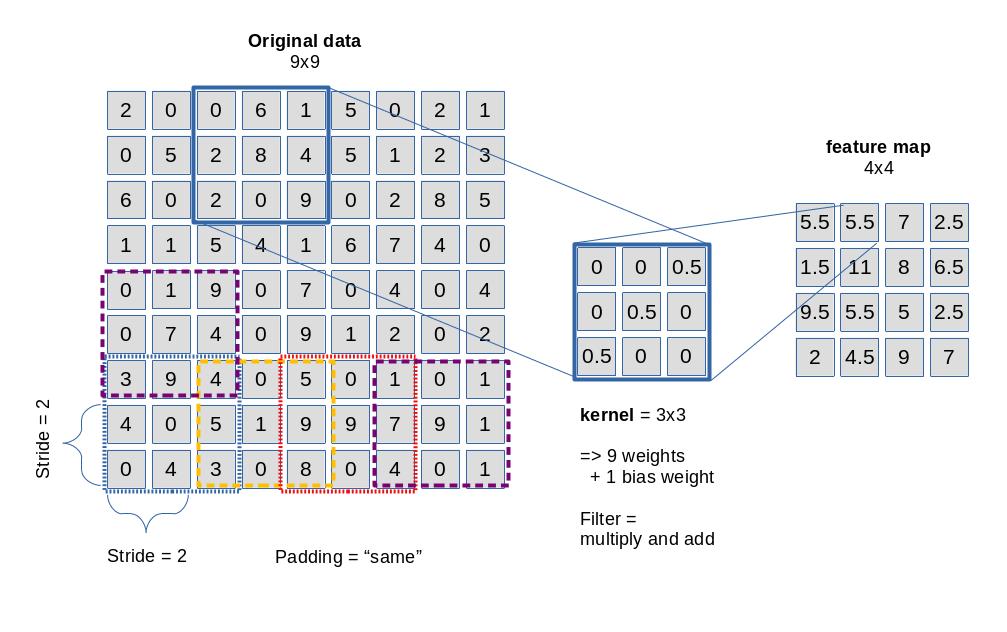
The picture below sketches the basic principle of a 3×3-filter which is applied with a constant stride of 2 along each axis of the image:

Convolution is not so complicated as it sounds. It means: You multiply the original data values in the covered small area by factors defined in the filter’s kernel and add the resulting values up to get a a distinct value at a defined position inside the map. In the given example with a stride of 2 we get a resulting feature map of 4×4 out of a original 9×9 (image or map).

Note that a filter need not be defined as a square. It can have a rectangular (n x m) shape with (n, m) being integers. (In principle we could also think of other tile forms as e.g. hexagons – as long as they can seamlessly cover a defined plane. Interesting, although I have not seen a hexagon based CNN in the literature, yet).

A filter’s kernel defines factors used in the convolution operation – one for each of the (n x m) defined points in the filter area.

Note also that filters may have a “depth” property when they shall be applied to three-dimensional data sets; we may need a depth when we cover colored images (which require 3 input layers). But let us keep to flat filters in this introductory discussion …

Now we come to a central question: Does a CNN Conv layer use just one filter? The answer is: No!

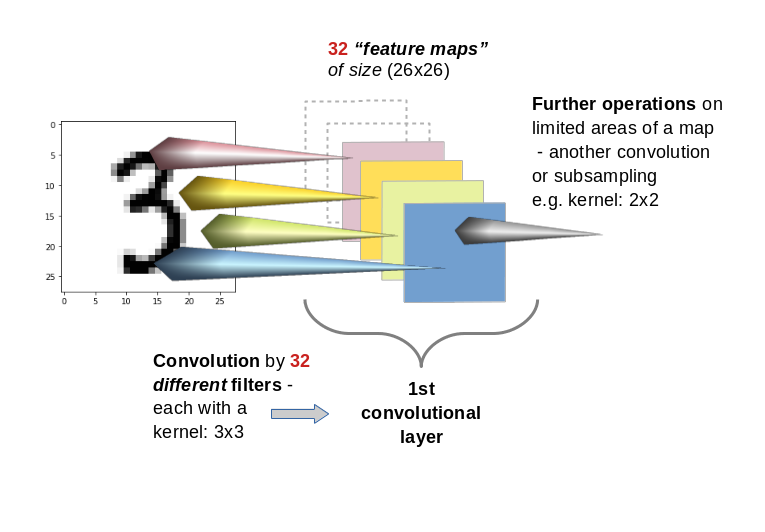
A Conv layer of a CNN you allows for the construction of multiple different filters. Thus we have to deal with a whole bunch of filters per each convolutional layer. E.g. 32 filters for the first convolutional layer and 64 for the second and 128 for the third. The outcome of the respective filter operations is the creation is of equally many “feature maps” (one for each filter) per convolutional layer. With 32 different filters on a Conv layer we would thus build 32 maps at this layer.

This means: A Conv layer has a multitude of sub-layers, i.e. “maps” which result of the application of different filters on previous image or map data.

You may have guessed already that the next step of abstraction is:
You can apply filters also to “maps” of previous filters, i.e. you can chain convolutions. Thus, feature maps are either connected to the image (1st Conv layer) or to the maps of a previous layer.

By using a sequence of multiple Conv layers you cover growing areas of the original image. Everything clear? Probably not …

Filters and their related weights are the end products of the training and optimization of a CNN!

When I first was confronted with the concept of filters, I got confused because many authors only describe the basic technical details of the “convolution” mechanism. They explain with many words how a filter and its kernel work when the filtering area is “moved” across the surface of an image. They give you pretty concrete filter examples; very popular are straight lines and crosses indicated by “ones” as factors in the filter’s kernel and zeros otherwise. And then you get an additional lecture on strides and padding. You have certainly read various related passages in books about ML and/or CNNs. A pretty good example for this “explanation” is the (otherwise interesting and helpful!) book of Deru and Ndiaye (see the bottom of this article. I refer to the introductory chapter 3.5.1 on CNN architectures.)

Well, the technical procedure is pretty easy to understand from drawings as given above – the real question that nags in your brain is:

“Where the hell do all the different filter definitions come from?”

What many authors forget is a central introductory sentence for beginners:

A filter is not given a priori. Filters (and their kernels) are systematically constructed and build up during the training of a CNN; filters are the end products of a learning and optimization process every CNN must absolve.

This means: For a given problem or dataset you do not know in advance what the “filters” (and their defining kernels) will look like after training (aside of their pixel dimensions already fixed by the CNN’s layer definitions). The “factors” of a filter used in the convolution operation are actually weights, whose final values are the outcome of a learning process. Just as in MLPs …

Nothing is really “moved” …

Another critical point is the somewhat misleading analogy of “moving” a filter across an image’s or map’s pixel surface. Nothing is ever actually “moved” in a CNN’s algorithm. All masks are already in place when the convolution operations are performed:

Every element of a specific e.g. 3×3 kernel corresponds to “factors” for the convolution operation. What are these factors? Again: They are nothing else but weights – in exactly the same sense as we used them in MLPs. A filter kernel represents a set of weight-values to be multiplied with original output values at the “nodes” in other layers or maps feeding input to the nodes of the present map.

Things become much clearer if you imagine a feature map as a bunch of arranged “nodes”. Each node of a map is connected to (n x m) nodes of a previous set of nodes on a map or layer delivering input to the Conv layer’s maps.

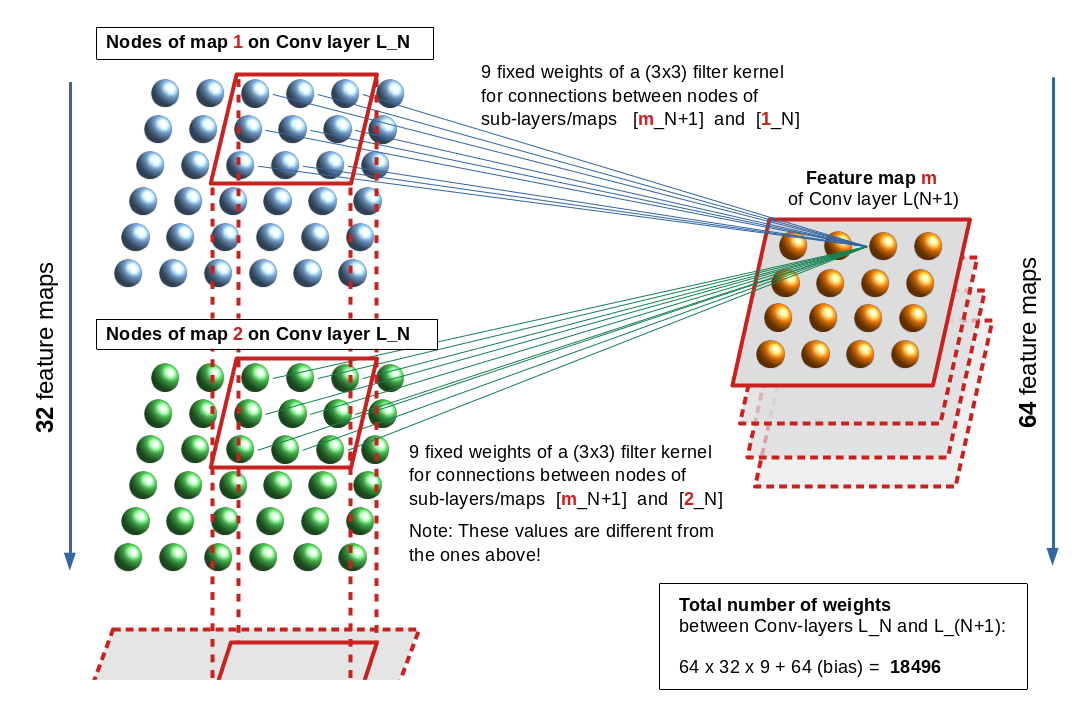
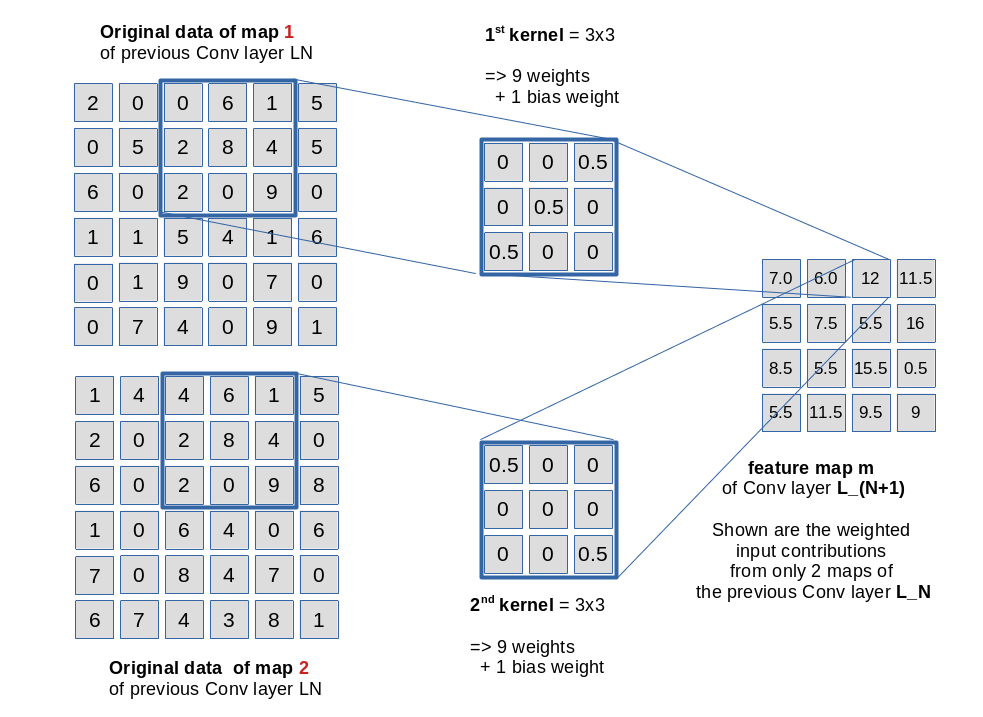
Let us look at an example. The following drawing shows the connections from “nodes” of a feature map “m” of a Conv layer L_(N+1) to nodes of two different maps “1” and “2” of
Conv layer L_N. The stride for the kernels is assumed to be just 1.

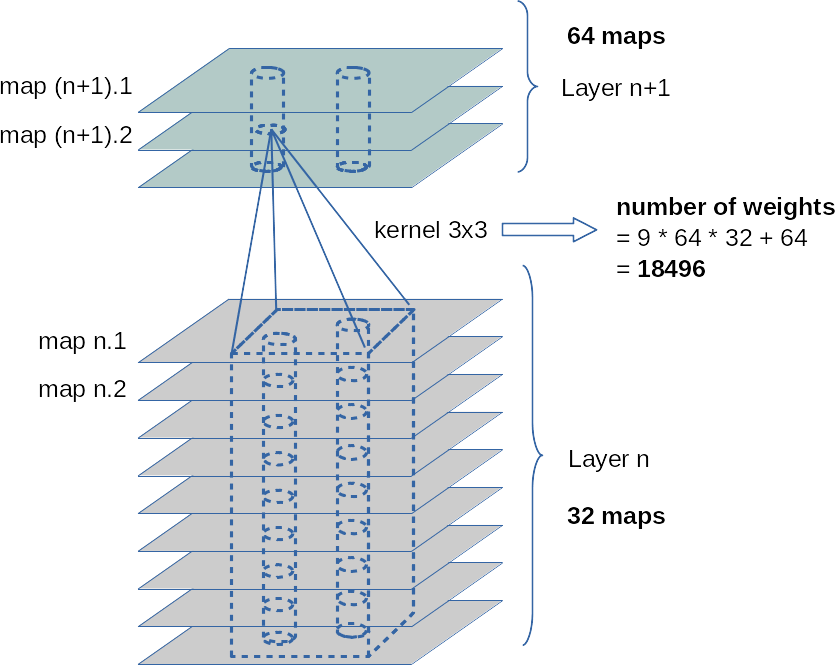
In the example the related weights are described by two different (3×3) kernels. Note, however, that each node of a specific map uses the same weights for connections to another specific map or sub-layer of the previous (input) layer. This explains the total number of weights between two sequential Conv layers – one with 32 maps and the next with 64 maps – as (64 x 32 x 9) + 64 = 18496. The 64 extra weights account for bias values per map on layer L_(N+1). (As all nodes of a map use fixed bunches of weights, we only need exactly one bias value per map).

Note also that a stride is defined for the whole layer and not per map. Thus we enforce the same size of all maps in a layer. The convolutions between a distinct map and all maps of the previous layer L_N can be thought as operations performed on a column of stacked filter areas at the same position – one above the other across all maps of L_N. See the illustration below:

The weights of a specific kernel work together as an ensemble: They condense the original 3×3 pixel information in the filtered area of the connected input layer or a map to a value at one node of the filter specific feature map. Please note that there is a bias weight in addition for every map; however, at all masking areas of a specific filter the very same 9 weights are applied. See the next drawing for an illustration of the weight application in our example for fictitious node and kernel values.

A CNN learns the appropriate weights (= the filter definitions) for a given bunch of images via training and is guided by the optimization of a loss function. You know these concepts already from MLPs …

The difference is that the ANN now learns about appropriate “weight ensembles” – eventually (!) working together as a defined convolutional filter between different maps of neighboring Conv (and/or sampling ) Layers. (For sampling see a separate paragraph below.)

The next picture illustrates the column like convolution of information across the identically positioned filter areas across multiple maps of a previous convolution layer:

The fact that the weight ensemble of a specific filter between maps is always the same, explains, by the way, the relatively (!) small number of weight parameters in deep CNNS.

Intermediate summary: The weights, which represent the factors used by a specific filter operation called convolution, are defined during a training process. The filter, its kernel and the respective weight values are the outcome of a mathematical optimization process – mostly guided by gradient descent.

Activation functions

As in MLPs each Conv layer has an associated “activation function” which is applied at each node of all maps after the resulting values of the convolution have been calculated as
the nodes input. The output then feeds the connections to the next layer. In CNNs for image handling often “Relu” or “Selu” are used as activation functions – and not “sigmoid” which we applied in the MLP code discussed in another article series of this blog.

Tensors

The above drawings indicate already that we need to arrange the data (of an image) and also the resulting map data in an organized way to be able to apply the required convolutional multiplications and summations the right way.

An colored image is basically a regular 3 dimensional structure with a width “w” (number of pixels along the x-axis), a height “h” (number of pixels along the y-axis) and a (color) depth “d” (d=3 for RGB colors).

If you represent the color value at each pixel and RGB-layer by a float you get a bunch of w x h x d float values which we can organize and index in a 3 dimensional Numpy array. Mathematically such well organized arrays with a defined number of axes (rank), a set of numbers describing the dimension along each axis (shape), a data-type, possible operations (and invariance aspects) define an abstract object called a “tensor“. Colored image data can be arranged in 3-dimensional tensors; gray colored images in a pseudo 3D-tensor which has a shape of (n, m, 1). (Keras and Tensorflow want to get imagedata in form of 2D tensors).

Now the important point is: The output data of Conv-layers and their feature maps also represent tensors. A bunch of 32 maps with a defined width and height defines data of a 3D-tensor.

You can imagine each value of such a tensor as the input or output given at a specific node in a layer with a 3-dimensional sub-structure. (In other even more complex data structures than images we would other multi-dimensional data structures.) The weights of a filter kernel describe the connections of the nodes of a feature map on a layer L_N to a specific map of a previous layer. Weights, actually, also define elements of a tensor.

The forward- and backward-propagation operations performed throughout such a complex net during training thus correspond to sequences of tensor-operations – i.e. generalized versions of the np.dot()-product we got to know in MLPs.

You understood already that e.g strides are important. But you do not need to care about details – Keras and Tensorflow will do the job for you! If you want to read a bit look a the documentation of the TF function “tf.nn.conv2d()”.

When we later on train with mini-batches of input data (i.e. batches of images) we get yet another dimension of our tensors. This batch dimension can – quite similar to MLPs – be used to optimize the tensor operations in a vectorized way. See my series on MLPs.

Chained convolutions cover growing areas of the original image

Two sections above I characterized the training of a CNN as a two-fold procedure. From the first drawing it is relatively easy to understand how we get to grasp tiny sub-structures of an image: Just use filters with small kernel sizes!

Fine, but there is probably a second question already arising in your mind:

By what mechanism does a CNN find or recognize a hierarchy of features?

One part of the answer is: Chain convolutions!

Let us assume a first convolutional layer with filters having a stride of 1 and a (3×3) kernel. We get maps with a shape of (26, 26) on this layer. The next Conv layer shall use a (4×4) kernel and also a stride of 1; then we get maps with a shape of (23, 23). A node on the second layer covers (6×6)-arrays on the original image. Two neighboring nodes a total area of (7×7). The individual (6×6)-areas of course overlap.

With a stride of 2 on each Conv-layer the corresponding areas on the original image are (7×7) and (11×11).

So a stack of consecutive (sequential) Conv-layers covers growing areas on the original image. This supports the detection of a pattern or feature hierarchy in the data of the input images.

However: Small strides require a relatively big number of sequential Conv-layers (for 3×3 kernels and stride 2) at least 13 layers to eventually cover the full image area.

Even if we would not enlarge the number of maps beyond 128 with growing layer number, we would get

(32 x 9 + 32) + (64 x 32 +64) + (128 x 64 + 128) + 10 x (128 x 128 + 128) = 320 + 18496 + 73856 + 10*147584 = 1.568 million weight parameters

to take care of!

This number has to be multiplied by the number of images in a mini-batch – e.g. 500. And – as we know from MLPs we have to keep all intermediate output results in RAM to accelerate the BW propagation for the determination of gradients. Too many data and parameters for the analysis of small 28×28 images!

Big strides, however, would affect the spatial resolution of the first layers in a CNN. What is the way out?

Sub-sampling is necessary!

The famous VGG16 CNN uses pairs and triples of convolution chains in its architecture. How does such a network get control over the number of weight parameters and the RAM requirement for all the output data at all the layers?

To get information in the sense of a feature hierarchy the CNN clearly should not look at details and related small sub-fields of the image, only. It must cover step-wise growing (!) areas of the original image, too. How do we combine these seemingly contradictory objectives in one training algorithm which does not lead to an exploding number of parameters, RAM and CPU time? Well, guys, this is the point where we should pay due respect to all the creative inventors of CNNs:

The answer is: We must accumulate or sample information across larger image or map areas. This is the (underestimated?) task of pooling– or sampling-layers.

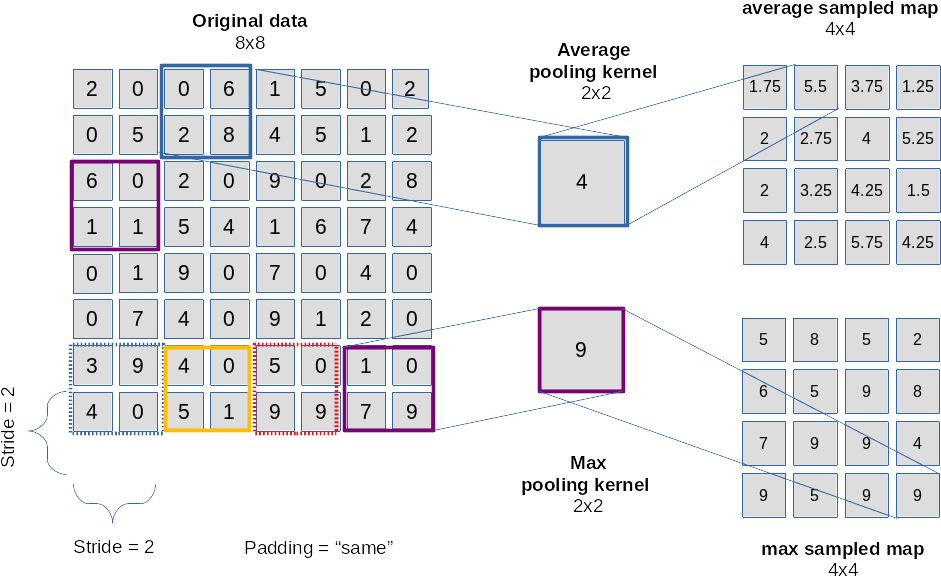
For me it was just another confusing point in the beginning – until one grasps the real magic behind it. At first sight a layer like a typical “maxpooling” layer seems to reduce information, only; see the next picture:

The drawing explains that we “sample” the information over multiple pixels e.g. by

  • either calculating an average over pixels (or map node values)
  • or by just picking the maximum value of pixels or map node values (thereby stressing the most important information)

in a certain defined sub-area of an image or map.

The shift or stride used as a default in a pooling layer is exactly the side length of the pooling area. We thus cover the image by adjacent, non-overlapping tiles! This leads to a substantial decrease of the dimensions of the resulting map! With a (2×2) pooling size by a an effective factor of 2. (You can change the default pooling stride – but think about the consequences!)

Of course, averaging or picking a max value corresponds to information reduction.

However: What the CNN really also will do in a subsequent Conv layer is to invest in further weights for the combination of information (features) in and of substantially larger areas of the original image! Pooling followed by an additional convolution obviously supports hierarchy building of information on different scales of image areas!

After we first have concentrated on small scale features (like with a magnifying glass) we now – in a figurative sense – make a step backwards and look at larger scales of the image again.

The trick is to evaluate large scale information by sampling layers in addition to the small scale information information already extracted by the previous convolutions. Yes, we drop resolution information – but by introducing a suitable mix of convolutions and sampling layers we also force the network systematically to concentrate on combined large scale features, which in the end are really important for the image classification as a whole!

As sampling counterbalances an explosion of parameters we can invest into a growing number of feature maps with growing scales of covered image areas. I.e. we add more and new filters reacting to combinations of larger scale information.

Look at the second to last illustration: Assume that the 32 maps on layer L_N depicted there are the result of a sampling operation. The next convolution gathers new knowledge about more, namely 64 different combinations of filtered structures over a whole vertical stack of small filter areas located at the same position on the 32 maps of layer N. The new information is in the course of training conserved into 64 weight ensembles for 64 maps on layer N+1.

Resulting options for architectures

We can think of multiple ways of combining Conv layers and pooling layers. A simple recipe for small images could be

  • Layer 0: Input layer (tensor of original image data, 3 color layers or one gray layer)
  • Layer 1: Conv layer (small 3×3 kernel, stride 1, 32 filters, 32 maps (26×26), analyzes 3×3 overlapping areas)
  • Layer 2: Pooling layer (2×2 max pooling => 32 (13×13) maps,
    a node covers 4×4 non overlapping areas per node on the original image)
  • Layer 3: Conv layer (3×3 kernel, stride 1, 64 filters, 64 maps (11×11),
    a node covers 8×8 overlapping areas on the original image (total effective stride 2))
  • Layer 4: Pooling layer (2×2 max pooling => 64 maps (5×5),
    a node covers 10×10 areas per node on the original image (total effective stride 5), some border info lost)
  • Layer 5: Conv layer (3×3 kernel, stride 1, 64 filters, 64 maps (3×3),
    a node covers 18×18 per node (effective stride 5), some border info lost )

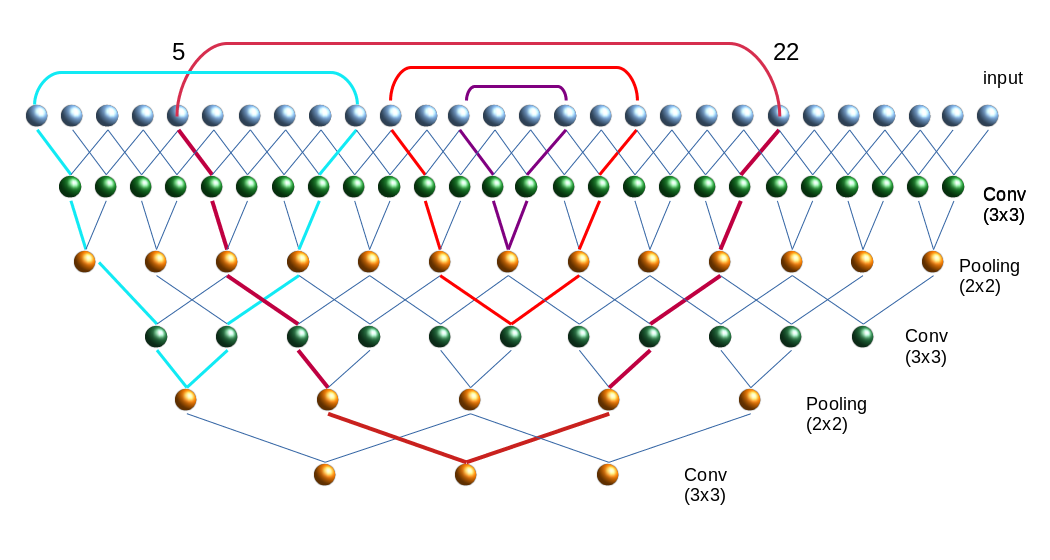
The following picture illustrates the resulting successive combinations of nodes along one axis of a 28×28 image.

Note that I only indicated the connections to border nodes of the Conv filter areas.

The kernel size decides on the smallest structures we look at – especially via the first convolution. The sampling decides on the sequence of steadily growing areas which we then analyze for specific combinations of smaller structures.

Again: It is most of all the (down-) sampling which allows for an effective hierarchical information building over growing larger image areas! Actually we do not really drop information by sampling – instead we give the network a chance to collect and code new information on a higher, more abstract level (via a whole bunch of numerous new weights).

The big advantages of the sampling layers get obvious:

  • They reduce the numbers of required weights
  • They reduce the amount of required memory – not only for weights but also for the output data, which must be saved for every layer, map and node.
  • They reduce the CPU load for FW and BW propagation
  • They also limit the risk of overfitting as some detail information is dropped.

Of course there are many other sequences of layers one could think about. E.g., we could combine 2 to 3 Conv layers before we apply a pooling layer. Such a layer sequence is characteristic of the VGG nets.

Further aspects

Just as MLPs a CNN represents an acyclic graph, where the maps contain increasingly fewer nodes but where the number of maps per layer increases on average.

Questions and objectives for this article series

An interesting question, which seldom is answered in introductory books, is whether two totally independent training runs for a given CNN-architecture applied on the same input data will produce the same filters in the same order. We shall investigate this point in the forthcoming articles.

Another interesting point is: What does a CNN see at which convolution layer?
And even more important: What do the “features” (= basic structural elements) in an image which trigger/activate a specific filter or map, look like?

If we could look into the output at some maps we could possibly see what filters do with the original image. And if we found a way to construct a structured image which triggers a specific filter then we could better understand what patterns the CNN reacts to. Are these patterns really “features” in the sense of conceptual entities? Examples for these different types of visualizations with respect to convolution in a CNN are objectives of this article series.

Conclusion

Today we covered a lot of “theory” on some aspects of CNNs. But we have a sufficiently solid basis regarding the structure and architecture now.

CNNs obviously have a much more complex structure than MLPs: They are deep in the sense of many sequential layers. And each convolutional layer has a complex structure in form of many parallel sub-layers (feature maps) itself. Feature maps are associated with filters, whose parameters (weights) get learned during the training. A map results from covering the original image or a map of a previous layer with small (overlapping) tiles of small filtering areas.

A mix of convolution and pooling layers allows for a look at detail patterns of the image in small areas in lower layers, whilst later layers can focus on feature combinations of larger image areas. The involved filters thus allow for the “awareness” of a hierarchy of features with translational invariance.

Pooling layers are important because they help to control the amount of weight parameters – and they enhance the effectiveness of detecting the most important feature correlations on larger image scales.

All nice and convincing – but the attentive reader will ask: Where and how do we do the classification?
Try to answer this question yourself first.

In the next article we shall build a concrete CNN and apply it to the MNIST dataset of images of handwritten digits. And whilst we do it I deliver the answer to the question posed above. Stay tuned …

Literature

“Advanced Machine Learning with Python”, John Hearty, 2016, Packt Publishing – See chapter 4.

“Deep Learning mit Python und Keras”, Francois Chollet, 2018, mitp Verlag – See chapter 5.

“Hands-On Machine learning with SciKit-Learn, Keras & Tensorflow”, 2nd edition, Aurelien Geron, 2019, O’Reilly – See chapter 14.

“Deep Learning mit Tensorflow, keras und Tensorflow.js”, Matthieu Deru, Alassane Ndiaye, 2019, Rheinwerk Verlag, Bonn – see chapter 3

Further articles in this series

A simple CNN for the MNIST dataset – XI – Python code for filter visualization and OIP detection
A simple CNN for the MNIST dataset – X – filling some gaps in filter
visualization

A simple CNN for the MNIST dataset – IX – filter visualization at a convolutional layer
A simple CNN for the MNIST dataset – VIII – filters and features – Python code to visualize patterns which activate a map strongly
A simple CNN for the MNIST dataset – VII – outline of steps to visualize image patterns which trigger filter maps
A simple CNN for the MNIST dataset – VI – classification by activation patterns and the role of the CNN’s MLP part
A simple CNN for the MNIST dataset – V – about the difference of activation patterns and features
A simple CNN for the MNIST dataset – IV – Visualizing the activation output of convolutional layers and maps
A simple CNN for the MNIST dataset – III – inclusion of a learning-rate scheduler, momentum and a L2-regularizer
A simple CNN for the MNIST datasets – II – building the CNN with Keras and a first test
A simple CNN for the MNIST datasets – I – CNN basics

Addendum 20.10.2020: “Feature maps” or “response maps”?

Whilst reading some more books on AI I got the impression that some authors associate the term “feature map” with the full collection of all maps related to a Conv layer. A single map then is called a “response map” or an “output channel” of the feature map. However, as most books (e.g. the book of A. Geron on Machine Learning) call a singular map a “feature map” I cling to this usage throughout this series.


Samba 4, shares, wsdd and Windows 10 – how to list Linux Samba servers in the Win 10 Explorer

These days I relatively often need to work with Windows 10 at home (home-office, corona virus, …). Normally, I isolate my own Win 10 instance in a VMware virtual machine on my Linux PC – and reduce any network connections of this VM to selected external servers. Under normal conditions all ports on the Linux host are closed for the virtual machine [VM]. But on a few temporary occasions I want to the Win 10 system to access a specific Samba exchange directory on a KVM virtualized Linux instance on the same host.

Off topic: You see that I never present directories of my Linux host directly to a Win 10 guest via Samba. Instead I transfer files via an exchange directory on an intermediate VM whose Samba service is configured to disallow access of the Win system on shares presented to the host. A primitive, but effective form of separation. The only inconvenient consequence is that synchronization becomes a two-fold process on the host and the Linux VM. But we have Linux tools for this, so the effort is limited. )

Of course we want to use the SMB protocol in a modern version, i.e. version 3.x (SMB3), over TCP/IP for this purpose (port 445). In addition we need some mechanism to detect and browse SMB servers on the Windows system. In the old days NetBIOS was used for the latter. On the Linux side we had the nmbd-daemon for it – and we could set up a special Samba server as a WINS server.

During the last year Microsoft has – via updates and new builds of Windows 10 – followed a consistent politics of deactivating the use of SMB V1.0 systematically. This, however, led to problems – not only between Windows PCs, but also between Win 10 instances and Samba 4 servers. This article addresses one of these problems: the missing list of available Samba servers in the Windows Explorer.

There are many contributions on the Internet describing this problem and some even say that you only can solve it by restoring SMB V1 capabilities in Win 10 again. In this article I want to recommend two different solutions:

  • Ignore the problem of Samba server detection and use your Samba shares on Win 10 with the SMB3 protocol as network drives.
  • If you absolutely want to see and list your Samba servers in the Windows Explorer of a Win 10 client, use the “Web-Service-Discovery” service via a WSDD-daemon provided by a Python script of Steffen Christgau.

I myself got on the right track of solving the named problem by an article of a guy called “Stilez”. His article is the first one listed under the section “Links” below. I recommend strongly to read it; it is Stilez who deserves all credit in pointing out both the problem and the solution. I just applied his insight to my own situation with virtualized Samba servers based on Opensuse Leap 15.1.

SMB V1.0 should be avoided – but NetBIOS needs it to exchange information about SMB servers

SMB, especially version SMB V1.0, is well known for security problems. Even MS has understood this – especially after the Wannacry disaster. See e.g. the links in the section “Links” => “Warnings of SMBV1” at the end of this article. MS has deactivated SMB V1 in the background via some updates of Win 8 and Win 10.

One of the resulting problem is that we do not see Samba servers in the Windows Explorer of a Win 10 system any longer. In the section “Network” of the Windows Explorer you normally should see a list of servers which are members of a Workgroup and offer shares.

Two years ago we would use NetBIOS’s discovery protocol and a WINS server to get this information. Unfortunately, the NetBIOS service detection ability depends on SMB1 features. The stupid thing is that we for a long while now had and have a relatively secure SMB2/3, but NetBIOS discovery only worked with SMB V1 enabled on the Windows client. Deactivating SMB V1 means deactivating NetBIOS at the
same time – and if you watch your Firewall logs for incoming packets from the Win 10 clients you will notice that exactly such a thing happened on Win 10 clients.

This actually means that you can have a full featured Samba/NetBIOS setup on the Linux side, that you may have opened the right ports on the firewalls for your Samba/WINS server and client systems, but that you will nevertheless not get any list of available Samba servers in Win 10’s Explorer. 🙁

Having understood this leads to the key question for our problem:

By what did MS replace the detection features of NetBIOS in combination with SMB-services?

Settings on the MS Win side – which alone will not help

When you google a bit you may find many hints regarding settings by which you activate network “discovery” functionalities via two Windows services. See

https://www.wintips.org/fix-windows-10-network-computers-not-showing/
https://winaero.com/blog/network-computers-not-visible-windows-10-version-1803/

You can follow these recommendations. If you want to see your own PC and other Windows systems in the Explorer’s list of network resources you must have activated them (see below). However, in my Win 10 client the recommended settings were already activated – with the exception of SMB V1, which I did and do not wish to reactivate again. The “discovery” settings may help you with other older Windows systems, but they do not enable a listing of Samba 4 servers without additional measures on Win 10.

There is another category of hints which in my opinion are contra-productive regarding security. See https://devanswers.co/network-error-problem-windows-cannot-access-hostname-samba/
Why activate an insecure setting? Especially, as such a setting does not really help us with our special problem? 🙁

A last set of hints concerns the settings on the Samba server, itself. I find it especially nice when such recommendations come from Microsoft :-). See: http://woshub.com/cannot-access-smb-network-shares-windows-10-1709/

[global]
server min protocol = SMB2_10
client max protocol = SMB3
client min protocol = SMB2_10
encrypt passwords = true
restrict anonymous = 2

Thanks to MS we now understand that we should not use SMB V1 …. But, actually, these hints are again insufficient regarding the Explorer problem …

What you could do – but should NOT do

Once you have understood that NetBIOS and SMB V1 still have an intimate relation (at least on a Windows systems) you may get the idea that there might exist some option to reactivate SMBV1 again on the Win 10 system. This is indeed possible. See here:
https://community.nethserver.org/t/windows-10-not-showing-servers-shares-in-network-browser/14263/4
https://www.wintips.org/fix-windows-10-network-computers-not-showing/

If you follow the advice of the authors and in addition re-open the standard ports for NetBIOS (UDP) 137, 138, (TCP) 139 on your firewalls between the Win 10 machine and your Samba servers you will – almost at once – get up the list of your accessible Samba servers in the Network section of the Win 10 Explorer. (Maybe you have to restart the smb and nmb services on your Linux machines).

But: You should not do this! SMB V1 should definitely become history!

Fortunately, a re-activation of SMB V1
on a Win 10 system is NOT required to mount Samba shares and it is neither required to get a list of available Samba servers in the Win 10 Explorer.

What you should do: Win 10 service settings

There are two service settings which are required to see other servers (and your own Win10 PC itself) in the list of network hosts presented by the Windows explorer:
Start services.msc ( press the Windows key + R => Enter “services.msc” in the dialog. Or: start services.msc it via the Control Panel => System and Security => Services)

  • Look for “Function Discovery Provider Host” => Set : Startup Type => Automatic
  • Look for “Function Discovery Resource Publication” => Set : Startup Type => Automatic (Delayed Start) !!

I noticed that on my VMware Win 10 guests the second setting appeared to be crucial to get the Win 10 PC itself listed among the network servers.

What you should do: Use the SMBV3 protocol!

As you as a Linux user meanwhile have probably replaced all your virtualized Win 7 guests, you should use the following settings in the [global] section of the configuration file “/etc/samba/smb.conf” of your Samba servers:

[global]

“protocol = SMB3”.

This is what Win 10 supports; you need SMB2_10 with some builds of Win 8 (???), only. Remember also that port 445 must be open on a firewall between the Win 10 client and your Samba server.

For Linux requirements to use SMB3 see
https://wiki.samba.org: SMB3 kernel status
For “SMB Direct” (RDMA) you normally need a kernel version > 4.16. On Opensuse Leap 15.1 most of the required kernel features have been backported. In Win 10 SMB Direct is normally activated; you find it in the “Window-Features” settings (https://www.windowscentral.com/how-manage-optional-features-windows-10)

Not seeing Samba servers in the Explorer does not mean that mounting a Samba share as a network drive does not work

Not seeing the Samba servers in the Win 10 Explorer – because the NetBIOS detection is defunct – does not mean that you cannot work with a Samba share on a Win 10 system. You can just “mount” it on Windows as a “network drive“:

Open a Windows Explorer, choose “This PC” on the left side, then click “Map network drive” in the upper area of the window and follow the instructions:
You choose a free drive letter and provide the Samba server name and its share in the usual MS form as “\\SERVERNAME\SHARE”.
Afterwards, you must activate the option “Connect using different credentials” in the dialog on the Win 10 side, if your Win 10 user for security reasons has a different UID and Password on the Samba server than on Win 10. Needless to say that this is a setting I strongly recommend – and of course we do not allow any direct anonymous or guest access to our Samba server without credentials delivered from a Windows machine (at least not without any central authentication systems).
So, you eventually must provide a valid Samba user name on your Samba server and the password – and there you happily go and use your resources on the Samba share from your Win 10 client.

I assumed of course that you have allowed access from the Win 10 host and the user by respective settings of “hosts allow” and “valid users” for the share in your Samba configuration.
Note: You need not mark the option for reconnecting the share in the Windows dialog for network drives if you only use the Samba exchange shares temporarily.

On an Opensuse system this works perfectly with the protocol settings for SMB3 on the server. So, you can use your shares even without seeing the samba
server in the Explorer: You just have to know what your shares are named and on which Samba servers they are located. No problem for a Linux admin.

In my opinion this approach is the most secure one among all “peer to peer”-approaches which have to work without a central network wide authentication service. It only requires to open port 445 for the time of a Samba session to a specific Samba server. Otherwise you do not provide any information for free to the Win 10 system and its “users”. (Well, an open question is what MS really does with the provided Samba credentials. But that is another story ….)

What you should do: Use the WSDD service on your Samba server

If you allow for some information sharing between your virtualized Win 10 and other KVM based virtual Samba machines in your LAN – and are not afraid of Microsoft or Antivirus companies on the Windows system to collect respective information – then there is a working option to get a stable list of the available Samba servers in the Windows Explorer – without the use of SMB V1.0.

Windows 10 implements web service detection via multiple mechanisms; among them: Multicast messages over ports 3702 (UDP), TCP 5357 and 1900 (UDP). For a detection of Samba services you “only” need ports 3702 (UDP) and 5357 (TCP). The general service detection port 1900 can remain closed in the firewalls between your Win 10 instances and your Linux world for our specific purpose. See
https://www.speedguide.net/port.php?port=5357
https://www.speedguide.net/port.php?port=3702
https://techcommunity.microsoft.com/t5/ask-the-performance-team/ws2008-the-wsd-port-monitor/ba-p/372760
https://en.wikipedia.org/wiki/Simple Service Discovery Protocol

The mechanism using ports 3702 and 5351 is called “Web Service Discovery” and was introduced by MS to cover the detection of printers and other devices in networks. In combination with SMB2 and SMB3 it is the preferred service to detect Samba services.

OK, do we have something like a counter-part available on a Linux system? Obviously, such a service is not (yet?) included in Samba 4 – at least not in the 4.9 version on my system with Opensuse Leap 15.1. The fact that WSD is not (yet?) a part of Samba may have some good reasons. See link.
One can understand the reservations and hesitation to include it, as WSD also serves other purposes than just the detection of SMB services.

Fortunately, a guy named Steffen Christgau, has written an (interesting) Python 3 script, which offers you the basic WSD functionality. See https://github.com/christgau/wsdd.

You can use the script in form of a daemon process on a Linux system – hence we speak of WSDD.

Using YaST I quickly found out that a WSDD RPM package is actually included in my “Opensuse Leap 15.1 Update” repository. People with other Linux distros may download the present WSDD version from GitHub.

On Opensuse it comes with an associated systemd service-file which you find in the directory “/usr/lib/systemd/system”.

[Unit]
Description=Web Services Dynamic Discovery host daemon
After=network-online.target
Wants=network-online.target

[Service]
Type=simple
AmbientCapabilities=CAP_SYS_CHROOT
PermissionsStartOnly=true
Environment= WSDD_ARGS=-p
ExecStartPre=/usr/lib/wsdd/wsdd-init.sh
EnvironmentFile=-/run/sysconfig/wsdd
ExecStart=/usr/sbin/wsdd --shortlog -c /run/wsdd $WSDD_ARGS
ExecStartPost=/usr/bin/rm /run/
sysconfig/wsdd
User=wsdd
Group=wsdd

[Install]
WantedBy=multi-user.target

Reading the documentation you find out that the daemon runs chrooted – which is a reasonable security measure.
Opensuse even provides an elementary configuration file in “/etc/sysconfig/wsdd“.

I used the parameter

WSDD_WORKGROUP=”MYWORKGROUP”

there to announce the right Workgroup for my (virtualized) Samba server.

So, I had everything ready to start WSDD by “rcwsdd start” (or by “systemctl start wsdd.service”) on my Samba server.

On the local firewall of the SMB server I opened

  • port 445 (TCP) for SMB(3) In/Out for the server and from/to the Win-10-Client,
  • port 3702 (UDP) for incoming packets to the server and outgoing packets from the server to the Multicast address 239.255.255.250,
  • port 5357 (TCP) In/Out for the server and from/to the Win 10 client.

And: I closed all NetBIOS ports (UDP 137, 138 / TCP 139) and eventually stopped the “nmbd”-service on the Samba server! (UDP 137, 138 / TCP 139)

Within a second or so, my Samba 4 server appeared in the Windows 10 Explorer!

Further hints:
As the 3702 port is used with the UDP protocol it should be regarded as potentially dangerous. See: https://blogs.akamai.com/sitr/2019/09/new-ddos-vector-observed-in-the-wild-wsd-attacks-hitting-35gbps.html
The port 1900 which appeared in the firewall logs does not seem to be important. I blocked it.

So far, so good. However, when I refreshed the list in the Win 10 Explorer my SAMBA server disappeared again. 🙁

What you should do: Take special care about the network interface to which the WSDD service gets attached to

It took me a while to find out that the origin of the last problem had to do with the fact that my virtualized server and my Win 10 client both had multiple network interfaces on virtualized bridges. There are no loops in the configuration, but it occurred that multiple broadcasts packets arrive via different paths at the Samba server and were answered – and thus multiple return messages appeared at the Win 10 client during a refresh – which Win 10 did not like (see the discussion in the following link.
https://github.com/christgau/wsdd/issues/8

As soon as I restricted the answer of the Samba server to exactly one of the interfaces on my virtual bridge via the the parameter “WSDD_INTERFACES” in the “/etc/sysconfig/wsdd”-configuration file everything went fine. Refreshes now lead to an immediate update including the Samba server.

So, be a little careful, when you have some complicated bridge structures associated with your virtualized VMware or KVM guests. The WSDD service should be limited to exactly one interface of the Samba server.

Note: As we do not need NetBIOS any longer – block ports 137, 138 (UDP) and 139 (TCP) in your firewalls! It will make you feel better instantaneously.

Conclusion

The “end” of SMB V1 on Win 10 is a reasonable step. However, it undermines the visibility of Samba servers in the Windows Explorers. The reason is that NetBIOS requires SMB1.0 features on Windows. NetBIOS is/was therefore consistently deactivated on Win 10, too. The service detection on the network is replaced by the WSD service which was originally introduced for printer detection (and possibly other devices). Activating it on the Win 10 system may help with the detection of other Windows (8 and 10) systems on the network, but not with Samba 4 servers. Samba servers presently only serve NetBIOS requests of Win clients
to allow for server and share detection. Therefore, without additional measures, they are not displayed in the Windows Explorer of a regular Win 10 client.

This does, however, not restrict the usage of Samba shares on the Win 10 client via the SMB3 protocol. They can be used as “network drives” – just as before. Not distributing name and device information on a network has its advantages regarding security.

If you absolutely must see your Samba servers in the Win 10 Explorer install and configure the WSDD package of Steffen Christgau. You can use it as a systemd service. You should restrict the interfaces WSDD gets attached to – especially if your Samba servers are attached to virtual network bridges (Linux bridges or VMware bridges).

So:

  • Disable SMBV1 in Windows 10 if an update has not yet done it for you!
  • Set the protocol in the Samba servers to SMBV3!
  • Try to work with “networks drives” on your Win 10 guests, only!
  • Install, configure and use WSDD, if you really need to see your Samba servers in the Windows Explorer.
  • Open the port 445 (TCP, IN/OUT between the Win 10 client and the server), 3072 (UDP, OUT from the server and the Win 10 client to 239.255.255.250, IN to the server from the Win 10 client / IN to the Win 10 client from the server; rules details depending on the firewall location), port 5357 (TCP; In/OUT between the Samba server and the Win 10 client) on your firewalls between the Samba server and the Win 10 system.
  • Close the NetBIOS ports in your firewalls!
  • You should also take care of stopping multicast messages leaving perimeter firewalls; normally packets to multicast addresses should not be routed, but blocking them explicitly for certain interfaces is no harm, either.

Of course you must repeat the WSDD and firewall setup for all your Samba servers. But as a Linux admin you have your tools for distributing common configuration files or copying virtualization setups.

Links

The real story
!!!! https://www.ixsystems.com/community/resources/how-to-kill-off-smb1-netbios-wins-and-still-have-windows-network-neighbourhood-better-than-ever.106/ !!!

https://forums.linuxmint.com/viewtopic.php?p=1799875

https://devanswers.co/discover-ubuntu-machines-samba-shares-windows-10-network/

https://bugs.launchpad.net/ubuntu/ source/ samba/ +bug/ 1831441

https://forums.opensuse.org/ showthread.php/ 540083-Samba-Network-Device-Type-for-Windows-10

https://kofler.info/zugriff-auf-netzwerkverzeichnisse-mit-nautilus/

WSDD and its problems
https://github.com/christgau/wsdd
https://github.com/christgau/wsdd/issues/8
https://forums.opensuse.org/ showthread.php/ 540083-Samba-Network-Device-Type-for-Windows-10

Warnings of SMB V1
https://docs.microsoft.com/de-de/windows-server/storage/file-server/troubleshoot/detect-enable-and-disable-smbv1-v2-v3
https://blog.malwarebytes.com/101/2018/12/how-threat-actors-are-using-smb-vulnerabilities/
https://securityboulevard.com/2018/12/whats-the-problem-with-smb-1-and-should-you-worry-about-smb-2-and-3/
https://techcommunity.microsoft.com/t5/storage-at-microsoft/stop-using-smb1/ba-p/425858
https://www.cubespotter.de/cubespotter/wannacry-nsa-exploits-und-das-maerchen-von-smbv1/

Problems with Win 10 and shares
https://social.technet.microsoft.com/ Forums/ en-US: cannot-connect-to-cifs-smb-samba-network-shares-amp-shared-folders-in-windows-10-after-update?forum=win10itpronetworking

RDMA and SMB Direct
https://searchstorage.techtarget.com/ definition/ Remote-Direct-Memory-Access

Other settings in the SMB/Samba environment of minor relevance
http://woshub.com/cannot-access-smb-network-shares-windows-10-1709/
https://superuser.com/questions/1466968/unable-to-connect-to-a-linux-samba-server-via-hostname-on-windows-10
https://superuser.com/questions/1522896/windows-10-cannot-connect-to-linux-samba-shares-except-from-smb1-cifs
https://www.reddit.com/ r/ techsupport/ comments/ 3yevip/ windows 10 cant see samba shares/
https://devanswers.co/network-error-problem-windows-cannot-access-hostname-samba/


MLP, Numpy, TF2 – performance issues – Step III – a correction to BW propagation

In the last articles of this series

MLP, Numpy, TF2 – performance issues – Step II – bias neurons, F- or C- contiguous arrays and performance
MLP, Numpy, TF2 – performance issues – Step I – float32, reduction of back propagation

we looked at the FW-propagation of the MLP code which I discussed in another article series. We found that the treatment of bias neurons in the input layer was technically inefficient due to a collision of C- and F-contiguous arrays. By circumventing the problem we could accelerate the FW-propagation of big batches (as the complete training or test data set) by more than a factor of 2.

In this article I want to turn to the BW propagation and do some analysis regarding CPU consumption there. We will find a simple (and stupid) calculation step there which we shall replace. This will give us another 15% to 22% performance improvement in comparison to what we have reached in the last article for MNIST data:

  • 9.6 secs for 35 epochs and a batch-size of 500
  • and 8.7 secs for a batch-size of 20000.

Present CPU time relation between the FW- and the BW-propagation

The central training of mini-batches is performed by the method “_handle_mini_batch()”.

#
    ''' -- Method to deal with a batch -- '''
    def _handle_mini_batch (self, num_batch = 0, num_epoch = 0, b_print_y_vals = False, b_print = False, b_keep_bw_matrices = True):
        ''' .... '''
        # Layer-related lists to be filled with 2-dim Numpy matrices during FW propagation
        # ********************************************************************************
        li_Z_in_layer  = [None] * self._n_total_layers # List of matrices with z-input values for each layer; filled during FW-propagation
        li_A_out_layer = li_Z_in_layer.copy()          # List of matrices with results of activation/output-functions for each layer; filled during FW-propagation
        li_delta_out   = li_Z_in_layer.copy()          # Matrix with out_delta-values at the outermost layer 
        li_delta_layer = li_Z_in_layer.copy()          # List of the matrices for the BW propagated delta values 
        li_D_layer     = li_Z_in_layer.copy()          # List of the derivative matrices D containing partial derivatives of the activation/ouput functions 
        li_grad_layer  = li_Z_in_layer.copy()          # List of the matrices with gradient values for weight corrections
        
        # Major steps for the mini-batch during one epoch iteration 
        # **********************************************************
        
        #ts=time.perf_counter()
        # Step 0: List of indices for data records in the present mini-batch
        # ******
        ay_idx_batch = self._ay_mini_batches[num_batch]
        
        # Step 1: Special preparation of the Z-input to the MLP's input Layer L0
        # ******
        # ts=time.perf_counter()
        # slicing 
        li_Z_in_layer[0] = self._X_train[ay_idx_batch] # numpy arrays can be indexed by an array of integers
        
        # transposition 
        #~~~~~~~~~~~~~~
        li_Z_in_layer[0] = li_Z_in_layer[0].T
        #te=time.perf_counter(); t_batch = te - ts;
        #print("\nti - transposed inputbatch =", t_batch)
        
        # Step 2: Call forward propagation method for the present mini-batch of training records
        # *******
n        #tsa = time.perf_counter() 
        self._fw_propagation(li_Z_in = li_Z_in_layer, li_A_out = li_A_out_layer) 
        #tea = time.perf_counter(); ta = tea - tsa;  print("ta - FW-propagation", "%10.8f"%ta)
        
        # Step 3: Cost calculation for the mini-batch 
        # ********
        #tsb = time.perf_counter() 
        ay_y_enc = self._ay_onehot[:, ay_idx_batch]
        ay_ANN_out = li_A_out_layer[self._n_total_layers-1]
        total_costs_batch, rel_reg_contrib = self._calculate_loss_for_batch(ay_y_enc, ay_ANN_out, b_print = False)
        # we add the present cost value to the numpy array 
        self._ay_costs[num_epoch, num_batch]            = total_costs_batch
        self._ay_reg_cost_contrib[num_epoch, num_batch] = rel_reg_contrib
        #teb = time.perf_counter(); tb = teb - tsb; print("tb - cost calculation", "%10.8f"%tb)
        
        
        # Step 4: Avg-error for later plotting 
        # ********
        #tsc = time.perf_counter() 
        # mean "error" values - averaged over all nodes at outermost layer and all data sets of a mini-batch 
        ay_theta_out = ay_y_enc - ay_ANN_out
        ay_theta_avg = np.average(np.abs(ay_theta_out)) 
        self._ay_theta[num_epoch, num_batch] = ay_theta_avg 
        #tec = time.perf_counter(); tc = tec - tsc; print("tc - error", "%10.8f"%tc)
        
        
        # Step 5: Perform gradient calculation via back propagation of errors
        # ******* 
        #tsd = time.perf_counter() 
        self._bw_propagation( ay_y_enc = ay_y_enc, 
                              li_Z_in = li_Z_in_layer, 
                              li_A_out = li_A_out_layer, 
                              li_delta_out = li_delta_out, 
                              li_delta = li_delta_layer,
                              li_D = li_D_layer, 
                              li_grad = li_grad_layer, 
                              b_print = b_print,
                              b_internal_timing = False 
                              ) 
        #ted = time.perf_counter(); td = ted - tsd; print("td - BW propagation", "%10.8f"%td)
        
        # Step 7: Adjustment of weights  
        # *******        
        #tsf = time.perf_counter() 
        rg_layer=range(0, self._n_total_layers -1)
        for N in rg_layer:
            delta_w_N = self._learn_rate * li_grad_layer[N]
            self._li_w[N] -= ( delta_w_N + (self._mom_rate * self._li_mom[N]) )
            
            # save momentum
            self._li_mom[N] = delta_w_N
        #tef = time.perf_counter(); tf = tef - tsf; print("tf - weight correction", "%10.8f"%tf)
        
        return None


I took some time measurements there:

ti - transposed inputbatch = 0.0001785
ta - FW-propagation 0.00080975
tb - cost calculation 0.00030705
tc - error 0.00016182
td - BW propagation 0.00112558
tf - weight correction 0.00020079

ti - transposed inputbatch = 0.00018144
ta - FW-propagation 0.00082022
tb - cost calculation 0.00031284
tc - error 0.00016652
td - BW propagation 0.00106464
tf - weight correction 0.00019576

You see that the FW-propagation is a bit faster than the BW-propagation. This is a bit strange as the FW-propagation is dominated meanwhile by a really expensive operation which we cannot accelerate (without choosing a new activation function): The calculation of the sigmoid value for the inputs at layer L1.

So let us look into the BW-propagation; the code for it is momentarily:

    ''' -- Method to handle error BW propagation for a mini-batch --'''
    def _bw_propagation(self, 
                        ay_y_enc, li_Z_in, li_A_out, 
                        li_delta_out, li_delta, li_D, li_
grad, 
                        b_print = True, b_internal_timing = False):
        
        # List initialization: All parameter lists or arrays are filled or to be filled by layer operations 
        # Note: the lists li_Z_in, li_A_out were already filled by _fw_propagation() for the present batch 
        
        # Initiate BW propagation - provide delta-matrices for outermost layer
        # *********************** 
        tsa = time.perf_counter() 
        # Input Z at outermost layer E  (4 layers -> layer 3)
        ay_Z_E = li_Z_in[self._n_total_layers-1]
        # Output A at outermost layer E (was calculated by output function)
        ay_A_E = li_A_out[self._n_total_layers-1]
        
        # Calculate D-matrix (derivative of output function) at outmost the layer - presently only D_sigmoid 
        ay_D_E = self._calculate_D_E(ay_Z_E=ay_Z_E, b_print=b_print )
        #ay_D_E = ay_A_E * (1.0 - ay_A_E)

        # Get the 2 delta matrices for the outermost layer (only layer E has 2 delta-matrices)
        ay_delta_E, ay_delta_out_E = self._calculate_delta_E(ay_y_enc=ay_y_enc, ay_A_E=ay_A_E, ay_D_E=ay_D_E, b_print=b_print) 
        
        # add the matrices to their lists ; li_delta_out gets only one element 
        idxE = self._n_total_layers - 1
        li_delta_out[idxE] = ay_delta_out_E # this happens only once
        li_delta[idxE]     = ay_delta_E
        li_D[idxE]         = ay_D_E
        li_grad[idxE]      = None    # On the outermost layer there is no gradient ! 
        
        tea = time.perf_counter(); ta = tea - tsa; print("\nta-bp", "%10.8f"%ta)
        
        # Loop over all layers in reverse direction 
        # ******************************************
        # index range of target layers N in BW direction (starting with E-1 => 4 layers -> layer 2))
        range_N_bw_layer = reversed(range(0, self._n_total_layers-1))   # must be -1 as the last element is not taken 
        
        # loop over layers 
        tsb = time.perf_counter() 
        for N in range_N_bw_layer:
            
            # Back Propagation operations between layers N+1 and N 
            # *******************************************************
            # this method handles the special treatment of bias nodes in Z_in, too
            tsib = time.perf_counter() 
            ay_delta_N, ay_D_N, ay_grad_N = self._bw_prop_Np1_to_N( N=N, li_Z_in=li_Z_in, li_A_out=li_A_out, li_delta=li_delta, b_print=False )
            teib = time.perf_counter(); tib = teib - tsib; print("N = ", N, " tib-bp", "%10.8f"%tib)
            
            # add matrices to their lists 
            #tsic = time.perf_counter() 
            li_delta[N] = ay_delta_N
            li_D[N]     = ay_D_N
            li_grad[N]= ay_grad_N
            #teic = time.perf_counter(); tic = teic - tsic; print("\nN = ", N, " tic = ", "%10.8f"%tic)
        teb = time.perf_counter(); tb = teb - tsb; print("tb-bp", "%10.8f"%tb)
       
        return


Typical timing results are:

ta-bp 0.00007112
N =  2  tib-bp 0.00025399
N =  1  tib-bp 0.00051683
N =  0  tib-bp 0.00035941
tb-bp 0.00126436

ta-bp 0.00007492
N =  2  tib-bp 0.00027644
N =  1  tib-bp 0.00090043
N =  0  tib-bp 0.00036728
tb-bp 0.00168378

We see that the CPU consumption of “_bw_prop_Np1_to_N()” should be analyzed in detail. It is relatively time consuming at every layer, but especially at layer L1. (The list adds are insignificant.)
What does this method presently look like?

    ''' -- Method to calculate the BW-propagated delta-matrix and the gradient matrix to/for layer N '''
    def _bw_prop_Np1_to_N(self, N, li_Z_in, li_A_out, li_delta, b_print=False):
        '''
        BW-
error-propagation between layer N+1 and N 
        Version 1.5 - partially accelerated 

        Inputs: 
            li_Z_in:  List of input Z-matrices on all layers - values were calculated during FW-propagation
            li_A_out: List of output A-matrices - values were calculated during FW-propagation
            li_delta: List of delta-matrices - values for outermost ölayer E to layer N+1 should exist 
        
        Returns: 
            ay_delta_N - delta-matrix of layer N (required in subsequent steps)
            ay_D_N     - derivative matrix for the activation function on layer N 
            ay_grad_N  - matrix with gradient elements of the cost fnction with respect to the weights on layer N 
        '''
        
        # Prepare required quantities - and add bias neuron to ay_Z_in 
        # ****************************
        
        # Weight matrix meddling between layers N and N+1 
        ay_W_N = self._li_w[N]

        # delta-matrix of layer N+1
        ay_delta_Np1 = li_delta[N+1]

        # fetch output value saved during FW propagation 
        ay_A_N = li_A_out[N]

        # Optimization V1.5 ! 
        if N > 0: 
            
            #ts=time.perf_counter()
            ay_Z_N = li_Z_in[N]
            # !!! Add intermediate row (for bias) to Z_N !!!
            ay_Z_N = self._add_bias_neuron_to_layer(ay_Z_N, 'row')
            #te=time.perf_counter(); t1 = te - ts; print("\nBW t1 = ", t1, " N = ", N) 
        
            # Derivative matrix for the activation function (with extra bias node row)
            # ********************
            #    can only be calculated now as we need the z-values
            #ts=time.perf_counter()
            ay_D_N = self._calculate_D_N(ay_Z_N)
            #te=time.perf_counter(); t2 = te - ts; print("\nBW t2 = ", t2, " N = ", N) 
            
            # Propagate delta
            # **************

            # intermediate delta 
            # ~~~~~~~~~~~~~~~~~~
            #ts=time.perf_counter()
            ay_delta_w_N = ay_W_N.T.dot(ay_delta_Np1)
            #te=time.perf_counter(); t3 = te - ts; print("\nBW t3 = ", t3) 
            
            # final delta 
            # ~~~~~~~~~~~
            #ts=time.perf_counter()
            ay_delta_N = ay_delta_w_N * ay_D_N
            
            # Orig reduce dimension again
            # **************************** 
            ay_delta_N = ay_delta_N[1:, :]
            #te=time.perf_counter(); t4 = te - ts; print("\nBW t4 = ", t4) 
            
        else: 
            ay_delta_N = None
            ay_D_N = None
        
        # Calculate gradient
        # ********************
        #ts=time.perf_counter()
        ay_grad_N = np.dot(ay_delta_Np1, ay_A_N.T)
        #te=time.perf_counter(); t5 = te - ts; print("\nBW t5 = ", t5) 
        
        # regularize gradient (!!!! without adding bias nodes in the L1, L2 sums) 
        #ts=time.perf_counter()
        if self._lambda2_reg > 0: 
            ay_grad_N[:, 1:] += self._li_w[N][:, 1:] * self._lambda2_reg 
        if self._lambda1_reg > 0: 
            ay_grad_N[:, 1:] += np.sign(self._li_w[N][:, 1:]) * self._lambda1_reg 
        #te=time.perf_counter(); t6 = te - ts; print("\nBW t6 = ", t6) 
        
        return ay_delta_N, ay_D_N, ay_grad_N

 
Timing data for a batch-size of 500 are:

N =  2
BW t1 =  0.0001169009999557602  N =  2
BW t2 =  0.00035331499998392246  N =  2
BW t3 =  0.00018078099992635543
BW t4 =  0.00010234199999104021
BW t5 =  9.928200006470433e-05
BW t6 =  2.4267000071631628e-05
N =  2  tib-bp 0.00124414

N =  1
BW t1 =  0.0004323499999827618  N =  1
BW t2 =  0.
000781415999881574  N =  1
BW t3 =  4.2077999978573644e-05
BW t4 =  0.00022921000004316738
BW t5 =  9.376399998473062e-05
BW t6 =  0.00012183700005152787
N =  1  tib-bp 0.00216281

N =  0
BW t5 =  0.0004289769999559212
BW t6 =  0.00015404999999191205
N =  0  tib-bp 0.00075249
....
N =  2
BW t1 =  0.00012802800006284087  N =  2
BW t2 =  0.00034988200013685855  N =  2
BW t3 =  0.0001854429999639251
BW t4 =  0.00010359299994888715
BW t5 =  0.00010210400000687514
BW t6 =  2.4010999823076418e-05
N =  2  tib-bp 0.00125854

N =  1
BW t1 =  0.0004407169999467442  N =  1
BW t2 =  0.0007845899999665562  N =  1
BW t3 =  0.00025684100000944454
BW t4 =  0.00012409999999363208
BW t5 =  0.00010345399982725212
BW t6 =  0.00012994100006835652
N =  1  tib-bp 0.00221321

N =  0
BW t5 =  0.00044504700008474174
BW t6 =  0.00016473000005134963
N =  0  tib-bp 0.00071442

....
N =  2
BW t1 =  0.000292730999944979  N =  2
BW t2 =  0.001102525000078458  N =  2
BW t3 =  2.9429999813146424e-05
BW t4 =  8.547999868824263e-06
BW t5 =  3.554099998837046e-05
BW t6 =  2.5041999833774753e-05
N =  2  tib-bp 0.00178565

N =  1
BW t1 =  3.143399999316898e-05  N =  1
BW t2 =  0.0006720640001276479  N =  1
BW t3 =  5.4785999964224175e-05
BW t4 =  9.756200006449944e-05
BW t5 =  0.0001605449999715347
BW t6 =  1.8391000139672542e-05
N =  1  tib-bp 0.00147566

N =  0
BW t5 =  0.0003641810001226986
BW t6 =  6.338999992294703e-05
N =  0  tib-bp 0.00046542

 
It seems that we should care about t1, t2, t3 for hidden layers and maybe about t5 at layers L1/L0.

However, for a batch-size of 15000 things look a bit different:

N =  2
BW t1 =  0.0005776280000304723  N =  2
BW t2 =  0.004995969999981753  N =  2
BW t3 =  0.0003165199999557444
BW t4 =  0.0005244750000201748
BW t5 =  0.000518499999998312
BW t6 =  2.2458999978880456e-05
N =  2  tib-bp 0.00736144

N =  1
BW t1 =  0.0010120430000029046  N =  1
BW t2 =  0.010797029000002567  N =  1
BW t3 =  0.0005006920000028003
BW t4 =  0.0008704929999794331
BW t5 =  0.0010805200000163495
BW t6 =  3.0326000000968634e-05
N =  1  tib-bp 0.01463436

N =  0
BW t5 =  0.006987539000022025
BW t6 =  0.00023552499999368592
N =  0  tib-bp 0.00730959


N =  2
BW t1 =  0.0006299790000525718  N =  2
BW t2 =  0.005081416999985322  N =  2
BW t3 =  0.00018547400003399162
BW t4 =  0.0005970070000103078
BW t5 =  0.000564008000026206
BW t6 =  2.3311000006742688e-05
N =  2  tib-bp 0.00737899

N =  1
BW t1 =  0.0009376909999900818  N =  1
BW t2 =  0.010650266999959968  N =  1
BW t3 =  0.0005232729999988806
BW t4 =  0.0009100700000317374
BW t5 =  0.0011237720000281115
BW t6 =  0.00016643800000792908
N =  1  tib-bp 0.01466144

N =  0
BW t5 =  0.006987463000029948
BW t6 =  0.00023978600000873485
N =  0  tib-bp 0.00734308

 
For big batch-sizes “t2” dominates everything. It seems that we have found another code area which causes the trouble with big batch-sizes which we already observed before!

What operations do the different CPU times stand for?

To keep an overview without looking into the code again, I briefly summarize which operations cause which of the measured time differences:

  • t1” – which contributes for small batch-sizes stands for adding a bias neuron to the input data Z_in at each layer.
  • t2” – which is by far dominant for big batch sizes stands for calculating the derivative of the output/activation function (in our case of the sigmoid function) at the various layers.
  • t3” – which contributes at
    some layers stands for a dot()-matrix multiplication with the transposed weight-matrix,
  • t4” – covers an element-wise matrix-multiplication,
  • t5” – contributes at the BW-transition from layer L1 to L0 and covers the matrix multiplication there (including the full output matrix with the bias neurons at L0)

Use the output values calculated at each layer during FW-propagation!

Why does the calculation of the derivative of the sigmoid function take so much time? Answer: Because I coded it stupidly! Just look at it:

    ''' -- Method to calculate the matrix with the derivative values of the output function at outermost layer '''
    def _calculate_D_N(self, ay_Z_N, b_print= False):
        '''
        This method calculates and returns the D-matrix for the outermost layer
        The D matrix contains derivatives of the output function with respect to local input "z_j" at outermost nodes. 
        
        Returns
        ------
        ay_D_E:    Matrix with derivative values of the output function 
                   with respect to local z_j valus at the nodes of the outermost layer E
        Note: This is a 2-dim matrix over layer nodes and training samples of the mini-batch
        '''
        if self._my_out_func == 'sigmoid':
            ay_D_E = self._D_sigmoid(ay_Z = ay_Z_N)
        
        else:
            print("The derivative for output function " + self._my_out_func + " is not known yet!" )
            sys.exit()
        
        return ay_D_E

    ''' -- method for the derivative of the sigmoid function-- '''
    def _D_sigmoid(self, ay_Z):
        ''' 
        Derivative of sigmoid function with respect to Z-values 
        - works via expit element-wise on matrices
        Input:  Z - Matrix with Input values for the activation function Phi() = sigmoid() 
        Output: D - Matrix with derivative values 
        '''
        S_Z = self._sigmoid(ay_Z)
        return S_Z * (1.0 - S_Z)

 
We first call an intermediate function which then directs us to the right function for a chosen activation function. Well meant: So far, we use only the sigmoid function, but it could e.g. also be the relu() or tanh()-function. So, we did what we did for the sake of generalization. But we did it badly because of two reasons:

  • We did not keep up a function call pattern which we introduced in the FW-propagation.
  • The calculation of the derivative is inefficient.

The first point is a minor one: During FW-propagation we called the right (!) activation function, i.e. the one we choose by input parameters to our ANN-object, by an indirect call. Why not do it the same way here? We would avoid an intermediate function call and keep up a pattern. Actually, we prepared the necessary definitions already in the __init__()-function.

The second point is relevant for performance: The derivative function produces the correct results for a given “ay_Z”, but this is totally inefficient in our BW-situation. The code repeats a really expensive operation which we have already performed during FW-propagation: calling sigmoid(ay_Z) to get “A_out”-values per layer then. We even put the A_out-values [=sigmoid(ay_Z_in)] per layer and batch (!) with some foresight into a list in “li_A_out[]” at that point of the code (see the FW-propagation code discussed in the last article).

So, of course, we should use these “A_out”-values now in the BW-steps! No further comment …. you see what we need to do.

Hint: Actually, also other activation functions “act(Z)” like e.g. the “tanh()”-function have derivatives which depend on on “A=act(
Z)”, only. So, we should provide Z and A via an interface to the derivative function and let the respective functions take what it needs.
But, my insight into my own dumbness gets worse.

Eliminate the bias neuron operation!

Why did we need a bias-neuron operation? Answer: We do not need it! It was only introduced due to insufficient cleverness. In the article

A simple Python program for an ANN to cover the MNIST dataset – VII – EBP related topics and obstacles

I have already indicated that we use the function for adding a row of bias-neurons again only to compensate one deficit: The matrix of the derivative values did not fit the shape of the weight matrix for the required element-wise operations. However, I also said: There probably is an alternative.

Well, let me make a long story short: The steps behind t1 up to t4 to calculate “ay_delta_N” for the present layer L_N (with N>=1) can be compressed into two relatively simple lines:

ay_delta_w_N = ay_W_N.T.dot(ay_delta_Np1)
ay_delta_N = ay_delta_w_N[1:,:] * ay_A_N[1:,:] * (1.0 – ay_A_N[1:,:]); ay_D_N = None;

No bias back and forth corrections! Instead we use simple slicing to compensate for our weight matrices with a shape covering an extra row of bias node output. No Z-based derivative calculation; no sigmoid(Z)-call. The last statement is only required to support the present output interface. Think it through in detail; the shortcut does not cause any harm.

Code change for tests

Before we bring the code into a new consolidated form with re-coded methods let us see what we gain by just changing the code to the two lines given above in terms of CPU time and performance. Our function “_bw_prop_Np1_to_N()” then gets reduced to the following lines:

    ''' -- Method to calculate the BW-propagated delta-matrix and the gradient matrix to/for layer N '''
    def _bw_prop_Np1_to_N(self, N, li_Z_in, li_A_out, li_delta, b_print=False):
        
        # Weight matrix meddling between layers N and N+1 
        ay_W_N = self._li_w[N]
        ay_delta_Np1 = li_delta[N+1]

        # fetch output value saved during FW propagation 
        ay_A_N = li_A_out[N]

        # Optimization from previous version  
        if N > 0: 
            #ts=time.perf_counter()
            ay_Z_N = li_Z_in[N]
            
            # Propagate delta
            # ~~~~~~~~~~~~~~~~~
            ay_delta_w_N = ay_W_N.T.dot(ay_delta_Np1)
            ay_delta_N = ay_delta_w_N[1:,:] * ay_A_N[1:,:] * (1.0 - ay_A_N[1:,:])
            ay_D_N = None; 
            
        else: 
            ay_delta_N = None
            ay_D_N = None
        
        # Calculate gradient
        # ********************
        ay_grad_N = np.dot(ay_delta_Np1, ay_A_N.T)
        
        if self._lambda2_reg > 0: 
            ay_grad_N[:, 1:] += self._li_w[N][:, 1:] * self._lambda2_reg 
        if self._lambda1_reg > 0: 
            ay_grad_N[:, 1:] += np.sign(self._li_w[N][:, 1:]) * self._lambda1_reg 
        
        return ay_delta_N, ay_D_N, ay_grad_N


Performance gain

What run times do we get with this setting? We perform our typical test runs over 35 epochs – but this time for two different batch-sizes:

Batch-size = 500

 
------------------
Starting epoch 35

Time_CPU for epoch 35 0.2169024469985743
Total CPU-time:  7.52385053600301

learning rate =  0.0009994051838157095

total costs of training set   =  -1.0
rel. reg. contrib. to total costs =  -1.0

total costs 
of last mini_batch   =  65.43618
rel. reg. contrib. to batch costs =  0.12302863

mean abs weight at L0 :  -10.0
mean abs weight at L1 :  -10.0
mean abs weight at L2 :  -10.0

avg total error of last mini_batch =  0.00758
presently batch averaged accuracy   =  0.99272

-------------------
Total training Time_CPU:  7.5257336139984545

Not bad! We became faster by around 2 secs compared to the results of the last article! This is close to an improvement of 20%.

But what about big batch sizes? Here is the result for a relatively big batch size:

Batch-size = 20000

------------------
Starting epoch 35

Time_CPU for epoch 35 0.2019189490019926
Total CPU-time:  6.716679593999288

learning rate =  9.994051838157101e-05

total costs of training set   =  -1.0
rel. reg. contrib. to total costs =  -1.0

total costs of last mini_batch   =  13028.141
rel. reg. contrib. to batch costs =  0.00021923862

mean abs weight at L0 :  -10.0
mean abs weight at L1 :  -10.0
mean abs weight at L2 :  -10.0

avg total error of last mini_batch =  0.04389
presently batch averaged accuracy   =  0.95602

-------------------
Total training Time_CPU:  6.716954112998792

Again an acceleration by roughly 2 secs – corresponding to an improvement of 22%!

In both cases I took the best result out of three runs.

Conclusion

Enough for today! We have done a major step with regard to performance optimization also in the BW-propagation. It remains to re-code the derivative calculation in form which uses indirect function calls to remain flexible. I shall give you the code in the next article.

We learned today is that we, of course, should reuse the results of the FW-propagation and that it is indeed a good investment to save the output data per layer in some Python list or other suitable structures during FW-propagation. We also saw again that a sufficiently efficient bias neuron treatment can be achieved by a more efficient solution than provisioned so far.

All in all we have meanwhile gained more than a factor of 6.5 in performance since we started with optimization. Our new standard values are 7.3 secs and 6.8 secs for 35 epochs on MNIST data and batch sizes of 500 and 20000, respectively.

We have reached the order of what Keras and TF2 can deliver on a CPU for big batch sizes. For small batch sizes we are already faster. This indicates that we have done no bad job so far …

In the next article we shall look a bit at the matrix operations and evaluate further optimization options.

MLP, Numpy, TF2 – performance issues – Step II – bias neurons, F- or C- contiguous arrays and performance

Welcome back, my friends of MLP coding. In the last article we gave the code developed in the article series

A simple Python program for an ANN to cover the MNIST dataset – I – a starting point

a first performance boost by two simple measures:

  • We set all major arrays to the “numpy.float32” data type instead of the default “float64”.
  • In addition we eliminated superfluous parts of the backward [BW] propagation between the first hidden layer and the input layer.

This brought us already down to around

11 secs for 35 epochs on the MNIST dataset, a batch-size of 500 and an accuracy around 99 % on the training set

This was close to what Keras (and TF2) delivered for the same batch size. It marks the baseline for further performance improvements of our MLP code.

Can we get better than 11 secs for 35 epochs? The answer is: Yes, we can – but only in small steps. So, do not expect any gigantic performance leaps for the training loop itself. But, there was and is also our observation that there is no significant acceleration with growing batch sizes over 1000 – but with Keras we saw such an acceleration.

In this article I shall shortly discuss why we should care about big batch sizes – at least in combination with FW-propagation. Afterwards I want to draw your attention to a specific code segment of our MLP. We shall see that an astonishingly simple array operation dominates the CPU time of our straight forward coded FW propagation. Especially for big batch sizes!

Actually, it is an operation I would never have guessed to be such an an obstacle to efficiency if somebody had asked me. As a naive Python beginner I had to learn that the arrangement of arrays in the computer’s memory sometimes have an impact – especially when big arrays are involved. To get to this generally useful insight we will have to invest some effort into performance tests of some specific Numpy operations on arrays. The results give us some options for possible performance improvements; but in the end we shall circumvent the impediment all together.

The discussion will indicate that we should change our treatment of bias neurons fundamentally. We shall only go a preliminary step in this direction. This step will give us already a 15% improvement regarding the training time. But even more important, it will reward us with a significant improvement – by a factor > 2.5 – with respect to the FW-propagation of the complete training and test data sets, i.e. for the FW-propagation of “batches” with big sizes (60000 or 10000 samples).

“np.” abbreviates the “Numpy” library below. I shall sometimes speak of our 2-dimensional Numpy “arrays” as “matrices” in an almost synonymous way. See, however, one of the links at the bottom of the article for the subtle differences of related data types. For the time being we can safely ignore the mathematical differences between matrices, stacks of matrices and tensors. But we should have a clear understanding of the profound difference between the “*“-operation and the “np.dot()“-operation on 2-dimensional arrays.

Why are big batch sizes relevant?

There are several reasons why we should care about an efficient treatment of big batches. I name a few, only:

  • Numpy operations on bigger matrices may become more efficient on systems with multiple CPUs, CPU cores or multiple GPUs.
  • Big batch sizes together with a relatively small learning rate will lead to a smoother descent path on the cost hyperplane. Could become important in some intricate real life scenarios beyond MNIST.
  • We should test the achieved accuracy on evaluation and test datasets during training. This data sets may have a much bigger size than the training batches.

The last point addresses the problem of overfitting: We may approach a minimum of the loss function of the training data set, but may leave the minimum of the cost function (and of related errors) of the test data set at some point. Therefore, we should check the accuracy on evaluation and test data sets already during the training phase. This requires the FW-propagation of such sets – preferably in one sweep. I.e. we talk about the propagation of really big batches with 10000 samples or more.

How do we measure the accuracy? Regarding the training set we gather averaged errors of batches during the training run and determine the related accuracy at the end of every printout period via an average over all batches: The average is taken over the absolute values of the difference between the sigmoidal output and the one-hot encoded target values of the batch samples. Note that this will give us slightly different values than tests where Numpy.argmax() is applied to the output first.

We can verify the accuracy also on the complete training and test data sets. Often we will do so after each and every epoch. Then we involve argmax(), by the way to get numbers in terms of correctly classified samples.

We saw that the forward [FW] propagation of the complete training data set “X_train” in one sweep requires a substantial (!) amount of CPU time in the present state of our code. When we perform such a test at each and every epoch on the training set the pure training time is prolonged by roughly a factor 1.75. As said: In real live scenarios we would rather or in addition perform full accuracy tests on prepared evaluation and test data sets – but they are big “batches” as well.

So, one relevant question is: Can we reduce the time required for a forward [FW] propagation of complete training and test data sets in one vectorized sweep?

Which operation dominates the CPU time of our present MLP forward propagation?

The present code for the FW-propagation of a mini-batch through my MLP comprises the following statements – enriched below by some lines to measure the required CPU-time:

 
    ''' -- Method to handle FW propagation for a mini-batch --'''
    def _fw_propagation(self, li_Z_in, li_A_out):
        ''' 
        Parameter: 
        li_Z_in :   list of input values at all layers  - li_Z_in[0] is already filled - 
                    other elemens to to be filled during FW-propagation
        li_A_out:   list of output values at all layers - to be filled during FW-propagation
        '''
        # index range for all layers 
        #    Note that we count from 0 (0=>L0) to E L(=>E) / 
        #    Careful: during BW-propagation we need a clear indexing of the lists filled during FW-propagation
        ilayer = range(0, self._n_total_layers-1)
        
        # propagation loop
        # ***************
        for il in ilayer:
            
            # Step 1: Take input of last layer and apply activation function 
            # ******
            ts=time.perf_counter()
            if il == 0: 
                A_out_il = li_Z_in[il] # L0: activation function is identity !!!
            else: 
                A_out_il = self._act_func( li_Z_in[il] ) # use defined activation function (e.g. sigmoid) 
            te=time.perf_counter(); ta = te - ts; print("\nta = ", ta, " shape = ", A_out_il.shape, " type = ", A_out_il.dtype, " A_out flags = ", A_out_il.flags) 
            
            # Step 2: Add bias node
            # ****** 
            ts=time.perf_counter()
            A_out_il = self._
add_bias_neuron_to_layer(A_out_il, 'row')
            li_A_out[il] = A_out_il
            te=time.perf_counter(); tb = te - ts; print("tb = ", tb, " shape = ", A_out_il.shape, " type = ", A_out_il.dtype) 
            
            # Step 3: Propagate by matrix operation
            # ****** 
            ts=time.perf_counter()
            Z_in_ilp1 = np.dot(self._li_w[il], A_out_il) 
            li_Z_in[il+1] = Z_in_ilp1
            te=time.perf_counter(); tc = te - ts; print("tc = ", tc, " shape = ", li_Z_in[il+1].shape, " type = ", li_Z_in[il+1].dtype) 
        
        # treatment of the last layer 
        # ***************************
        ts=time.perf_counter()
        il = il + 1
        A_out_il = self._out_func( li_Z_in[il] ) # use the defined output function (e.g. sigmoid)  
        li_A_out[il] = A_out_il
        te=time.perf_counter(); tf = te - ts; print("\ntf = ", tf) 
        
        return None

 
The attentive reader notices that I also included statements to print out information about the shape and so called “flags” of the involved arrays.

I give you some typical CPU times for the MNIST dataset first. Characteristics of the test runs were:

  • data were taken during the first two epochs;
  • the batch-size was 10000; i.e. we processed 6 batches per epoch;
  • “ta, tb, tc, tf” are representative data for a single batch comprising 10000 MNIST samples.

Averaged timing results for such batches are:

Layer L0
ta =  2.6999987312592566e-07
tb =  0.013209896002081223 
tc =  0.004847299001994543
Layer L1
ta =  0.005858420001459308
tb =  0.0005839099976583384
tc =  0.00040631899901200086
Layer L2
ta =  0.0025550600003043655
tb =  0.00026626299950294197
tc =  0.00022965300013311207
Layer3 
tf =  0.0008438359982392285

Such CPU time data vary of course a bit (2%) with the background activity on my machine and with the present batch, but the basic message remains the same. When I first saw it I could not believe it:

Adding a bias-neuron to the input layer obviously dominated the CPU-consumption during forward propagation. Not the matrix multiplication at the input layer L0!

I should add at this point that the problem increases with growing batch size! (We shall see this later in elementary test, too). This means that propagating the complete training or test dataset for accuracy check at each epoch will cost us an enormous amount of CPU time – as we have indeed seen in the last article. Performing a full propagation for an accuracy test at the end of each and every epoch increased the total CPU time roughly by a factor of 1.68 (19 sec vs. 11.33 secs for 35 epochs; see the last article).

Adding a row of constant input values of bias neurons

I first wanted to know, of course, whether my specific method of adding a bias neuron to the A-output matrix at each layer really was so expensive. My naive approach – following a suggestion in a book of S. Rashka, by the way – was:

def add_bias_neuron_to_layer(A, how='column'):
    if how == 'column':
        A_new = np.ones((A.shape[0], A.shape[1]+1), dtype=np.float32)
        A_new[:, 1:] = A
    elif how == 'row':
        A_new = np.ones((A.shape[0]+1, A.shape[1]), dtype=np.float32)
        A_new[1:, :] = A
    return A_new    

What we do here is to create a new array which is bigger by one row and fit the original array into it. Seemed to be a clever approach at the time of coding (and actually it is faster than using np.vstack or np.hstack). The operation is different from directly adding a row to the existing input array explicitly, but it still requires a lot of row operations.

As we have seen I call this function in “_fw_
propagation()” by

A_out_il = self._add_bias_neuron_to_layer(A_out_il, 'row')

“A_out_il” is the transposition of a slice of the original X_train array. The slice in our test case for MNIST had a shape of (10000, 784).
This means that we talk about a matrix with shape (784, 10000) in the case of the MNIST dataset before adding the bias neuron and a shape of (785, 10000) after. I.e. we add a row with 10000 constant entries at the beginning of our transposed slice. Note also that the function returns a new array in memory.

Thus, our approach contains two possibly costly operations. Why did we do such a strange thing in the first place?

Well, when we coded the MLP it seemed to be a good idea to include the fact that we have bias neurons directly in the definition of the weight matrices and their shapes. So, we need(ed) to fit our input matrices at the layers to the defined shape of the weight matrices. As we see it now, this is a questionable strategy regarding performance. But, well, let us not attack something at the very center of the MLP code for all layers (except the output layer) at this point in time. We shall do this in a forthcoming article.

A factor of 3 ??

To understand my performance problem a bit better, I did the following test in a Jupyter cell:

''' Method to add values for a bias neuron to A_out  all with C-cont. arrays '''
def add_bias_neuron_to_layer_C(A, how='column'):
    if how == 'column':
        A_new = np.ones((A.shape[0], A.shape[1]+1), dtype=np.float32)
        A_new[:, 1:] = A
    elif how == 'row':
        A_new = np.ones((A.shape[0]+1, A.shape[1]), dtype=np.float32)
        A_new[1:, :] = A
    return A_new    
input_shape =(784, 10000)
ay_inpC = np.array(np.random.random_sample(input_shape)*2.0, dtype=np.float32)
tx = time.perf_counter()
ay_inpCb = add_bias_neuron_to_layer_C(ay_inpC, 'row')
li_A.append(ay_inpCb)
ty = time.perf_counter(); t_biasC = ty - tx; 
print("\n bias time = ", "%10.8f"%t_biasC)
print("shape_biased = ", ay_inpCb.shape)

to get:

 bias time  =  0.00423444

Same batch-size, but substantially faster – by roughly a factor of 3! – compared to what my MLP code delivered. Actually the timing data varied a bit between 0.038 and 0.045 (with an average at 0.0042) when repeating the run. To exclude any problems with calling the function from within a Python class I repeated the same test inside the class “MyANN” during FW-propagation – with the same result (as it should be; see the first link at the end of this article).

So: Applying one and the same function on a randomly filled array was much faster than applying it on my Numpy (input) array “A_out_il” (with the same shape). ????

C- and F-contiguous arrays

It took me a while to find the reason: “A_out_il” is the result of a matrix transposition. In Numpy this corresponds to a certain view on the original array data – but this still has major consequences for the handling of the data:

A 2 dimensional array or matrix is an ordered addressable sequence of data in the computer’s memory. Now, if you yourself had to program an array representation in memory on a basic level you would – due to performance reasons – make a choice whether you arrange data row-wise or column-wise. And you would program functions for array-operations with your chosen “order” in mind!

Actually, if you google a bit you find that the two ways of arranging array or matrix data are both well established. In connection with Numpy we speak of either a C-contiguous order or a F-contiguous order of the array data. In the first case (C) data are stored and addressed row by row and can be read efficiently this way, in the other (F) case data are arranged
column by column. By the way: The “C” refers to the C-language, the “F” to Fortran.

On a Linux system Numpy normally creates and operates with C-contiguous arrays – except when you ask Numpy explicitly to work differently. Quite many array related functions, therefore, have a parameter “order”, which you can set to either ‘C’ or ‘F’.

Now, let us assume that we have a C-contiguous array. What happens when we transpose it – or look at it in a transposed way? Well, logically it then becomes F-contiguous! Then our “A_out_il” would be seen as F-contiguous. Could this in turn have an impact on performance? Well, I create “A_out_il” in method “_handle_mini_batch()” of my MyANN-class via

        # Step 0: List of indices for data records in the present mini-batch
        # ******
        ay_idx_batch = self._ay_mini_batches[num_batch]
        
        # Step 1: Special preparation of the Z-input to the MLP's input Layer L0
        # ******
        # Layer L0: Fill in the input vector for the ANN's input layer L0 
        li_Z_in_layer[0] = self._X_train[ay_idx_batch] # numpy arrays can be indexed by an array of integers
        li_Z_in_layer[0]  = li_Z_in_layer[0].T
        ...
        ...

Hm, pretty simple. But then, what happens if we perform our rather special adding of the bias-neuron row-wise, as we logically are forced to? Remember, the array originally had a shape of (10000, 784) and after transposing a shape of (784, 10000), i.e. the columns then represent the samples of the mini-batch. Well, instead of inserting a row of 10000 data contiguously into memory in one swipe into a C-contiguous array we must hop to the end of each contiguous column of the F-contiguous array “A_out_il” in memory and add one element there. Even if you would optimize it there are many more addresses and steps involved. Can’t become efficient ….

How can we see, which order an array or view onto it follows? We just have to print its “flags“. And I indeed got:

flags li_Z_in[0] =    
  C_CONTIGUOUS : False
  F_CONTIGUOUS : True
  OWNDATA : False
  WRITEABLE : True
  ALIGNED : True
  WRITEBACKIFCOPY : False
  UPDATEIFCOPY : False

Additional tests with Jupyter

Let us extend the tests of our function in the Jupyter cell in the following way to cover a variety of options related to our method of adding bias neurons:

 
# The bias neuron problem 
# ************************
import numpy as np
import scipy
from scipy.special import expit 
import time

''' Method to add values for a bias neuron to A_out - by creating a new C-cont. array '''
def add_bias_neuron_to_layer_C(A, how='column'):
    if how == 'column':
        A_new = np.ones((A.shape[0], A.shape[1]+1), dtype=np.float32)
        A_new[:, 1:] = A
    elif how == 'row':
        A_new = np.ones((A.shape[0]+1, A.shape[1]), dtype=np.float32)
        A_new[1:, :] = A
    return A_new    

''' Method to add values for a bias neuron to A_out - by creating a new F-cont. array '''
def add_bias_neuron_to_layer_F(A, how='column'):
    if how == 'column':
        A_new = np.ones((A.shape[0], A.shape[1]+1), order='F', dtype=np.float32)
        A_new[:, 1:] = A
    elif how == 'row':
        A_new = np.ones((A.shape[0]+1, A.shape[1]), order='F', dtype=np.float32)
        A_new[1:, :] = A
    return A_new    

rg_j = range(50)

li_A = []

t_1 = 0.0; t_2 = 0.0; 
t_3 = 0.0; t_4 = 0.0; 
t_5 = 0.0; t_6 = 0.0; 
t_7 = 0.0; t_8 = 0.0; 

# two types of input shapes 
input_shape1 =(784, 10000)
input_shape2 =(10000, 784)
    

for j in rg_j: 
    
    # For test 1: C-cont. array with shape (784, 10000) 
    # in a MLP programm delivering X_train as (
10000, 784) we would have to (re-)create it 
    # explicitly with the C-order (np.copy or np.asarray)
    ay_inpC = np.array(np.random.random_sample(input_shape1)*2.0, order='C', dtype=np.float32)
    
    # For test 2: C-cont. array with shape (10000, 784) as it typically is given by a slice of the 
    # original X_train  
    ay_inpC2 = np.array(np.random.random_sample(input_shape2)*2.0, order='C', dtype=np.float32)
    
    # For tests 3 and 4: transposition - this corresponds to the MLP code   
    ay_inpF = ay_inpC2.T
    
    # For test 5: The original X_train or mini-batch data are somehow given in F-cont.form, 
    # then inpF3 below would hopefully be in C-cont. form        
    ay_inpF2 = np.array(np.random.random_sample(input_shape2)*2.0, order='F', dtype=np.float32)
    
    # For test 6 
    ay_inpF3 = ay_inpF2.T

    # Test 1:  C-cont. input to add_bias_neuron_to_layer_C - with a shape that fits already
    # ******
    tx = time.perf_counter()
    ay_Cb = add_bias_neuron_to_layer_C(ay_inpC, 'row')
    li_A.append(ay_Cb)
    ty = time.perf_counter(); t_1 += ty - tx; 
    
    # Test 2:  Standard C-cont. input to add_bias_neuron_to_layer_C - but col.-operation due to shape 
    # ******
    tx = time.perf_counter()
    ay_C2b = add_bias_neuron_to_layer_C(ay_inpC2, 'column')
    li_A.append(ay_C2b)
    ty = time.perf_counter(); t_2 += ty - tx; 
    

    # Test 3:  F-cont. input to add_bias_neuron_to_layer_C (!) - but row-operation due to shape 
    # ******   will give us a C-cont. output array which later is used in np.dot() on the left side
    tx = time.perf_counter()
    ay_C3b = add_bias_neuron_to_layer_C(ay_inpF, 'row')
    li_A.append(ay_C3b)
    ty = time.perf_counter(); t_3 += ty - tx; 

    
    # Test 4:  F-cont. input to add_bias_neuron_to_layer_F (!) - but row-operation due to shape 
    # ******   will give us a F-cont. output array which later is used in np.dot() on the left side
    tx = time.perf_counter()
    ay_F4b = add_bias_neuron_to_layer_F(ay_inpF, 'row')
    li_A.append(ay_F4b)
    ty = time.perf_counter(); t_4 += ty - tx; 

    
    # Test 5:  F-cont. input to add_bias_neuron_to_layer_F (!) - but col-operation due to shape 
    # ******   will give us a F-cont. output array with wrong shape for weight matrix 
    tx = time.perf_counter()
    ay_F5b = add_bias_neuron_to_layer_F(ay_inpF2, 'column')
    li_A.append(ay_F5b)
    ty = time.perf_counter(); t_5 += ty - tx; 
    
    # Test 6:  C-cont. input to add_bias_neuron_to_layer_C (!) -  row-operation due to shape 
    # ******   will give us a C-cont. output array with wrong shape for weight matrix 
    tx = time.perf_counter()
    ay_C6b = add_bias_neuron_to_layer_C(ay_inpF3, 'row')
    li_A.append(ay_C6b)
    ty = time.perf_counter(); t_6 += ty - tx; 

    # Test 7:  C-cont. input to add_bias_neuron_to_layer_F (!) -  row-operation due to shape 
    # ******   will give us a F-cont. output array with wrong shape for weight matrix 
    tx = time.perf_counter()
    ay_F7b = add_bias_neuron_to_layer_F(ay_inpC2, 'column')
    li_A.append(ay_F7b)
    ty = time.perf_counter(); t_7 += ty - tx; 
    
    
print("\nTest 1: nbias time C-cont./row with add_.._C() => ", "%10.8f"%t_1)
print("shape_ay_Cb = ", ay_Cb.shape, " flags = \n", ay_Cb.flags)

print("\nTest 2: nbias time C-cont./col with add_.._C() => ", "%10.8f"%t_2)
print("shape of ay_C2b = ", ay_C2b.shape, " flags = \n", ay_C2b.flags)

print("\nTest 3: nbias time F-cont./row with add_.._C() => ", "%10.8f"%t_3)
print("shape of ay_C3b = ", ay_C3b.shape, " flags = \n", ay_C3b.flags)

print("\nTest 4: nbias time F-cont./row with add_.._F() => ", "%10.8f"%t_4)
print("shape of ay_F4b = ", ay_F4b.shape, " flags = \n", ay_F4b.flags)

print("\nTest 5: nbias time F-cont./col 
with add_.._F() => ", "%10.8f"%t_5)
print("shape of ay_F5b = ", ay_F5b.shape, " flags = \n", ay_F5b.flags)

print("\nTest 6: nbias time C-cont./row with add_.._C() => ", "%10.8f"%t_6)
print("shape of ay_C6b = ", ay_C6b.shape, " flags = \n", ay_C6b.flags)

print("\nTest 7: nbias time C-cont./col with add_.._F() => ", "%10.8f"%t_7)
print("shape of ay_F7b = ", ay_F7b.shape, " flags = \n", ay_F7b.flags)


You noticed that I defined two different ways of creating the bigger array into which we place the original one.

Results are:

 
Test 1: bias time C-cont./row with add_.._C() =>  0.20854935
shape_ay_Cb =  (785, 10000)  flags = 
   C_CONTIGUOUS : True
  F_CONTIGUOUS : False
  OWNDATA : True
  WRITEABLE : True
  ALIGNED : True
  WRITEBACKIFCOPY : False
  UPDATEIFCOPY : False


Test 2: bias time C-cont./col with add_.._C() =>  0.25661559
shape of ay_C2b =  (10000, 785)  flags = 
   C_CONTIGUOUS : True
  F_CONTIGUOUS : False
  OWNDATA : True
  WRITEABLE : True
  ALIGNED : True
  WRITEBACKIFCOPY : False
  UPDATEIFCOPY : False


Test 3: bias time F-cont./row with add_.._C() =>  0.67718296
shape of ay_C3b =  (785, 10000)  flags = 
   C_CONTIGUOUS : True
  F_CONTIGUOUS : False
  OWNDATA : True
  WRITEABLE : True
  ALIGNED : True
  WRITEBACKIFCOPY : False
  UPDATEIFCOPY : False


Test 4: nbias time F-cont./row with add_.._F() =>  0.25958392
shape of ay_F4b =  (785, 10000)  flags = 
   C_CONTIGUOUS : False
  F_CONTIGUOUS : True
  OWNDATA : True
  WRITEABLE : True
  ALIGNED : True
  WRITEBACKIFCOPY : False
  UPDATEIFCOPY : False


Test 5: nbias time F-cont./col with add_.._F() =>  0.20990409
shape of ay_F5b =  (10000, 785)  flags = 
   C_CONTIGUOUS : False
  F_CONTIGUOUS : True
  OWNDATA : True
  WRITEABLE : True
  ALIGNED : True
  WRITEBACKIFCOPY : False
  UPDATEIFCOPY : False


Test 6: nbias time C-cont./row with add_.._C() =>  0.22129941
shape of ay_C6b =  (785, 10000)  flags = 
   C_CONTIGUOUS : True
  F_CONTIGUOUS : False
  OWNDATA : True
  WRITEABLE : True
  ALIGNED : True
  WRITEBACKIFCOPY : False
  UPDATEIFCOPY : False


Test 7: nbias time C-cont./col with add_.._F() =>  0.67642328
shape of ay_F7b =  (10000, 785)  flags = 
   C_CONTIGUOUS : False
  F_CONTIGUOUS : True
  OWNDATA : True
  WRITEABLE : True
  ALIGNED : True
  WRITEBACKIFCOPY : False
  UPDATEIFCOPY : False


These results

  • confirm that it is a bad idea to place a F-contiguous array or (F-contiguous view on an array) into a C-contiguous one the way we presently do it;
  • confirm that we should at least create the surrounding array with the same order as the input array, which we place into it.

The best combinations are

  1. either to put an original C-contiguous array with fitting shape into a C-contiguous one with one more row,
  2. or to place an original F-contiguous array with suitable shape into a F-contiguous one with one more column.

By the way: Some systematic tests also showed that the time difference between the first and the third operation grows with batch size:

bs = 60000, rep. = 30   => t1=0.70, t3=2.91, fact=4.16 
bs = 50000, rep. = 30   => t1=0.58, t3=2.34, fact=4.03 
bs = 40000, rep. = 50   => t1=0.78, t3=3.07, fact=3.91
bs = 30000, rep. = 50   => t1=0.60, t3=2.21, fact=3.68     
bs = 20000, rep. = 60   => t1=0.49, t3=1.63, fact=3.35     
bs = 10000, rep. = 60   => t1=0.26, t3=0.82, fact=3.20     
bs =  5000, rep. = 60   => t1=0.
11, t3=0.35, fact=3.24     
bs =  2000, rep. = 60   => t1=0.04, t3=0.10, fact=2.41     
bs =  1000, rep. = 200  => t1=0.17, t3=0.38, fact=2.21     
bs =   500, rep. = 1000 => t1=0.15, t3=0.32, fact=2.17     
bs =   500, rep. = 200  => t1=0.03, t3=0.06, fact=2.15     
bs =   100, rep. = 1500 => t1=0.04, t3=0.07, fact=1.92 

“rep” is the loop range (repetition), “fact” is the factor between the fastest operation (test1: C-cont. into C-cont.) and the slowest (test3: F-cont. into C-cont). (The best results were selected among multiple runs with different repetitions for the table above).

We clearly see that our problem gets worse with batch sizes above bs=1000!

Problems with shuffling?

Okay, let us assume we wanted to go either of the 2 optimization paths indicated above. Then we would need to prepare the input array in a suitable form. But, how does such an approach fit to the present initialization of the input data and the shuffling of “X_train” at the beginning of each epoch?

If we keep up our policy of adding a bias neuron to the input layer by the mechanism we use we either have to get the transposed view into C-contiguous form or at least create the new array (including the row) in F-contiguous form. (The latter will not hamper the later np.dot()-multiplication with the weight-matrix as we shall see below.) Or we must circumvent the bias neuron problem at the input layer in a different way.

Actually, there are two fast shuffling options – and both are designed to work efficiently with rows, only. Another point is that the result is always C-contiguous. Let us look at some tests:

 
# Shuffling 
# **********
dim1 = 60000
input_shapeX =(dim1, 784)
input_shapeY =(dim1, )

ay_X = np.array(np.random.random_sample(input_shapeX)*2.0, order='C', dtype=np.float32)
ay_Y = np.array(np.random.random_sample(input_shapeY)*2.0, order='C', dtype=np.float32)
ay_X2 = np.array(np.random.random_sample(input_shapeX)*2.0, order='C', dtype=np.float32)
ay_Y2 = np.array(np.random.random_sample(input_shapeY)*2.0, order='C', dtype=np.float32)

# Test 1: Shuffling of C-cont. array by np.random.shuffle 
tx = time.perf_counter()
np.random.shuffle(ay_X)
np.random.shuffle(ay_Y)
ty = time.perf_counter(); t_1 = ty - tx; 

print("\nShuffle Test 1: time C-cont. => t = ", "%10.8f"%t_1)
print("shape of ay_X = ", ay_X.shape, " flags = \n", ay_X.flags)
print("shape of ay_Y = ", ay_Y.shape, " flags = \n", ay_Y.flags)

# Test 2: Shuffling of C-cont. array by random index permutation  
# as we have coded it for the beginning of each epoch  
tx = time.perf_counter()
shuffled_index = np.random.permutation(dim1)
ay_X2, ay_Y2 = ay_X2[shuffled_index], ay_Y2[shuffled_index]
ty = time.perf_counter(); t_2 = ty - tx; 

print("\nShuffle Test 2: time C-cont. => t = ", "%10.8f"%t_2)
print("shape of ay_X2 = ", ay_X2.shape, " flags = \n", ay_X2.flags)
print("shape of ay_Y2 = ", ay_Y2.shape, " flags = \n", ay_Y2.flags)

# Test3 : Copy Time for writing the whole X-array into 'F' ordered form 
# such that slices transposed get C-order
ay_X3x = np.array(np.random.random_sample(input_shapeX)*2.0, order='C', dtype=np.float32)
tx = time.perf_counter()
ay_X3 = np.copy(ay_X3x, order='F')
ty = time.perf_counter(); t_3 = ty - tx; 
print("\nTest 3: time to copy to F-cont. array => t = ", "%10.8f"%t_3)
print("shape of ay_X3 = ", ay_X3.shape, " flags = \n", ay_X3.flags)

# Test4 - shuffling of rows in F-cont. array => The result is C-contiguous! 
tx = time.perf_counter()
shuffled_index = np.random.permutation(dim1)
ay_X3, ay_Y2 = ay_X3[shuffled_index], ay_Y2[shuffled_index]
ty = time.perf_counter(); t_4 = ty - tx; 
print("\nTest 4: Shuffle rows of F-
cont. array => t = ", "%10.8f"%t_4)
print("shape of ay_X3 = ", ay_X3.shape, " flags = \n", ay_X3.flags)

# Test 5 - transposing and copying after => F-contiguous with changed shape   
tx = time.perf_counter()
ay_X5 = np.copy(ay_X.T)
ty = time.perf_counter(); t_5 = ty - tx; 
print("\nCopy Test 5: time copy to F-cont. => t = ", "%10.8f"%t_5)
print("shape of ay_X5 = ", ay_X5.shape, " flags = \n", ay_X5.flags)

# Test 6: shuffling columns in F-cont. array
tx = time.perf_counter()
shuffled_index = np.random.permutation(dim1)
ay_X6 = (ay_X5.T[shuffled_index]).T
ty = time.perf_counter(); t_6 = ty - tx; 
print("\nCopy Test 6: shuffling F-cont. array in columns => t = ", "%10.8f"%t_6)
print("shape of ay_X6 = ", ay_X6.shape, " flags = \n", ay_X6.flags)


Results are:

 
Shuffle Test 1: time C-cont. => t =  0.08650427
shape of ay_X =  (60000, 784)  flags = 
   C_CONTIGUOUS : True
  F_CONTIGUOUS : False
  OWNDATA : True
  WRITEABLE : True
  ALIGNED : True
  WRITEBACKIFCOPY : False
  UPDATEIFCOPY : False

shape of ay_Y =  (60000,)  flags = 
   C_CONTIGUOUS : True
  F_CONTIGUOUS : True
  OWNDATA : True
  WRITEABLE : True
  ALIGNED : True
  WRITEBACKIFCOPY : False
  UPDATEIFCOPY : False


Shuffle Test 2: time C-cont. => t =  0.02296818
shape of ay_X2 =  (60000, 784)  flags = 
   C_CONTIGUOUS : True
  F_CONTIGUOUS : False
  OWNDATA : True
  WRITEABLE : True
  ALIGNED : True
  WRITEBACKIFCOPY : False
  UPDATEIFCOPY : False

shape of ay_Y2 =  (60000,)  flags = 
   C_CONTIGUOUS : True
  F_CONTIGUOUS : True
  OWNDATA : True
  WRITEABLE : True
  ALIGNED : True
  WRITEBACKIFCOPY : False
  UPDATEIFCOPY : False


Test 3: time to copy to F-cont. array => t =  0.09333340
shape of ay_X3 =  (60000, 784)  flags = 
   C_CONTIGUOUS : False
  F_CONTIGUOUS : True
  OWNDATA : True
  WRITEABLE : True
  ALIGNED : True
  WRITEBACKIFCOPY : False
  UPDATEIFCOPY : False


Test 4: Shuffle rows of F-cont. array => t =  0.25790425
shape of ay_X3 =  (60000, 784)  flags = 
   C_CONTIGUOUS : True
  F_CONTIGUOUS : False
  OWNDATA : True
  WRITEABLE : True
  ALIGNED : True
  WRITEBACKIFCOPY : False
  UPDATEIFCOPY : False


Copy Test 5: time copy to F-cont. => t =  0.02146052
shape of ay_X5 =  (784, 60000)  flags = 
   C_CONTIGUOUS : False
  F_CONTIGUOUS : True
  OWNDATA : True
  WRITEABLE : True
  ALIGNED : True
  WRITEBACKIFCOPY : False
  UPDATEIFCOPY : False


Copy Test 6: shuffling F-cont. array in columns by using the transposed view => t =  0.02402249
shape of ay_X6 =  (784, 60000)  flags = 
   C_CONTIGUOUS : False
  F_CONTIGUOUS : True
  OWNDATA : False
  WRITEABLE : True
  ALIGNED : True
  WRITEBACKIFCOPY : False
  UPDATEIFCOPY : False


The results reveal three points:

  • Applying a random permutation of an index is faster than using np.random.shuffle() on the array.
  • The result is C-contiguous in both cases.
  • Shuffling of columns can be done in a fast way by shuffling rows of the transposed array.

So, at the beginning of each epoch we are in any case confronted with a C-contiguous array of shape (batch_size, 784). Comparing this with the test data further above seems to leave us with three choices:

  • Approach 1: At the beginning of each epoch we copy the input array into a F-contiguous one, such that the required transposed array afterwards is C-contiguous and our present version of “_add_bias_neuron_to_layer()” works fast with adding a row of bias nodes. The result
    would be a C-contiguous array with shape (785, size_batch).
  • Approach 2: We define a new method “_add_bias_neuron_to_layer_F()” which creates an F-contiguous array with an extra row into which we fit the existing (transposed) array “A_out_il”. The result would be a F-contiguous array with shape (785, size_batch).
  • Approach 3: We skip adding a row for bias neurons altogether.

The first method has the disadvantage that the copy-process requires time itself at the beginning of each epoch. But according to the test data the total gain would be bigger than the loss (6 batches!). The second approach has a small disadvantage because “_add_bias_neuron_to_layer_F()” is slightly slower than its row oriented counterpart – but this will be compensated by a slightly faster matrix dot()-multiplication. All in all the second option seems to be the better one – in case we do not find a completely different approach. Just wait a minute …

Intermezzo: Matrix multiplication np.dot() applied to C- and/or F-contiguous arrays

As we have come so far: How does np.dot() react to C- or F-contiguous arrays? The first two optimization approaches would end in different situations regarding the matrix multiplication. Let us cover all 4 possible combinations by some test:

 
# A simple test on np.dot() on C-contiguous and F-contiguous matrices
# *******************************************************
# Is the dot() multiplication fasterfor certain combinations of C- and F-contiguous matrices?  

input_shape =(800, 20000)
ay_inpC1 = np.array(np.random.random_sample(input_shape)*2.0, dtype=np.float32 )
#print("shape of ay_inpC1 = ", ay_inpC1.shape, " flags = ", ay_inpC1.flags)
ay_inpC2 = np.array(np.random.random_sample(input_shape)*2.0, dtype=np.float32 )
#print("shape of ay_inpC2 = ", ay_inpC2.shape, " flags = ", ay_inpC2.flags)
ay_inpC3 = np.array(np.random.random_sample(input_shape)*2.0, dtype=np.float32 )
print("shape of ay_inpC3 = ", ay_inpC3.shape, " flags = ", ay_inpC3.flags)

ay_inpF1 = np.copy(ay_inpC1, order='F')
ay_inpF2 = np.copy(ay_inpC2, order='F')
ay_inpF3 = np.copy(ay_inpC3, order='F')
print("shape of ay_inpF3 = ", ay_inpF3.shape, " flags = ", ay_inpF3.flags)

weight_shape =(101, 800)
weightC = np.array(np.random.random_sample(weight_shape)*0.5, dtype=np.float32)
print("shape of weightC = ", weightC.shape, " flags = ", weightC.flags)
weightF = np.copy(weightC, order='F')
print("shape of weightF = ", weightF.shape, " flags = ", weightF.flags)

rg_j = range(300)


ts = time.perf_counter()
for j in rg_j:
    resCC1 = np.dot(weightC, ay_inpC1)
    resCC2 = np.dot(weightC, ay_inpC2)
    resCC3 = np.dot(weightC, ay_inpC3)
    resCC1 = np.dot(weightC, ay_inpC1)
    resCC2 = np.dot(weightC, ay_inpC2)
    resCC3 = np.dot(weightC, ay_inpC3)
te = time.perf_counter(); tcc = te - ts; print("\n dot tCC time = ", "%10.8f"%tcc)


ts = time.perf_counter()
for j in rg_j:
    resCF1 = np.dot(weightC, ay_inpF1)
    resCF2 = np.dot(weightC, ay_inpF2)
    resCF3 = np.dot(weightC, ay_inpF3)
    resCF1 = np.dot(weightC, ay_inpF1)
    resCF2 = np.dot(weightC, ay_inpF2)
    resCF3 = np.dot(weightC, ay_inpF3)
te = time.perf_counter(); tcf = te - ts; print("\n dot tCF time = ", "%10.8f"%tcf)

ts = time.perf_counter()
for j in rg_j:
    resF1 = np.dot(weightF, ay_inpC1)
    resF2 = np.dot(weightF, ay_inpC2)
    resF3 = np.dot(weightF, ay_inpC3)
    resF1 = np.dot(weightF, ay_inpC1)
    resF2 = np.dot(weightF, ay_inpC2)
    resF3 = np.dot(weightF, ay_inpC3)
te = time.perf_counter(); tfc = te - ts; print("\n dot tFC time = ", "%10.8f"%tfc)

ts = time.
perf_counter()
for j in rg_j:
    resF1 = np.dot(weightF, ay_inpF1)
    resF2 = np.dot(weightF, ay_inpF2)
    resF3 = np.dot(weightF, ay_inpF3)
    resF1 = np.dot(weightF, ay_inpF1)
    resF2 = np.dot(weightF, ay_inpF2)
    resF3 = np.dot(weightF, ay_inpF3)
te = time.perf_counter(); tff = te - ts; print("\n dot tFF time = ", "%10.8f"%tff)


The results show some differences – but they are relatively small:

 
shape of ay_inpC3 =  (800, 20000)  flags =    C_CONTIGUOUS : True
  F_CONTIGUOUS : False
  OWNDATA : True
  WRITEABLE : True
  ALIGNED : True
  WRITEBACKIFCOPY : False
  UPDATEIFCOPY : False

shape of ay_inpF3 =  (800, 20000)  flags =    C_CONTIGUOUS : False
  F_CONTIGUOUS : True
  OWNDATA : True
  WRITEABLE : True
  ALIGNED : True
  WRITEBACKIFCOPY : False
  UPDATEIFCOPY : False

shape of weightC =  (101, 800)  flags =    C_CONTIGUOUS : True
  F_CONTIGUOUS : False
  OWNDATA : True
  WRITEABLE : True
  ALIGNED : True
  WRITEBACKIFCOPY : False
  UPDATEIFCOPY : False

shape of weightF =  (101, 800)  flags =    C_CONTIGUOUS : False
  F_CONTIGUOUS : True
  OWNDATA : True
  WRITEABLE : True
  ALIGNED : True
  WRITEBACKIFCOPY : False
  UPDATEIFCOPY : False


 dot tCC time =  21.77729867

 dot tCF time =  20.68745600

 dot tFC time =  21.42704156

 dot tFF time =  20.65543837

 
Actually, most of the tiny differences comes from putting the matrix into a fitting order. This is something Numpy.dot() performs automatically; see the documentation. The matrix operation is fastest for the second matrix being in F-order, but the difference is nothing to worry about at our present discussion level.

Avoiding the bias problem at the input layer

We could now apply one of the two strategies to improve our mechanism of dealing with the bias nodes at the input layer. You would notice a significant acceleration there. But you leave the other layers unchanged. Why?

The reason is quite simple: The matrix multiplications with the weight matrix – done by “np.dot()” – produces the C-contiguous arrays at later layers with the required shapes! E.g., an input array at layer L1 of the suitable shape (70, 10000). So, we can for the moment leave everything at the hidden layers and at the output layer untouched.

However, the discussion above made one thing clear: The whole approach of how we technically treat bias nodes is to be criticized. Can we at least go another way at the input layer?

Yes, we can. Without touching the weight matrix connecting the layers L0 and L1. We need to get rid of unnecessary or inefficient operations in the training loop, but we can afford some bigger operations during the setup of the input data. What, if we added the required bias values already to the input data array?

This would require a column operation on a transposition of the whole dataset “X”. But, we need to perform this operation only once – and before splitting the data set into training and test sets! As a MLP generally works with flattened data such an approach should work for other datasets, too.

Measurements show that adding a bias column will cost us between 0.030 and 0.035 secs. A worthy one time investment! Think about it: We would not need to touch our already fast methods of shuffling and slicing to get the batches – and even the transposed matrix would already have the preferred F-contiguous order for np.dot()! The required code changes are minimal; we just need to adapt our methods “_handle_input_data()” and “_fw_propagation()” by two, three lines:

 
    ''' -- Method to handle different types of input data sets 
           Currently only 
different MNIST sets are supported 
           We can also IMPORT a preprocessed MIST data set --''' 
    def _handle_input_data(self):    
        '''
        Method to deal with the input data: 
        - check if we have a known data set ("mnist" so far)
        - reshape as required 
        - analyze dimensions and extract the feature dimension(s) 
        '''
        # check for known dataset 
        try: 
            if (self._my_data_set not in self._input_data_sets ): 
                raise ValueError
        except ValueError:
            print("The requested input data" + self._my_data_set + " is not known!" )
            sys.exit()   
        
        # MNIST datasets 
        # **************
        
        # handle the mnist original dataset - is not supported any more 
        if ( self._my_data_set == "mnist"): 
            mnist = fetch_mldata('MNIST original')
            self._X, self._y = mnist["data"], mnist["target"]
            print("Input data for dataset " + self._my_data_set + " : \n" + "Original shape of X = " + str(self._X.shape) +
        #      "\n" + "Original shape of y = " + str(self._y.shape))
        #
        # handle the mnist_784 dataset 
        if ( self._my_data_set == "mnist_784"): 
            mnist2 = fetch_openml('mnist_784', version=1, cache=True, data_home='~/scikit_learn_data') 
            self._X, self._y = mnist2["data"], mnist2["target"]
            print ("data fetched")
            # the target categories are given as strings not integers 
            self._y = np.array([int(i) for i in self._y], dtype=np.float32)
            print ("data modified")
            print("Input data for dataset " + self._my_data_set + " : \n" + "Original shape of X = " + str(self._X.shape) +
              "\n" + "Original shape of y = " + str(self._y.shape))
            
        # handle the mnist_keras dataset - PREFERRED 
        if ( self._my_data_set == "mnist_keras"): 
            (X_train, y_train), (X_test, y_test) = kmnist.load_data()
            len_train =  X_train.shape[0]
            len_test  =  X_test.shape[0]
            X_train = X_train.reshape(len_train, 28*28) 
            X_test  = X_test.reshape(len_test, 28*28) 
            
            # Concatenation required due to possible later normalization of all data
            self._X = np.concatenate((X_train, X_test), axis=0)
            self._y = np.concatenate((y_train, y_test), axis=0)
            print("Input data for dataset " + self._my_data_set + " : \n" + "Original shape of X = " + str(self._X.shape) +
              "\n" + "Original shape of y = " + str(self._y.shape))
        #
        # common MNIST handling 
        if ( self._my_data_set == "mnist" or self._my_data_set == "mnist_784" or self._my_data_set == "mnist_keras" ): 
            self._common_handling_of_mnist()
        
        # handle IMPORTED MNIST datasets (could in later versions also be used for other dtaasets
        # **************************+++++
            # Note: Imported sets are e.g. useful for testing some new preprocessing in a Jupyter environment before implementing related new methods
        if ( self._my_data_set == "imported"): 
            if (self._X_import is not None) and (self._y_import is not None):
                self._X = self._X_import
                self._y = self._y_import
            else:
                print("Shall handle imported datasets - but they are not defined")
                sys.exit() 
        #
        # number of total records in X, y
        self._dim_X = self._X.shape[0]
            
        # ************************
        # Common dataset handling 
        # ************************

        # transform to 32 bit 
        # ~~~~~~~~~~~~~~~~~~~~
        self._X = self._X.astype(np.
float32)
        self._y = self._y.astype(np.int32)
                
        # Give control to preprocessing - Note: preproc. includes also normalization
        # ~~~~~~~~~~~~~~~~~~~~~~~~~~~~~~~~
        self._preprocess_input_data()   # scaling, PCA, cluster detection .... 
        
        # ADDING A COLUMN FOR BIAS NEURONS  
        # ~~~~~~~~~~~~~~~~~~~~~~~~~~~~~~~~~~
        self._X = self._add_bias_neuron_to_layer(self._X, 'column')
        print("type of self._X = ", self._X.dtype, "  flags = ", self._X.flags)
        print("type of self._y = ", self._y.dtype)
        
        # mixing the training indices - MUST happen BEFORE encoding
        # ~~~~~~~~~~~~~~~~~~~~~~~~~~~~~~~ 
        shuffled_index = np.random.permutation(self._dim_X)
        self._X, self._y = self._X[shuffled_index], self._y[shuffled_index]
        
        # Splitting into training and test datasets 
        # ~~~~~~~~~~~~~~~~~~~~~~~~~~~~~~~~~~~~~~~~~
        if self._num_test_records > 0.25 * self._dim_X:
            print("\nNumber of test records bigger than 25% of available data. Too big, we stop." )
            sys.exit()
        else:
            num_sep = self._dim_X - self._num_test_records
            self._X_train, self._X_test, self._y_train, self._y_test = self._X[:num_sep], self._X[num_sep:], self._y[:num_sep], self._y[num_sep:] 
 
        # numbers, dimensions
        # *********************
        self._dim_sets = self._y_train.shape[0]
        self._dim_features = self._X_train.shape[1] 
        print("\nFinal dimensions of training and test datasets of type " + self._my_data_set + 
              " : \n" + "Shape of X_train = " + str(self._X_train.shape) + 
              "\n" + "Shape of y_train = " + str(self._y_train.shape) + 
              "\n" + "Shape of X_test = " + str(self._X_test.shape) + 
              "\n" + "Shape of y_test = " + str(self._y_test.shape) 
              )
        print("\nWe have " + str(self._dim_sets) + " data records for training") 
        print("Feature dimension is " + str(self._dim_features)) 
       
        # Encode the y-target labels = categories // MUST happen AFTER encoding 
        # **************************
        self._get_num_labels()
        self._encode_all_y_labels(self._b_print_test_data)
        #
        return None
.....
.....
    ''' -- Method to handle FW propagation for a mini-batch --'''
    def _fw_propagation(self, li_Z_in, li_A_out):
        ''' 
        Parameter: 
        li_Z_in :   list of input values at all layers  - li_Z_in[0] is already filled - 
                    other elements of this list are to be filled during FW-propagation
        li_A_out:   list of output values at all layers - to be filled during FW-propagation
        '''
        
        # index range for all layers 
        #    Note that we count from 0 (0=>L0) to E L(=>E) / 
        #    Careful: during BW-propagation we need a clear indexing of the lists filled during FW-propagation
        ilayer = range(0, self._n_total_layers-1)
        
        # do not change if you use vstack - shape may vary for predictions - cannot take self._no_ones yet  
        # np_bias = np.ones((1,li_Z_in[0].shape[1]))

        # propagation loop
        # ***************
        for il in ilayer:
            
            # Step 1: Take input of last layer and apply activation function 
            # ******
            #ts=time.perf_counter()
            if il == 0: 
                A_out_il = li_Z_in[il] # L0: activation function is identity !!!
            else: 
                A_out_il = self._act_func( li_Z_in[il] ) # use real activation function 
            
            # Step 2: Add bias node
            # ****** 
            # As we have taken care of this for the input layer already at data setup we 
perform this only for hidden layers 
            if il > 0: 
                A_out_il = self._add_bias_neuron_to_layer(A_out_il, 'row')
            li_A_out[il] = A_out_il    # save data for the BW propagation 
            
            # Step 3: Propagate by matrix operation
            # ****** 
            Z_in_ilp1 = np.dot(self._li_w[il], A_out_il) 
            li_Z_in[il+1] = Z_in_ilp1
        
        # treatment of the last layer 
        # ***************************
        il = il + 1
        A_out_il = self._out_func( li_Z_in[il] ) # use the output function 
        li_A_out[il] = A_out_il   # save data for the BW propagation 
        
        return None

 
The required change of the first method consists of adding just one effective line

      
        self._X = self._add_bias_neuron_to_layer(self._X, 'column') 

Note that I added the column for the bias values after pre-processing. The bias neurons – more precisely – their constant values should not be regarded or included in clustering, PCA, normalization or whatever other things we do ahead of training.

In the second method we just had to eliminate a statement and add a condition, which excludes the input layer from an (additional) bias neuron treatment. That is all we need to do.

Improvements ???

How much of an improvement can we expect? Assuming that the forward propagation consumes around 40% of the total computational time of an epoch, and taking the introductory numbers we would say that we should gain something like 0.40*0.43*100 %, i.e. 17.2%. However, this too much as the basic effect of our change varies non-linearly with the batch-size.

So, something around a 15% reduction of the CPU time for a training run with 35 epochs and a batch size of only 500 would be great.

However, we should expect a much bigger effect on the FW-propagation of the complete training set (though the test data set may be more interesting otherwise). OK, let us do 2 test runs – the first without a special verification of the accuracy on the training set, the second with a verification of the accuracy via propagating the training set at the end of each and every epoch.

Results of the first run:

------------------
Starting epoch 35

Time_CPU for epoch 35 0.2717692229998647
Total CPU-time:  9.625694645001204

learning rate =  0.0009994051838157095

total costs of training set   =  -1.0
rel. reg. contrib. to total costs =  -1.0

total costs of last mini_batch   =  65.10513
rel. reg. contrib. to batch costs =  0.121494114

mean abs weight at L0 :  -10.0
mean abs weight at L1 :  -10.0
mean abs weight at L2 :  -10.0

avg total error of last mini_batch =  0.00805
presently batch averaged accuracy   =  0.99247

-------------------
Total training Time_CPU:  9.625974849001068

And the second run gives us :

------------------
Starting epoch 35

Time_CPU for epoch 35 0.37750117799805594
Total CPU-time:  13.164013020999846

learning rate =  0.0009994051838157095

total costs of training set   =  5929.9297
rel. reg. contrib. to total costs =  0.0013557569

total costs of last mini_batch   =  50.148125
rel. reg. contrib. to batch costs =  0.16029811

mean abs weight at L0 :  0.064023666
mean abs weight at L1 :  0.38064405
mean abs weight at L2 :  1.320015

avg total error of last mini_batch =  0.00626
presently reached train accuracy   =  0.99045
presently batch averaged accuracy   =  0.99267


-------------------
Total training Time_CPU:  13.16432525900018

The small deviation of the accuracy values determined by error averaging over batches vs. the test on the complete training set stems from slightly different measurement methods as discussed in the first sections of this article.

What do our results mean with respect to performance?
Well, we went down from 11.33 secs to 9.63 secs for the CPU time of the training run. This is a fair 15% improvement. But remember that we came from something like 50 secs at the beginning of our optimization, so all in all we have gained an improvement by a factor of 5 already!

In our last article we found a factor of 1.68 between the runs with a full propagation of the complete training set at each and every epoch for accuracy evaluation. Such a run lasted roughly for 19 secs. We now went down to 13.16 secs. Meaning: Instead of 7.7 secs we only consumed 3.5 secs for propagating all 60000 samples 35 times in one sweep.

We reduced the CPU time for the FW propagation of the training set (plus error evaluation) by 54%, i.e. by more than a factor of 2! Meaning: We have really achieved something for the FW-propagation of big batches!

By the way: Checking accuracy on the test dataset instead on the training dataset after each and every epoch requires 10.15 secs.

------------------
Starting epoch 35

Time_CPU for epoch 35 0.29742689200065797
Total CPU-time:  10.150781942997128

learning rate =  0.0009994051838157095

total costs of training set   =  -1.0
rel. reg. contrib. to total costs =  -1.0

total costs of last mini_batch   =  73.17834
rel. reg. contrib. to batch costs =  0.10932728

mean abs weight at L0 :  -10.0
mean abs weight at L1 :  -10.0
mean abs weight at L2 :  -10.0

avg total error of last mini_batch =  0.00804
presently reached test accuracy    =  0.96290
presently batch averaged accuracy   =  0.99269


-------------------
Total training Time_CPU:  10.1510079389991 

You see the variation in the accuracy values.

Eventually, I give you run times for 35 epochs of the MLP for larger batch sizes:

bs = 500   => t(35) = 9.63 secs 
bs = 5000  => t(35) = 8.75 secs
bs = 10000 => t(35) = 8.55 secs
bs = 20000 => t(35) = 8.68 secs
bs = 30000 => t(35) = 8.65 secs

So, we get not below a certain value – despite the fact that FW-propagation gets faster with batch-size. So, we have some more batch-size dependent impediments in the BW-propagation, too, which compensate our gains.

Plots

Just to show that our modified program still produces reasonable results after 650 training steps – here the plot and result data :

------------------
Starting epoch 651
....
....
avg total error of last mini_batch =  0.00878
presently reached train accuracy   =  0.99498
presently reached test accuracy    =  0.97740
presently batch averaged accuracy   =  0.99214
-------------------
Total training Time_CPU:  257.541123711002

The total time was to be expected as we checked accuracy values at each and every epoch both for the complete training and the test datasets (635/35*14 = 260 secs = 2.3 min!).

Conclusion

This was a funny ride today. We found a major
impediment for a fast FW-propagation. We determined its cause in the inefficient combination of two differently ordered matrices which we used to account for bias nodes in the input layer. We investigated some optimization options for our present approach regarding bias neurons at layer L0. But it was much more reasonable to circumvent the whole problem by adding bias values already to the input array itself. This gave us a significant improvement for the FW-propagation of big batches – roughly by a factor of 2.5 for the complete training data set as an extreme example. But also testing accuracy on the full test data set at each and every epoch is no major performance factor any longer.

However, our whole analysis showed that we must put a big question mark behind our present approach to bias neurons. But before we attack this problem, we shall take a closer look at BW-propagation in the next article:

MLP, Numpy, TF2 – performance issues – Step III – a correction to BW propagation

And there we shall replace another stupid time wasting part of the code, too. It will give us another improvement of around 15% to 20%. Stay tuned …

Links

Performance of class methods vs. pure Python functions
stackoverflow : how-much-slower-python-classes-are-compared-to-their-equivalent-functions

Shuffle columns?
stackoverflow: shuffle-columns-of-an-array-with-numpy

Numpy arrays or matrices?
stackoverflow : numpy-np-array-versus-np-matrix-performance

MLP, Numpy, TF2 – performance issues – Step I – float32, reduction of back propagation

In my last article in this blog I wrote a bit about some steps to get Keras running with Tensorflow 2 [TF2] and Cuda 10.2 on Opensuse Leap 15.1. One objective of these efforts was a performance comparison between two similar Multilayer Perceptrons [MLP] :

  • my own MLP programmed with Python and Numpy; I have discuss this program in another article series;
  • an MLP with a similar setup based on Keras and TF2

Not for reasons of a competition, but to learn a bit about differences. When and for what parameters do Keras/TF2 offer a better performance?
Another objective is to test TF-alternatives to Numpy functions and possible performance gains.

For the Python code of my own MLP see the article series starting with the following post:

A simple Python program for an ANN to cover the MNIST dataset – I – a starting point

But I will discuss relevant code fragments also here when needed.

I think, performance is always an interesting topic – especially for dummies as me regarding Python. After some trials and errors I decided to discuss some of my experiences with MLP performance and optimization options in a separate series of the section “Machine learning” in this blog. This articles starts with two simple measures.

A factor of 6 turns turns into a factor below 2

Well, what did a first comparison give me? Regarding CPU time I got a factor of 6 on the MNIST dataset for a batch-size of 500. Of course, Keras with TF2 was faster 🙂 . Devastating? Not at all … After years of dealing with databases and factors of up to 100 by changes of SQL-statements and indexing a factor of 6 cannot shock or surprise me.

The Python code was the product of an unpaid hobby activity in my scarce free time. And I am still a beginner in Python. The code was also totally unoptimized, yet – both regarding technical aspects and the general handling of forward and backward propagation. It also contained and still contains a lot of superfluous statements for testing. Actually, I had expected an even bigger factor.

In addition, some things between Keras and my Python programs are not directly comparable as I only use 4 CPU cores for Openblas – this gave me an optimum for Python/Numpy programs in a Jupyter environment. Keras and TF2 instead seem to use all available CPU threads (successfully) despite limiting threading with TF-statements. (By the way: This is an interesting point in itself. If OpenBlas cannot give them advantages what else do they do?)

A very surprising point was, however, that using a GPU did not make the factor much bigger – despite the fact that TF2 should be able to accelerate certain operations on a GPU by at least by a factor of 2 up to 5 as independent tests on matrix operations showed me. And a factor of > 2 between my GPU and the CPU is what I remember from TF1-times last year. So, either the CPU is better supported now or the GPU-support of TF2 has become worse compared to TF1. An interesting point, too, for further investigations …

An even bigger surprise was that I could reduce the factor for the given batch-size down to 2 by just two major, butsimple code changes! However, further testing also showed a huge dependency on the batch sizechosen for training – which is another interesting point. Simple tests show that we may even be able to reduce the performance factor further by

  • by using directly coupled matrix operations – if logically possible
  • by using the basic low-level Python API for some operations

Hope, this sounds interesting for you.

The reference model based on Keras

I used the following model as a reference
in a Jupyter environment executed on Firefox:

Jupyter Cell 1

 
# compact version 
# ****************
import time 
import tensorflow as tf
#from tensorflow import keras as K
import keras as K
from keras.datasets import mnist
from keras import models
from keras import layers
from keras.utils import to_categorical
from keras import regularizers
from tensorflow.python.client import device_lib
import os

# use to work with CPU (CPU XLA ) only 
os.environ["CUDA_VISIBLE_DEVICES"] = "-1"
# The following can only be done once - all CPU cores are used otherwise  
tf.config.threading.set_intra_op_parallelism_threads(4)
tf.config.threading.set_inter_op_parallelism_threads(4)

gpus = tf.config.experimental.list_physical_devices('GPU')
if gpus:
  try:
    tf.config.experimental.set_virtual_device_configuration(gpus[0], 
          [tf.config.experimental.VirtualDeviceConfiguration(memory_limit=1024)])
  except RuntimeError as e:
    print(e)
    
# if not yet done elsewhere 
#tf.compat.v1.disable_eager_execution()
#tf.config.optimizer.set_jit(True)
tf.debugging.set_log_device_placement(True)

use_cpu_or_gpu = 0 # 0: cpu, 1: gpu

# function for training 
def train(train_images, train_labels, epochs, batch_size, shuffle):
    network.fit(train_images, train_labels, epochs=epochs, batch_size=batch_size, shuffle=shuffle)

# setup of the MLP
network = models.Sequential()
network.add(layers.Dense(70, activation='sigmoid', input_shape=(28*28,), kernel_regularizer=regularizers.l2(0.01)))
#network.add(layers.Dense(80, activation='sigmoid'))
#network.add(layers.Dense(50, activation='sigmoid'))
network.add(layers.Dense(30, activation='sigmoid', kernel_regularizer=regularizers.l2(0.01)))
network.add(layers.Dense(10, activation='sigmoid'))
network.compile(optimizer='rmsprop', loss='categorical_crossentropy', metrics=['accuracy'])

# load MNIST 
mnist = K.datasets.mnist
(X_train, y_train), (X_test, y_test) = mnist.load_data()
# simple normalization
train_images = X_train.reshape((60000, 28*28))
train_images = train_images.astype('float32') / 255
test_images = X_test.reshape((10000, 28*28))
test_images = test_images.astype('float32') / 255
train_labels = to_categorical(y_train)
test_labels = to_categorical(y_test)


Jupyter Cell 2

# run it 
if use_cpu_or_gpu == 1:
    start_g = time.perf_counter()
    train(train_images, train_labels, epochs=35, batch_size=500, shuffle=True)
    end_g = time.perf_counter()
    test_loss, test_acc= network.evaluate(test_images, test_labels)
    print('Time_GPU: ', end_g - start_g)  
else:
    start_c = time.perf_counter()
    with tf.device("/CPU:0"):
        train(train_images, train_labels, epochs=35, batch_size=500, shuffle=True)
    end_c = time.perf_counter()
    test_loss, test_acc= network.evaluate(test_images, test_labels)
    print('Time_CPU: ', end_c - start_c)  

# test accuracy 
print('Acc:: ', test_acc)

Typical output – first run:

 
Epoch 1/35
60000/60000 [==============================] - 1s 16us/step - loss: 2.6700 - accuracy: 0.1939
Epoch 2/35
60000/60000 [==============================] - 0s 5us/step - loss: 2.2814 - accuracy: 0.3489
Epoch 3/35
60000/60000 [==============================] - 0s 5us/step - loss: 2.1386 - accuracy: 0.3848
Epoch 4/35
60000/60000 [==============================] - 0s 5us/step - loss: 1.9996 - accuracy: 0.3957
Epoch 5/35
60000/60000 [==============================] - 0s 5us/step - loss: 1.8941 - accuracy: 0.4115
Epoch 6/35
60000/60000 [==============================] - 
0s 5us/step - loss: 1.8143 - accuracy: 0.4257
Epoch 7/35
60000/60000 [==============================] - 0s 5us/step - loss: 1.7556 - accuracy: 0.4392
Epoch 8/35
60000/60000 [==============================] - 0s 5us/step - loss: 1.7086 - accuracy: 0.4542
Epoch 9/35
60000/60000 [==============================] - 0s 5us/step - loss: 1.6726 - accuracy: 0.4664
Epoch 10/35
60000/60000 [==============================] - 0s 5us/step - loss: 1.6412 - accuracy: 0.4767
Epoch 11/35
60000/60000 [==============================] - 0s 5us/step - loss: 1.6156 - accuracy: 0.4869
Epoch 12/35
60000/60000 [==============================] - 0s 5us/step - loss: 1.5933 - accuracy: 0.4968
Epoch 13/35
60000/60000 [==============================] - 0s 5us/step - loss: 1.5732 - accuracy: 0.5078
Epoch 14/35
60000/60000 [==============================] - 0s 5us/step - loss: 1.5556 - accuracy: 0.5180
Epoch 15/35
60000/60000 [==============================] - 0s 5us/step - loss: 1.5400 - accuracy: 0.5269
Epoch 16/35
60000/60000 [==============================] - 0s 5us/step - loss: 1.5244 - accuracy: 0.5373
Epoch 17/35
60000/60000 [==============================] - 0s 5us/step - loss: 1.5106 - accuracy: 0.5494
Epoch 18/35
60000/60000 [==============================] - 0s 5us/step - loss: 1.4969 - accuracy: 0.5613
Epoch 19/35
60000/60000 [==============================] - 0s 5us/step - loss: 1.4834 - accuracy: 0.5809
Epoch 20/35
60000/60000 [==============================] - 0s 5us/step - loss: 1.4648 - accuracy: 0.6112
Epoch 21/35
60000/60000 [==============================] - 0s 5us/step - loss: 1.4369 - accuracy: 0.6520
Epoch 22/35
60000/60000 [==============================] - 0s 5us/step - loss: 1.3976 - accuracy: 0.6821
Epoch 23/35
60000/60000 [==============================] - 0s 5us/step - loss: 1.3602 - accuracy: 0.6984
Epoch 24/35
60000/60000 [==============================] - 0s 5us/step - loss: 1.3275 - accuracy: 0.7084
Epoch 25/35
60000/60000 [==============================] - 0s 5us/step - loss: 1.3011 - accuracy: 0.7147
Epoch 26/35
60000/60000 [==============================] - 0s 5us/step - loss: 1.2777 - accuracy: 0.7199
Epoch 27/35
60000/60000 [==============================] - 0s 5us/step - loss: 1.2581 - accuracy: 0.7261
Epoch 28/35
60000/60000 [==============================] - 0s 5us/step - loss: 1.2411 - accuracy: 0.7265
Epoch 29/35
60000/60000 [==============================] - 0s 5us/step - loss: 1.2259 - accuracy: 0.7306
Epoch 30/35
60000/60000 [==============================] - 0s 5us/step - loss: 1.2140 - accuracy: 0.7329
Epoch 31/35
60000/60000 [==============================] - 0s 5us/step - loss: 1.2003 - accuracy: 0.7355
Epoch 32/35
60000/60000 [==============================] - 0s 5us/step - loss: 1.1890 - accuracy: 0.7378
Epoch 33/35
60000/60000 [==============================] - 0s 5us/step - loss: 1.1783 - accuracy: 0.7410
Epoch 34/35
60000/60000 [==============================] - 0s 5us/step - loss: 1.1700 - accuracy: 0.7425
Epoch 35/35
60000/60000 [==============================] - 0s 5us/step - loss: 1.1605 - accuracy: 0.7449
10000/10000 [==============================] - 0s 37us/step
Time_CPU:  11.055424336002034
Acc::  0.7436000108718872

 
A second run was a bit faster: 10.8 secs. Accuracy around: 0.7449.
The relatively low accuracy is mainly due to the regularization (and reasonable to avoid overfitting). Without regularization we would already have passed the 0.9 border.

My own unoptimized MLP-program was executed with the following parameter setting:


             my_data_set="mnist_keras", 
             n_hidden_layers = 2, 
             ay_nodes_layers = [0, 70, 30, 0], 
             n_nodes_layer_out = 10,
             num_test_records = 10000, # 
number of test data
             
             # Normalizing - you should play with scaler1 only for the time being      
             scaler1 = 1,   # 1: StandardScaler (full set), 1: Normalizer (per sample)        
             scaler2 = 0,   # 0: StandardScaler (full set), 1: MinMaxScaler (full set)       
             b_normalize_X_before_preproc = False,     
             b_normalize_X_after_preproc  = True,     

             my_loss_function = "LogLoss",
 
             n_size_mini_batch = 500,
             n_epochs = 35, 
             lambda2_reg = 0.01,  

             learn_rate = 0.001,
             decrease_const = 0.000001, 

             init_weight_meth_L0 = "sqrt_nodes",  # method to init weights in an interval defined by  =>"sqrt_nodes" or a constant interval  "const"
             init_weight_meth_Ln = "sqrt_nodes",  # sqrt_nodes", "const"
             init_weight_intervals = [(-0.5, 0.5), (-0.5, 0.5), (-0.5, 0.5)],   # in case of a constant interval
             init_weight_fact = 2.0,              # extends the interval 
             mom_rate   = 0.00005,

             b_shuffle_batches = True,    # shuffling the batches at the start of each epoch 
             b_predictions_train = True,  # test accuracy by  predictions for ALL samples of the training set (MNIST: 60000) at the start of each epoch
             b_predictions_test  = False,  
             prediction_train_period = 1, # 1: each and every epoch is used for accuracy tests on the full training set
             prediction_test_period = 1,  # 1: each and every epoch is used for accuracy tests on the full test dataset


People familiar with my other article series on the MLP program know the parameters. But I think their names and comments are clear enough.

With a measurement of accuracy based on a forward propagation of the complete training set after each and every epoch (with the adjusted weights) I got a run time of 60 secs.

With accuracy measurements based on error tracking for batches and averaging over all batches, I get 49.5 secs (on 4 CPU threads). So, this is the mentioned factor between 5 and 6.

(By the way: The test indicates some space for improvement on the “Forward Propagation” 🙂 We shall take care of this in the next article of this series – promised).

So, these were the references or baselines for improvements.

Two measures – and a significant acceleration

Well, let us look at the results after two major code changes. With a test of accuracy performed on the full training set of 60000 samples at the start of each epoch I get the following result :

------------------
Starting epoch 35

Time_CPU for epoch 35 0.5518779030026053
relative CPU time portions: shuffle: 0.05  batch loop: 0.58  prediction:  0.37
Total CPU-time:  19.065050211000198

learning rate =  0.0009994051838157095

total costs of training set   =  5843.522
rel. reg. contrib. to total costs =  0.0013737131

total costs of last mini_batch   =  56.300297
rel. reg. contrib. to batch costs =  0.14256112

mean abs weight at L0 :  0.06393985
mean abs weight at L1 :  0.37341583
mean abs weight at L2 :  1.302389

avg total error of last mini_batch =  0.00709
presently reached train accuracy   =  0.99072

-------------------
Total training Time_CPU:  19.04528829299714

With accuracy taken only from the error of a batch:

avg total error of last mini_batch =  0.00806
presently reached train accuracy   =  0.99194
-------------------
Total training Time_CPU:  11.331006342999899

Isn’t this good news? A time of 11.3 secs is pretty close to what Keras provides us with! (Well, at least for a batch size of 500). And with a better result regarding accuracy on my side – but this has to do with a probably different
handling of learning rates and the precise translation of the L2-regularization parameter for batches.

Plots:

How did I get to this point? As said: Two measures were sufficient.

A big leap in performance by turning to float32 precision

So far I have never cared too much for defining the level of precision by which Numpy handles arrays with floating point numbers. In the context of Machine Learning this is a profound mistake. on a 64bit CPU many time consuming operations can gain almost a factor of 2 in performance when using float 32 precision – if the programmers tweaked everything. And I assume the Numpy guys did it.

So: Just use “dtype=np.float32” (np means “numpy” which I always import as “np”) whenever you initialize numpy arrays!

For the readers following my other series: You should look at multiple methods performing some kind of initialization of my “MyANN”-class. Here is a list:

 
    def _handle_input_data(self): 
        .....
            self._y = np.array([int(i) for i in self._y], dtype=np.float32)
        .....
        self._X = self._X.astype(np.float32)
        self._y = self._y.astype(np.int32)
        .....
    def _encode_all_y_labels(self, b_print=True):
        .....
        self._ay_onehot = np.zeros((self._n_labels, self._y_train.shape[0]), dtype=np.float32)
        self._ay_oneval = np.zeros((self._n_labels, self._y_train.shape[0], 2), dtype=np.float32)
   
        .....
    def _create_WM_Input(self):
        .....
        w0 = w0.astype(dtype=np.float32)
        .....
    def _create_WM_Hidden(self):
        .....
            w_i_next = w_i_next.astype(dtype=np.float32)
        .....
    def _create_momentum_matrices(self):
        .....
            self._li_mom[i] = np.zeros(self._li_w[i].shape, dtype=np.float32)
        .....
    def _prepare_epochs_and_batches(self, b_print = True):
        .....
        self._ay_theta = -1 * np.ones(self._shape_epochs_batches, dtype=np.float32) 
        self._ay_costs = -1 * np.ones(self._shape_epochs_batches, dtype=np.float32) 
        self._ay_reg_cost_contrib = -1 * np.ones(self._shape_epochs_batches, dtype=np.float32) 
        .....
        self._ay_period_test_epoch     = -1 * np.ones(shape_test_epochs, dtype=np.float32) 
        self._ay_acc_test_epoch        = -1 * np.ones(shape_test_epochs, dtype=np.float32) 
        self._ay_err_test_epoch        = -1 * np.ones(shape_test_epochs, dtype=np.float32) 
        self._ay_period_train_epoch    = -1 * np.ones(shape_train_epochs, dtype=np.float32) 
        self._ay_acc_train_epoch       = -1 * np.ones(shape_train_epochs, dtype=np.float32) 
        self._ay_err_train_epoch       = -1 * np.ones(shape_train_epochs, dtype=np.float32) 
        self._ay_tot_costs_train_epoch = -1 * np.ones(shape_train_epochs, dtype=np.float32) 
        self._ay_rel_reg_train_epoch   = -1 * np.ones(shape_train_epochs, dtype=np.float32) 
        .....
        self._ay_mean_abs_weight = -10 * np.ones(shape_weights, dtype=np.float32) 
        .....
 
   def _add_bias_neuron_to_layer(self, A, how='column'):
        .....
            A_new = np.ones((A.shape[0], A.shape[1]+1), dtype=np.float32)
        .....
            A_new = np.ones((A.shape[0]+1, A.shape[1]), dtype=np.float32)
    .....


After I applied these changes the factor in comparison to Keras went down to 3.1 – for a batch size of 500. Good news after a first simple step!

Reducing the CPU time once more

The next step required a bit more thinking. When I went through further more detailed tests of CPU consumption for various steps during training I found that the error back propagation through the network required significantly more time than the forward propagation.

At first sight this seems to be logical. There are more operations to be done between layers – real matrix multiplications with np.dot() (or np.matmul()) and element-wise multiplications with the “*”-operation. See also my PDF on the basic math:
Back_Propagation_1.0_200216.

But this is wrong assumption: When I measured CPU times in detail I saw that such operations took most time when network layer L0 – i.e. the input layer of the MLP – got involved. This also seemed to be reasonable: the weight matrix is biggest there; the input layer of all layers has most neuron nodes.

But when I went through the code I saw that I just had been too lazy whilst coding back propagation:

 
    ''' -- Method to handle error BW propagation for a mini-batch --'''
    def _bw_propagation(self, 
                        ay_y_enc, li_Z_in, li_A_out, 
                        li_delta_out, li_delta, li_D, li_grad, 
                        b_print = True, b_internal_timing = False):
        
        # Note: the lists li_Z_in, li_A_out were already filled by _fw_propagation() for the present batch 
        
        # Initiate BW propagation - provide delta-matrices for outermost layer
        # *********************** 
        # Input Z at outermost layer E  (4 layers -> layer 3)
        ay_Z_E = li_Z_in[self._n_total_layers-1]
        # Output A at outermost layer E (was calculated by output function)
        ay_A_E = li_A_out[self._n_total_layers-1]
        
        # Calculate D-matrix (derivative of output function) at outmost the layer - presently only D_sigmoid 
        ay_D_E = self._calculate_D_E(ay_Z_E=ay_Z_E, b_print=b_print )
        
        # Get the 2 delta matrices for the outermost layer (only layer E has 2 delta-matrices)
        ay_delta_E, ay_delta_out_E = self._calculate_delta_E(ay_y_enc=ay_y_enc, ay_A_E=ay_A_E, ay_D_E=ay_D_E, b_print=b_print) 
        
        # add the matrices at the outermost layer to their lists ; li_delta_out gets only one element 
        idxE = self._n_total_layers - 1
        li_delta_out[idxE] = ay_delta_out_E # this happens only once
        li_delta[idxE]     = ay_delta_E
        li_D[idxE]         = ay_D_E
        li_grad[idxE]      = None    # On the outermost layer there is no gradient ! 
        
        # Loop over all layers in reverse direction 
        # ******************************************
        # index range of target layers N in BW direction (starting with E-1 => 4 layers -> layer 2))
        range_N_bw_layer = reversed(range(0, self._n_total_layers-1))   # must be -1 as the last element is not taken 
        
        # loop over layers 
        for N in range_N_bw_layer:
            
            # Back Propagation operations between layers N+1 and N 
            # *******************************************************
            # this method handles the special treatment of bias nodes in Z_in, too
            ay_delta_N, ay_D_N, ay_grad_
N = self._bw_prop_Np1_to_N( N=N, li_Z_in=li_Z_in, li_A_out=li_A_out, li_delta=li_delta, b_print=False )
            
            # add matrices to their lists 
            li_delta[N] = ay_delta_N
            li_D[N]     = ay_D_N
            li_grad[N]= ay_grad_N
       
        return

 
with the following key function:

 
    ''' -- Method to calculate the BW-propagated delta-matrix and the gradient matrix to/for layer N '''
    def _bw_prop_Np1_to_N(self, N, li_Z_in, li_A_out, li_delta):
        '''
        BW-error-propagation between layer N+1 and N 
        Inputs: 
            li_Z_in:  List of input Z-matrices on all layers - values were calculated during FW-propagation
            li_A_out: List of output A-matrices - values were calculated during FW-propagation
            li_delta: List of delta-matrices - values for outermost ölayer E to layer N+1 should exist 
        
        Returns: 
            ay_delta_N - delta-matrix of layer N (required in subsequent steps)
            ay_D_N     - derivative matrix for the activation function on layer N 
            ay_grad_N  - matrix with gradient elements of the cost fnction with respect to the weights on layer N 
        '''
        
        # Prepare required quantities - and add bias neuron to ay_Z_in 
        # ****************************
        
        # Weight matrix meddling between layers N and N+1 
        ay_W_N = self._li_w[N]
        # delta-matrix of layer N+1
        ay_delta_Np1 = li_delta[N+1]

        # !!! Add row (for bias) to Z_N intermediately !!!
        ay_Z_N = li_Z_in[N]
        ay_Z_N = self._add_bias_neuron_to_layer(ay_Z_N, 'row')
        
        # Derivative matrix for the activation function (with extra bias node row)
        ay_D_N = self._calculate_D_N(ay_Z_N)
        
        # fetch output value saved during FW propagation 
        ay_A_N = li_A_out[N]
        
        # Propagate delta
        # **************
        # intermediate delta 
        ay_delta_w_N = ay_W_N.T.dot(ay_delta_Np1)
        # final delta 
        ay_delta_N = ay_delta_w_N * ay_D_N
        # reduce dimension again (bias row)
        ay_delta_N = ay_delta_N[1:, :]
        
        # Calculate gradient
        # ********************
        #     required for all layers down to 0 
        ay_grad_N = np.dot(ay_delta_Np1, ay_A_N.T)
        
        # regularize gradient (!!!! without adding bias nodes in the L1, L2 sums) 
        ay_grad_N[:, 1:] += (self._li_w[N][:, 1:] * self._lambda2_reg + np.sign(self._li_w[N][:, 1:]) * self._lambda1_reg) 
        
        return ay_delta_N, ay_D_N, ay_grad_N


Now, look at the eventual code:

 
    ''' -- Method to calculate the BW-propagated delta-matrix and the gradient matrix to/for layer N '''
    def _bw_prop_Np1_to_N(self, N, li_Z_in, li_A_out, li_delta, b_print=False):
        '''
        BW-error-propagation between layer N+1 and N 
        .... 
        '''
        # Prepare required quantities - and add bias neuron to ay_Z_in 
        # ****************************
        
        # Weight matrix meddling between layers N and N+1 
        ay_W_N = self._li_w[N]
        ay_delta_Np1 = li_delta[N+1]

        # fetch output value saved during FW propagation 
        ay_A_N = li_A_out[N]

        # Optimization ! 
        if N > 0: 
            ay_Z_N = li_Z_in[N]
            # !!! Add intermediate row (for bias) to Z_N !!!
            ay_Z_N = self._add_bias_neuron_to_layer(ay_Z_N, 'row')
        
            # Derivative matrix for the activation function (with extra bias node 
row)
            ay_D_N = self._calculate_D_N(ay_Z_N)
        
            # Propagate delta
            # **************
            # intermediate delta 
            ay_delta_w_N = ay_W_N.T.dot(ay_delta_Np1)
            # final delta 
            ay_delta_N = ay_delta_w_N * ay_D_N
            # reduce dimension again 
            ay_delta_N = ay_delta_N[1:, :]
            
        else: 
            ay_delta_N = None
            ay_D_N = None
        
        # Calculate gradient
        # ********************
        #     required for all layers down to 0 
        ay_grad_N = np.dot(ay_delta_Np1, ay_A_N.T)
        
        # regularize gradient (!!!! without adding bias nodes in the L1, L2 sums) 
        if self._lambda2_reg > 0.0: 
            ay_grad_N[:, 1:] += self._li_w[N][:, 1:] * self._lambda2_reg 
        if self._lambda1_reg > 0.0: 
            ay_grad_N[:, 1:] += np.sign(self._li_w[N][:, 1:]) * self._lambda1_reg 
        
        return ay_delta_N, ay_D_N, ay_grad_N


You have, of course, detected the most important change:

We do not need to propagate any delta-matrices (originally coming from the error deviation at the output layer) down to layer 1!

This is due to the somewhat staggered nature of error back propagation – see the PDF on the math again. Between the first hidden layer L1 and the input layer L0 we only need to fetch the output matrix A at L0 to be able to calculate the gradient components for the weights in the weight matrix connecting L0 and L1. This saves us from the biggest matrix multiplication – and thus reduces computational time significantly.

Another bit of CPU time can be saved by calculating only the regularization terms really asked for; for my simple densely populated network I almost never use Lasso regularization; so L1 = 0.

These changes got me down to the values mentioned above. And, note: The CPU time for backward propagation then drops to the level of forward propagation. So: Be somewhat skeptical about your coding if backward propagation takes much more CPU time than forward propagation!

Dependency on the batch size

I should remark that TF2 still brings some major and remarkable advantages with it. Its strength becomes clear when we go to much bigger batch sizes than 500:
When we e.g. take a size of 10000 samples in a batch, the required time of Keras and TF2 goes down to 6.4 secs. This is again a factor of roughly 1.75 faster.
I do not see any such acceleration with batch size in case of my own program!

More detailed tests showed that I do not gain speed with a batch size over 1000; the CPU time increases linearly from that point on. This actually seems to be a limitation of Numpy and OpenBlas on my system.

Because , I have some reasons to believe that TF2 also uses some basic OpenBlas routines, this is an indication that we need to put more brain into further optimization.

Conclusion

We saw in this article that ML programs based on Python and Numpy may gain a boost by using only dtype=float32 and the related accuracy for Numpy arrays. In addition we saw that avoiding unnecessary propagation steps between the first hidden and at the input layer helps a lot.

In the next article of this series we shall look a bit at the performance of forward propagation – especially during accuracy tests on the training and test data set.

Further articles in this series

MLP, Numpy, TF2 – performance issues – Step II – bias neurons,
F- or C- contiguous arrays and performance

MLP, Numpy, TF2 – performance issues – Step III – a correction to BW propagation